4
COMMUNICATOR
®
Features and Controls
How to Wear the COMMUNICATOR
®
Wear the headset with the microphone on your right or left side
next to your mouth.
Adjust the headband and microphone boom as needed.
If you are using a belt-pac with headset, clip the belt-pac to your
belt or waistband on either your right or left side. Clip the clothing
clips on the headset cable to the back of your shirt and collar.
If you are using an Odyssey IQ headset, put the headset on your
head with the headset band behind your neck.
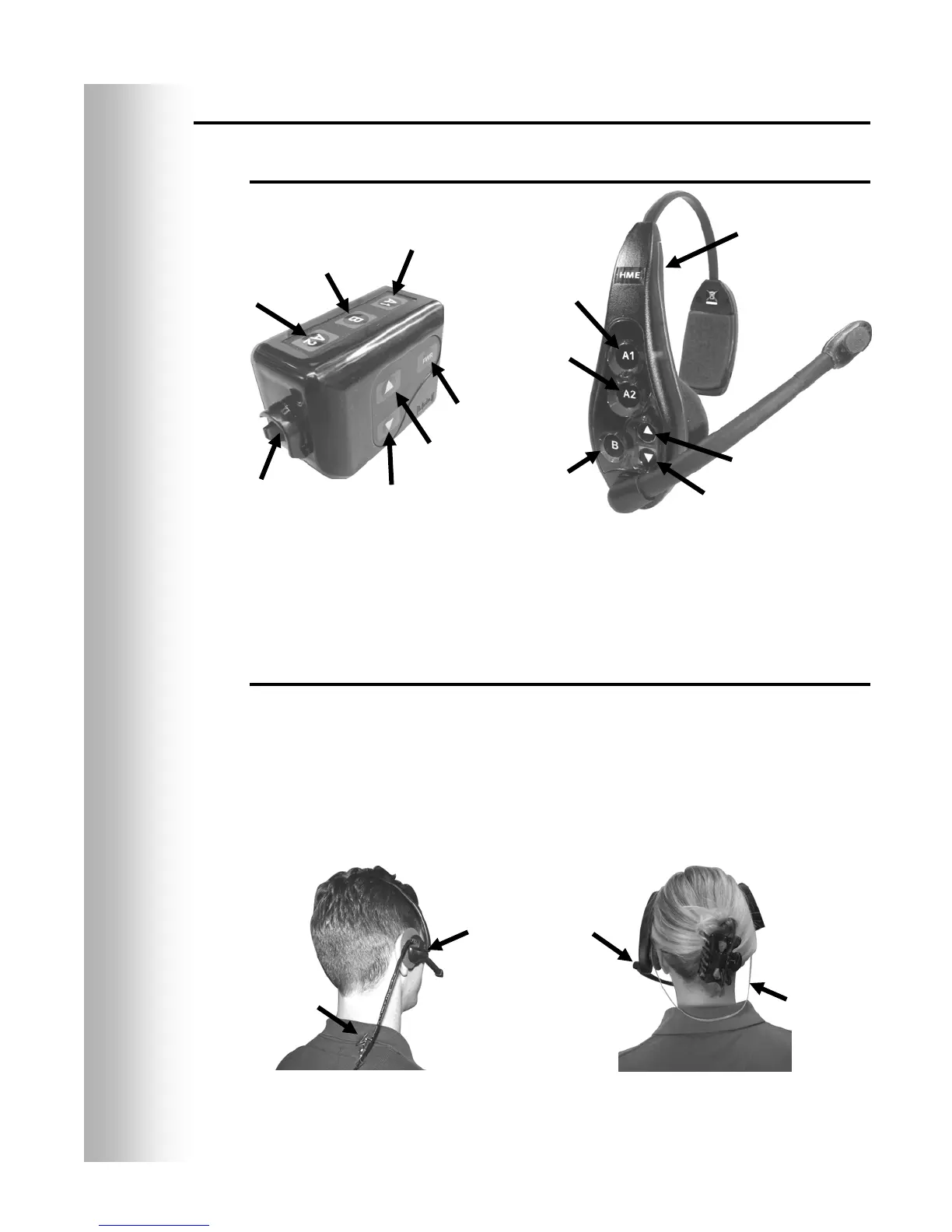
Figure 3. COMMUNICATOR
®
controls
Figure 4. Correct wearing of the headset
Channel
“A1”
Channel “B”
button
Channel “A2”
button
Power
utton
Volume-
u
Volume-
down
Headset cable
connector
Channel
“A1”
Channel
“
”
Channel
“
”
Power
utton
Volume-
up
Volume-
Belt-pac Communicator
Odyssey IQ all-in-one
headset Communicator
Belt-pac headset
Odyssey IQ headset
Headset band
Hold microphone
oom here to adjust
micro
hone
Clothin
cli


 To Next Page