3
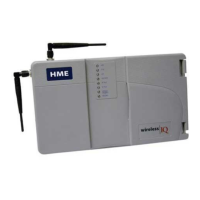
Front – (See A on Figure 2, page 2.)
Four power supply lights are on when the base station has AC power.
“A” TALK light is on during channel-A transmission.
“B” TALK light is on during channel-B transmission.
VEHICLE PRESENT light is on when a vehicle is present in the
drive-thru lane or when the system is in vehicle-detect override.
RECORD light is ON RED when the base station is ready to record
red message for the message repeater, and BLINKING RED while a
red message is being recorded. It is ON GREEN when the base
station is ready to record green message for the message repeater,
and BLINKING GREEN while a green message is being recorded.
Bottom – (See B on Figure 2, page 2.)
PUSH FOR RECORD MODE button must be pushed IN AND
RELEASED ONCE to prepare the base station to record red
message for the message repeater, or pushed IN AND RELEASED
TWICE to record green message.
Behind Front Door – (See C on Figure 2, page 2.)
GREEN MESSAGE and RED MESSAGE switches must be switched
ON to use the message repeater, OFF when the message repeater is
not being used. Instructions are given inside the front door.
SPEED TEAM switch must be switched ON for speed-team
operation, OFF for normal drive-thru operation.
VEHICLE DETECTOR switch must be switched to OVERRIDE to
disable the vehicle detector. To reset the vehicle detector, switch
to OVERRIDE for 5 seconds, then switch back to NORMAL and
leave for normal vehicle detection operation. If the switch is left
in the OVERRIDE position, the outside microphone will remain on
continuously.
DIP switches at the top are used to control message routing to the
outside speaker, grill speaker or COMMUNICATOR
®
s. DIP switch
settings are shown inside the front door.
Nine level controls are used to set the following levels:
VAA LEVEL CONTROL adjusts the volume level at which you hear
your own voice in the headset while you are speaking into the
microphone. Turn clockwise to lower your voice level in the headset
earpiece. Turn counterclockwise to raise your voice level.
VEH. PRES TONE VOL. adjusts the vehicle-present tone volume in
the headset.
VEH. PRES. TONE VOL. GRILL adjusts the volume of the vehicle
present tone played through the grill speaker.
SPKR VOL. OUTSIDE adjusts the outside speaker volume.
MSG VOL. OUTSIDE adjusts the volume of the outgoing message-
repeater message to the customer at the speaker post or menu board.
INBOUND VOL GRILL adjusts the volume of the inbound audio
from the outside microphone played through the grill speaker.
A VOL. GRILL adjusts the volume of channel A communication,
from Communicator operators, played through the grill speaker.
B VOL. GRILL adjusts the volume of channel B communication,
from Communicator operators, played through the grill speaker.
MSG VOL. GRILL adjusts the volume of the message-repeater
message played through the grill speaker.


 To Next Page