8
Battery Charger
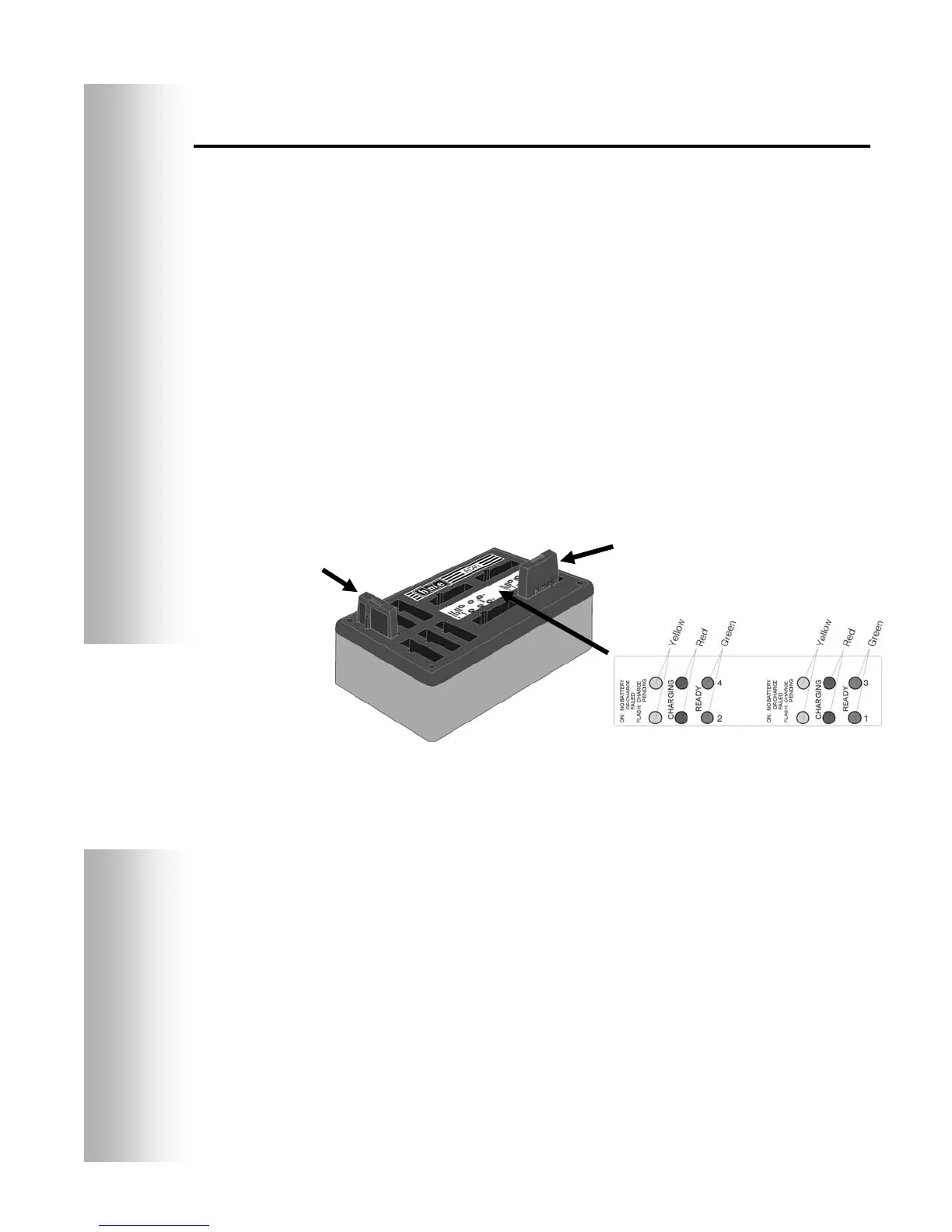
Up to four batteries can be charged in the charger at the same time.
Charging time is approximately 2.5 hours. The battery status lights
next to each charging port are explained below. Up to six fully
charged batteries can be stored in the battery storage ports.
A yellow light stays on steady next to each charging port while the
port is empty.
Insert a battery in one of the four charging ports until it clicks
in place.
If a yellow light is on steady next to a battery in a charging port, it
means CHARGE FAILED. Follow the diagnostic instructions on the
side of the battery charger.
If a yellow light is flashing next to a battery in a charging port, it
indicates CHARGE PENDING, which means the battery is too hot.
Lower the room temperature or move the charger to a cooler area.
A red CHARGING light will stay on next to a battery in a charging
port while the battery is charging.
A green READY light will go on next to a battery in a charging
port when the battery is fully charged.
Store fully charged batteries in the storage ports.
Figure 8. Batteries in charger
CAUTION:
Do not remove
batteries from
the charger until
the green READY
light is lit, or the
charger will reset
and the charge
cycle will begin
again.
Battery in
stora
e
or
Battery in
char
in
or


 To Next Page