© HMS Industrial Networks S.L.U - All rights reserved
This information is subject to change without notice
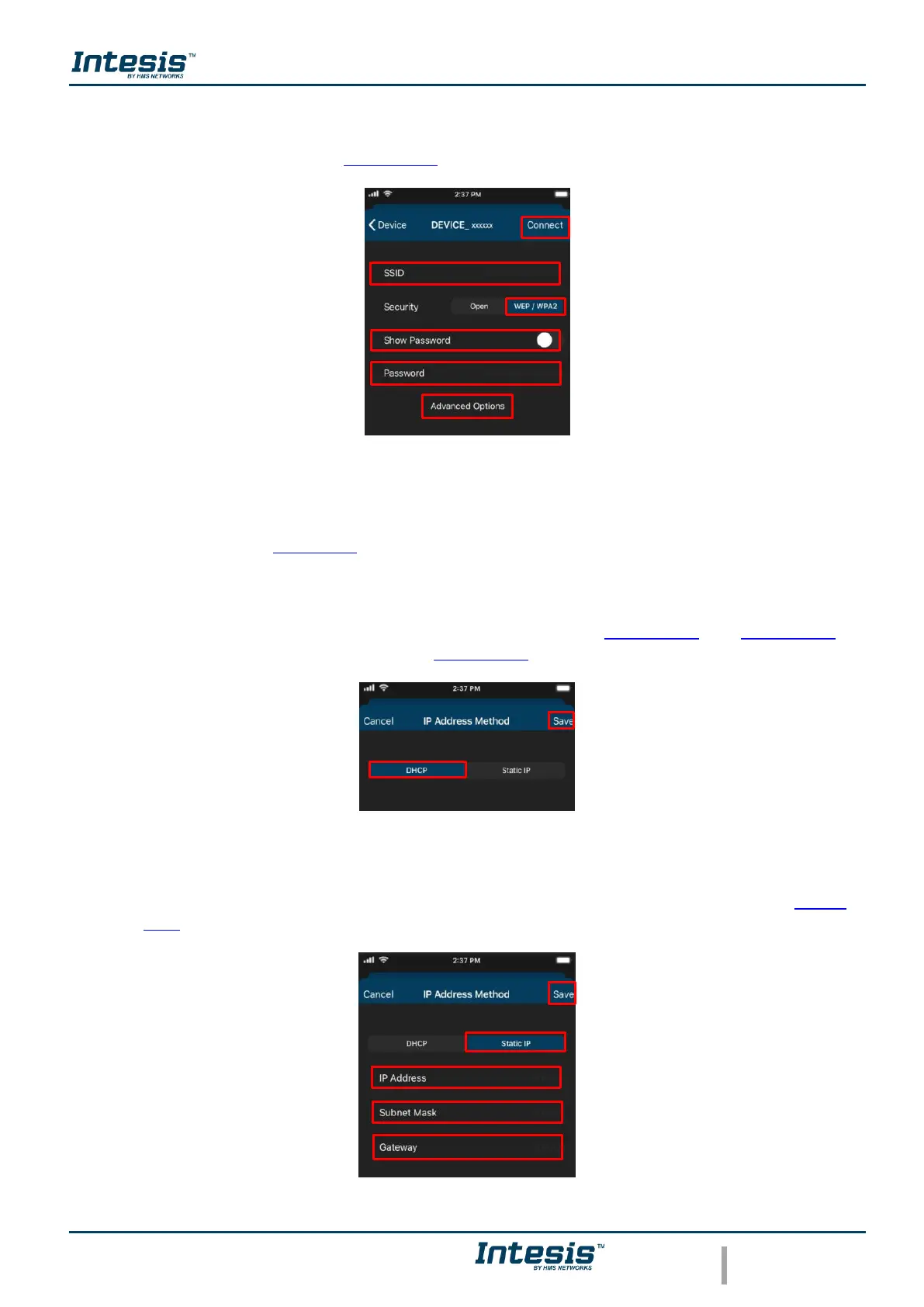
• In case to select the security WEP/WAP2 type the SSID of the Wi-Fi network wanted.
Also, type the password Wi-Fi network and to make sure is well entered slide Show
password selector (See Figure 3.11). Tap on Connect.
Figure 3.11 Security WEP/ WPA2.
If the configuration network has been carried out successfully the light of the LED will follow
a light sequence (See Figure 3.5). Tap on Done.
In case the light of the LED does not follow the sequence or start lighting different, start the
process from the beginning.
In manual mode is an option for advanced configuration. (See Figure 3.10 and Figure 3.11).
By default, it comes in option DHCP (See Figure 3.12). Tap on Save.
Figure 3.12 Advanced options (DHCP).
• In case to select Static IP, type the IP address, Subnet Mask and Getaway. (See Figure
3.13). Tap on Save.
Figure 3.13 Advanced options (Static IP).



 To Next Page