10. Built-in devices140
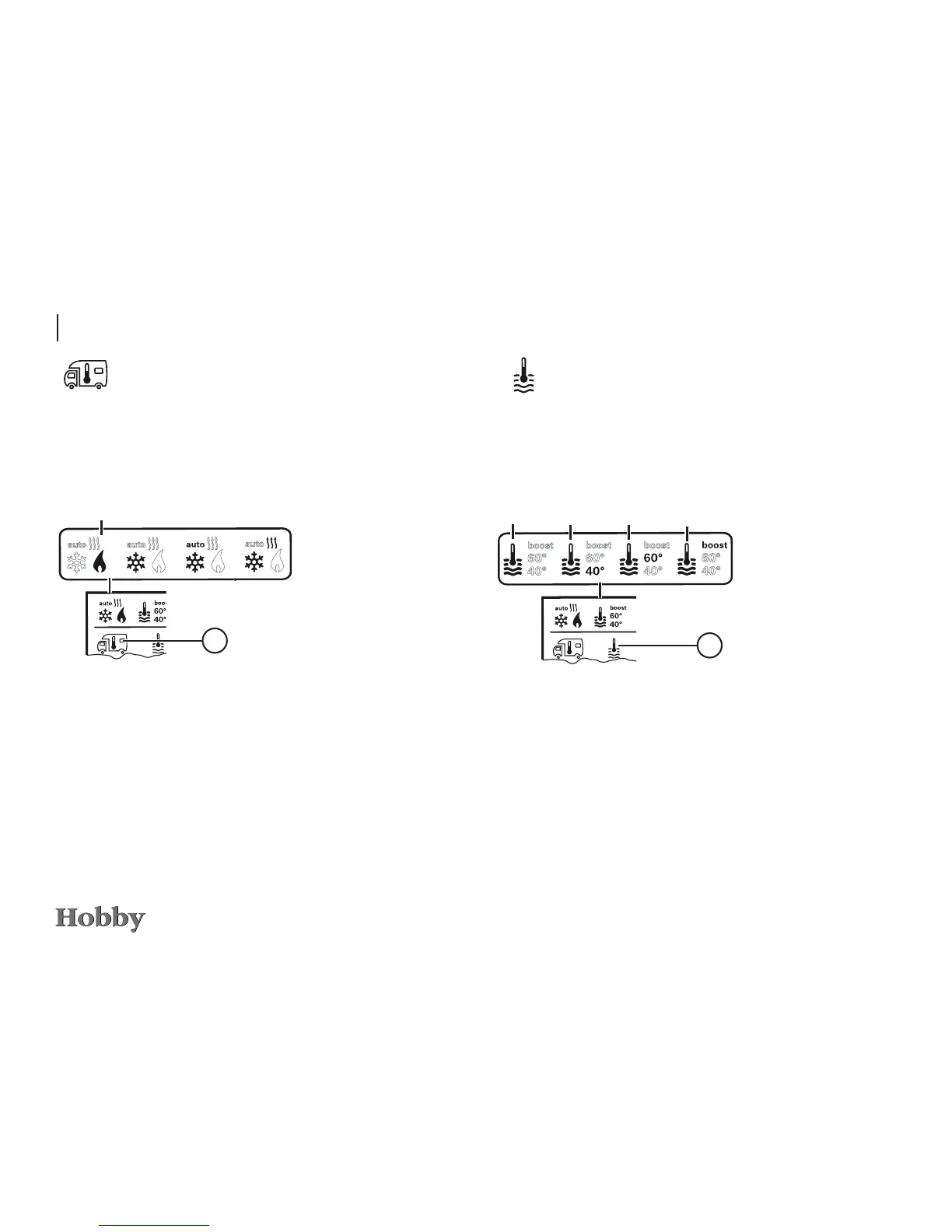
a = boiler
1)
is switched on
b = 40°
** hot water temperature of 40°C
c = 60° hot water temperature of 60°C
d = BOOST
1)
specically heats up the contents of the boiler
(boiler operation) fast for a max. period of 40 min.
Use the adjusting knob / pushbutton to select the icon in the
menu line
l
- Press to switch to the setting mode.
- Use the adjusting knob / pushbutton to select the desired temperature.
- Press the adjusting knob / pushbutton to conrm the temperature.
Changing the hot water temperature
1)
The icon will blink until the desired water temperature is
reached.
1)
Hot water temperature of 40°C can only be maintained at
40° C for a limited period of time if both the room and the
water are being heated.
a
b c
d
3
Use the adjusting knob / pushbutton to select the icon in the
menu line
l
- Press to switch to the setting mode.
- Use the adjusting knob / pushbutton to select the desired temperature.
- Press the adjusting knob / pushbutton to conrm the temperature.
Changing the room temperature
a = Heating
1)
- Heating is switched on.
- Adjustable range of temperature: 5 - 30°C (in increments of 1°C)
- Use the adjusting knob / pushbutton for fast temperature changes
(on stand-by screen).
a
3
1)
The icon will continue to blink as long as the desired room
temperature has not been reached.






 To Next Page