10. Built-in devices142
As soon as the heating has been switched on (room tempe-
rature and hot water temperature have been activated) the
fan speed selected in the previous heating operation is
displayed in the status line. Manufacturer's default setting:
“ECO”.
1)
Can lead to higher engine wear, depending on how often it
is selected.
2)
The “HIGH” fan speed has a higher current consumption,
higher noise level and higher engine wear.
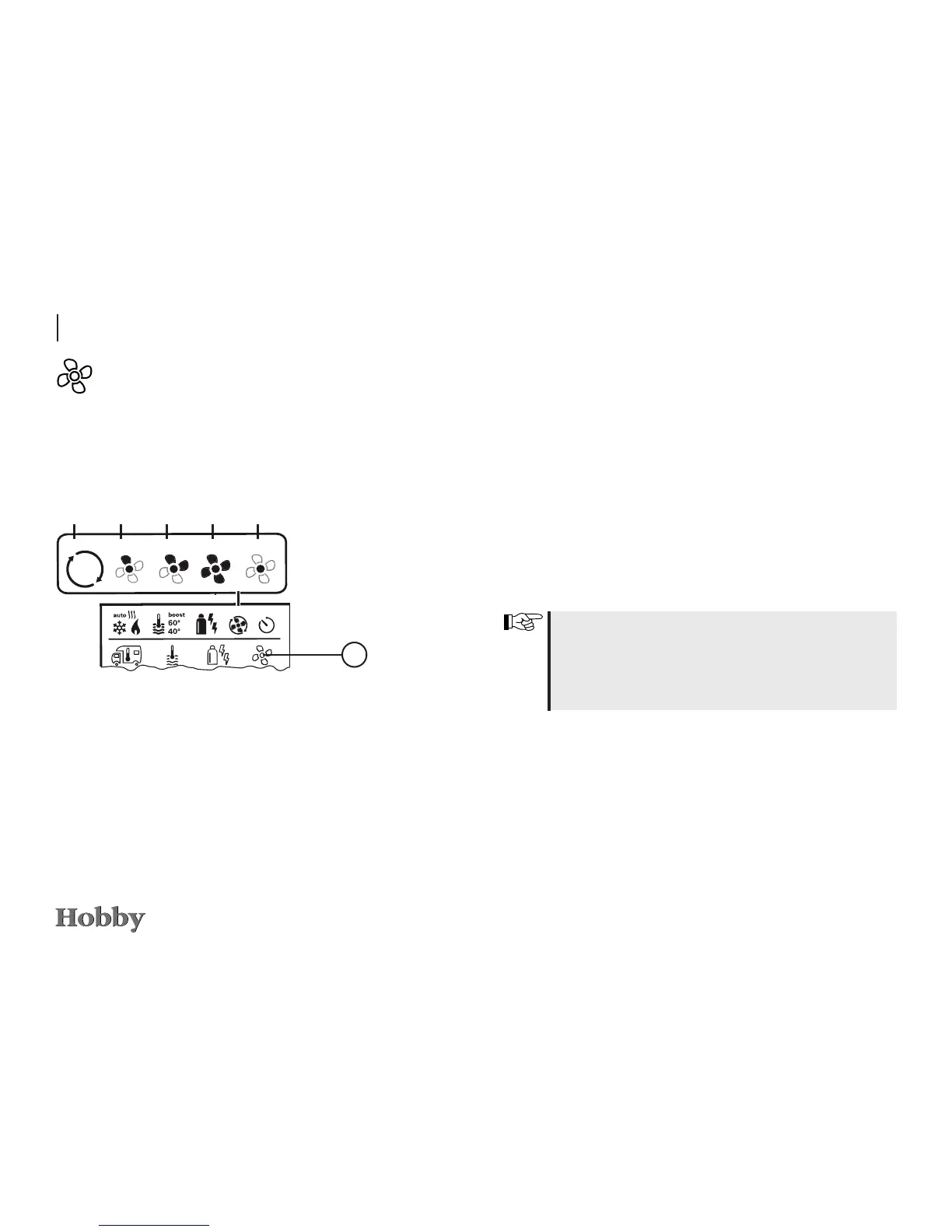
d
BOOST To heat room rapidly
Available if the dierence between the
selected and the actual room tempera-
ture is more than 10°C.
Icon Type of operation Description
- OFF Fan is switched o.
(Can only be used if no device is
being operated.)
a VENT
1)
Air circulation, if no device is being
operated. RPM can be selected in
10 increments.
b ECO Low fan speed
c HIGH
2)
High fan speed
Use the adjusting knob / pushbutton to select the icon in the
menu line
l
.
- Press to switch to the setting mode.
- Use the adjusting knob / pushbutton to select the desired
fan speed
.
- Press the adjusting knob / pushbutton to conrm the temperature.
Selecting the fan speed
a
b c
d
3
e





 To Next Page