27
hobie.com
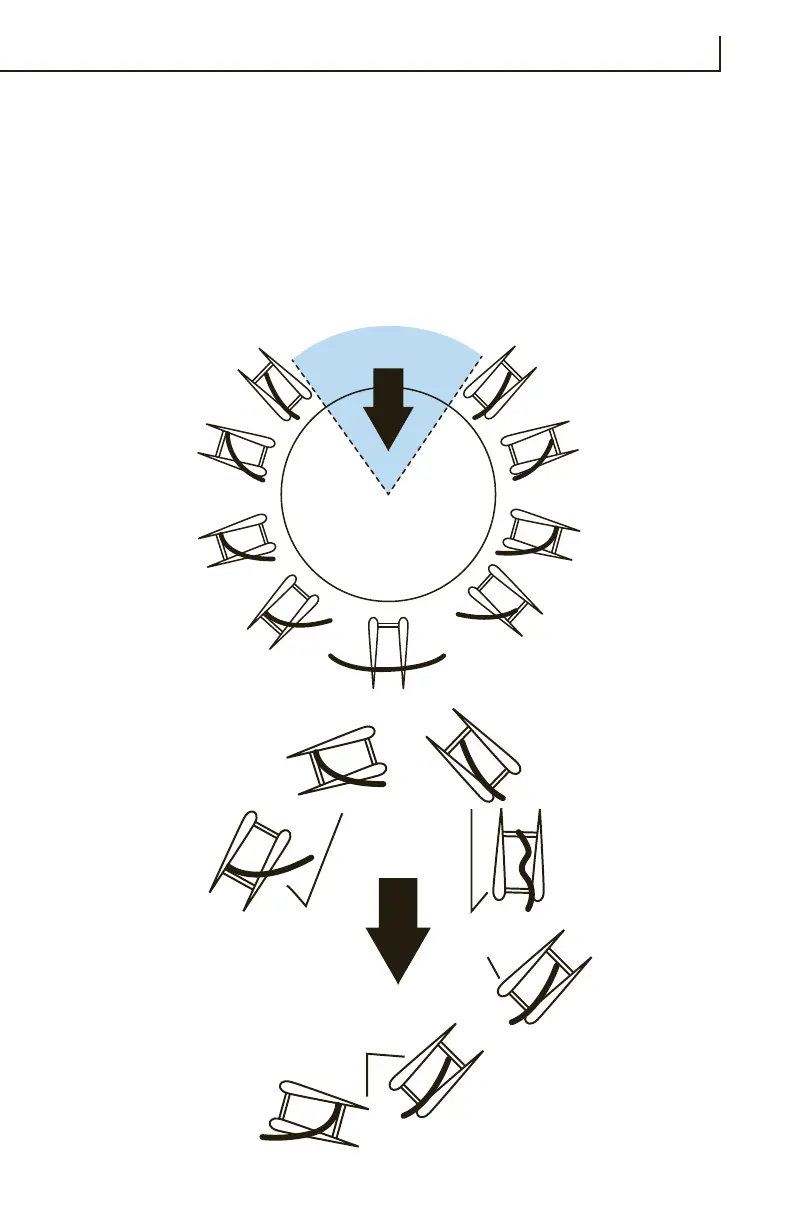
Refer to the sail trim diagram for approximate sail settings for the
different points of sail or directions you will be sailing. Note the “can’t
sail zone”. You cannot sail in this direction due to the fact that the
sail will luff constantly when pointed into the wind. If you get “stuck
in irons” (stopped pointed into the wind), you will need to reverse the
rudder and push the sail forward to back-wind. This will back the boat
up. Reverse the rudders and let the sail out until the boat is positioned
more across the wind (close reach). Then you can correctly trim the
sail once again and start moving forward.
Proper Sail
Trim
Let Sail Out
Turn Right
Pull Sail In
Turn Left
or
or
Proper Sail
Trim
Let Sail Out
Turn Left
Pull Sail In
Turn Right
or
or
CAN'T SAIL IN
THIS AREA
Close Hauled
Close Hauled
Close Reach
Close Reach
M
edium
Reach
Broad Reach
Medium Reach
Broad Reac
h
Downwind Run
Proper Sail
Trim
Let Sail Out
Turn Right
Pull Sail In
Turn Left
or
or
Proper Sail
Trim
Let Sail Out
Turn Left
Pull Sail In
Turn Right
or
or
WIND
WIND
Falling
Off
Heading Up
Coming
About
Sailing Basics



 To Next Page