29
Use and Maintenance Manual
ENGLISH
6.8 UNBALANCE SPLIT
Use of the wheel balancing machine
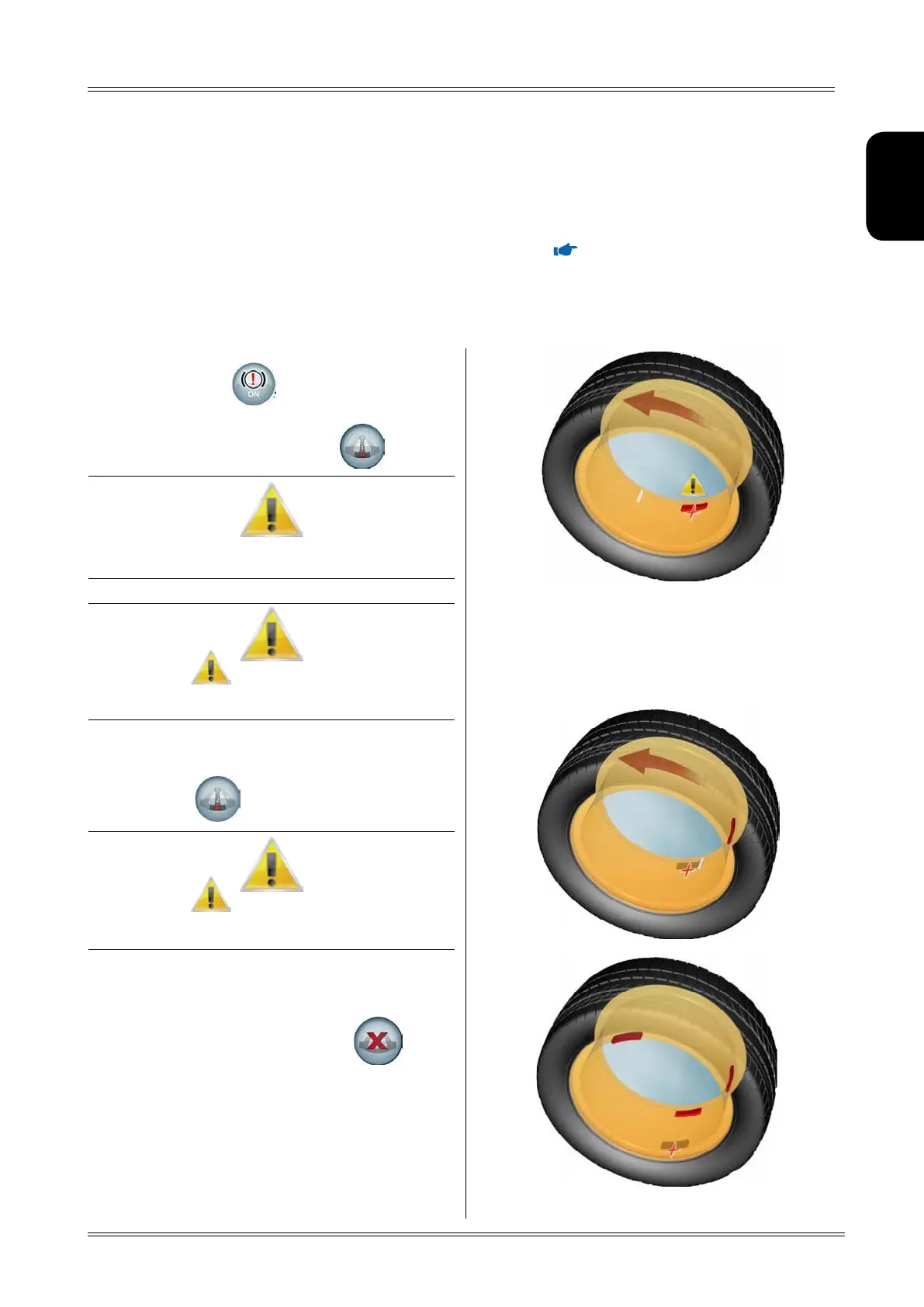
1. With the wheel in the outside correction position,
press the button to release it.
2. Select a spoke close to the position indicated by
the laser and press the button
The WhITe lINe oN The RIm INdIcATes The uNbAlANce
coRRecTIoN posITIoN NoT splIT.
If The symbol AppeARs, IT meANs ThAT you cANNoT
selecT The fIRsT spoKe AT ThAT poINT
(mAxImum dIsTANce 150°).
3. Turn the wheel in the direction indicated on the
screen and select the second spoke by pressing
the button
If The symbol AppeARs, IT meANs ThAT you cANNoT
selecT The secoNd spoKe AT ThAT poINT
(mINImum dIsTANce 18°, mAxImum dIsTANce 120°).
4. At this stage, two indications appear on the screen
for positioning of the unbalance correction weights.
To cancel the split, press the button
.
Any error in this procedure is clearly shown on screen.
The split function is enabled for the outside of aluminium rims (
ALUMINIUM RIMS) and is used to hide
any adhesive unbalance correction weights behind the rim spokes.
To split the unbalance measured in two different positions, proceed as follows:


 To Next Page