13 of 20
Wind
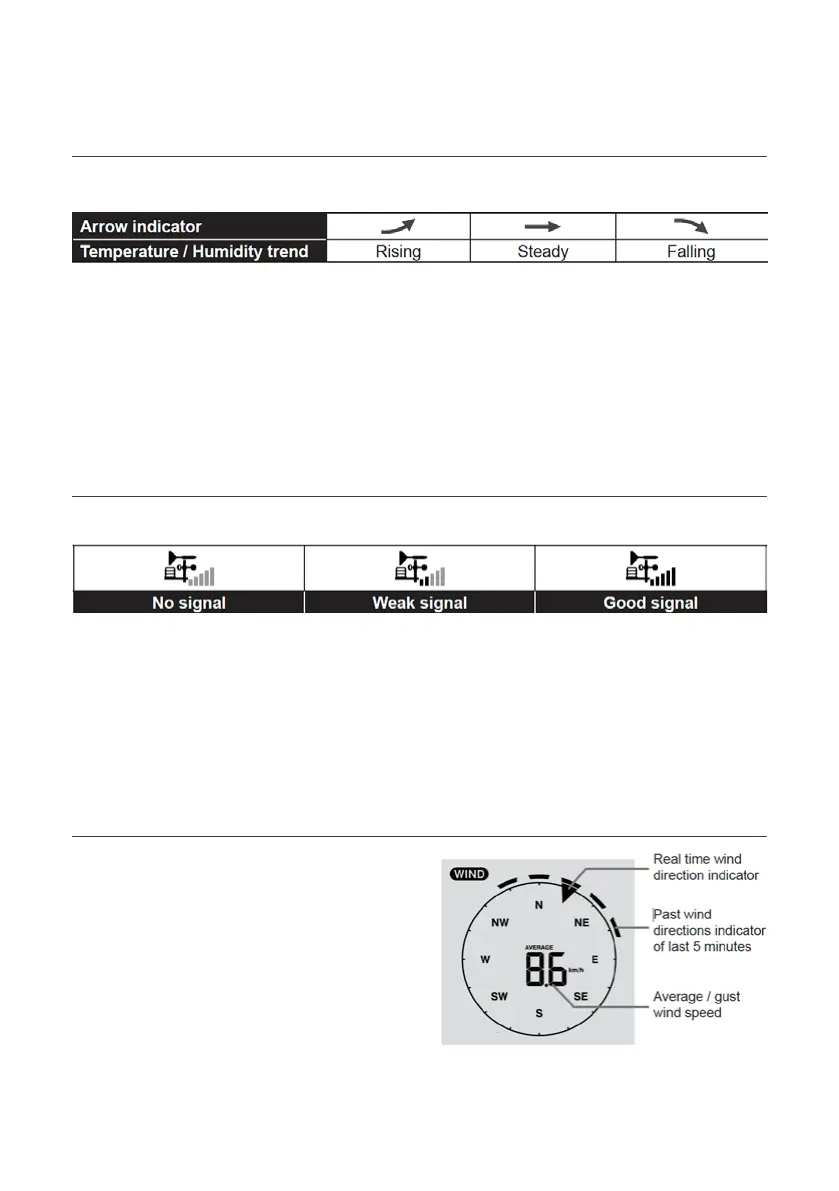
Set Wind Speed Unit and Direction Display Format:
1. In Normal Mode, press and hold WIND key for
2 seconds to enter into Wind Speed Unit Mode
and the unit will flash. Press or to
change the wind speed unit in this sequence:
m/s km/h KNOTS mph
2. Press WIND key again to return to Normal Mode.
Select Wind Display Mode: In Normal Mode, press
WIND to switch between Average and Gust wind speed.
Temperature/Humidity Function and Trend
Use the °C/°F slide switch to select the temperature display unit.
When indoor temperature is below -40°C, the LCD will display LO. If temperature is above 70°C, LCD will display HI.
When outdoor temperature is below -40°C, the LCD will display LO.
If temperature is above 80°C, LCD will display HI.
When humidity is below 1%, LCD will display LO. If humidity is above 99%, LCD will display HI.
Wireless Sensor Signal Receiving
1. The Main Console display signal strength for the 5-in-1 Wireless Outdoor Sensor, is as per the table below:
2. If the signal has discontinued and does not recover within 15 minutes, the signal icon will
disappear. The temperature and humidity will display ER for the corresponding channel.
3. If the signal does not recover within 48 hours, the ER display will become permanent. You
need to replace the batteries and then press SENSOR/Wi-Fi to pair the sensor again.
Operation and Settings (continued)


 To Next Page