17 of 20
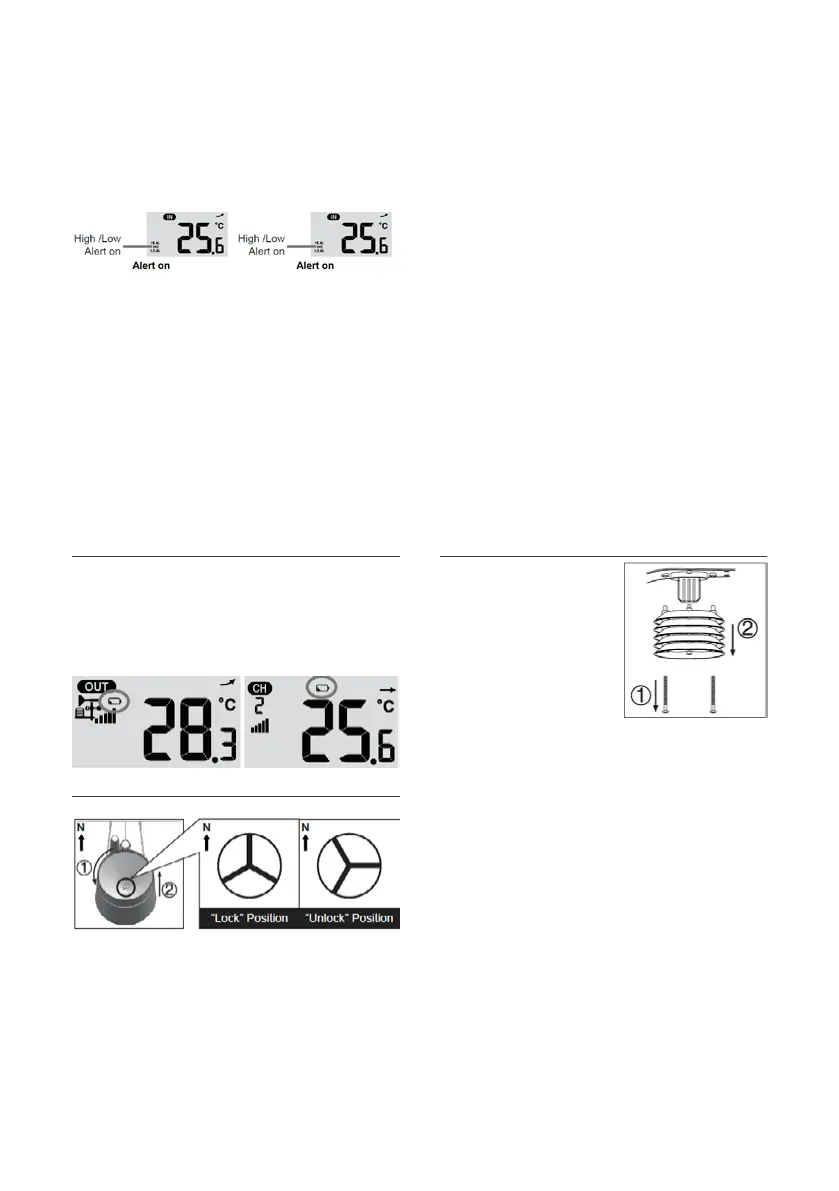
2. Under the current alert reading, press and
hold ALERT key for 2 seconds to enter alert
setting and the alert reading will flash.
3. Press or key to adjust the value or
press and hold the key to change rapidly.
4. Press ALERT key to confirm the value. Press
ALARM key to toggle the regarding alert on/off.
5. Press ALERT key to step to next alert reading.
6. Press any key on the front side to save alert on /
off status and go back to Normal Mode.
Silencing the Alert Alarm: Press SNOOZE key to silence the alert alarm
or let the alarm automatically turn off after 2 minutes.
Once the alert is triggered, the alarm will sound for 2 minutes and the related alert icon and readings will flash.
The weather alert will sound again when the weather readings falls into the alert range again.
Battery Replacement
If the low battery indicator is displayed in
OUT or CH section, it indicates that the current
channel wireless or outdoor 5 in 1 sensor battery
power is low. You should replace all the batteries
in the current channel sensor at once.
Cleaning the Rain Collector
1. Unscrew the rain collector by
turning it 30°anti-clockwise.
2. Gently remove the rain collector.
3. Clean and remove any debris or insects.
4. Install the collector when it is clean and fully dried.
Cleaning Outdoor Hygro-Thermo Sensor
1. Remove the 2 screws
at the bottom of
the louvre shield.
2. Gently pull out
the shield.
3. Carefully remove
any dirt or insects
on the sensor
casing (do not let the sensors inside get wet).
4. Clean the shield with water to
remove any dirt or insects.
5. Reinstall all the parts when they
are clean and fully dried.
Maintenance
Operation and Settings (continued)


 To Next Page