16 of 20
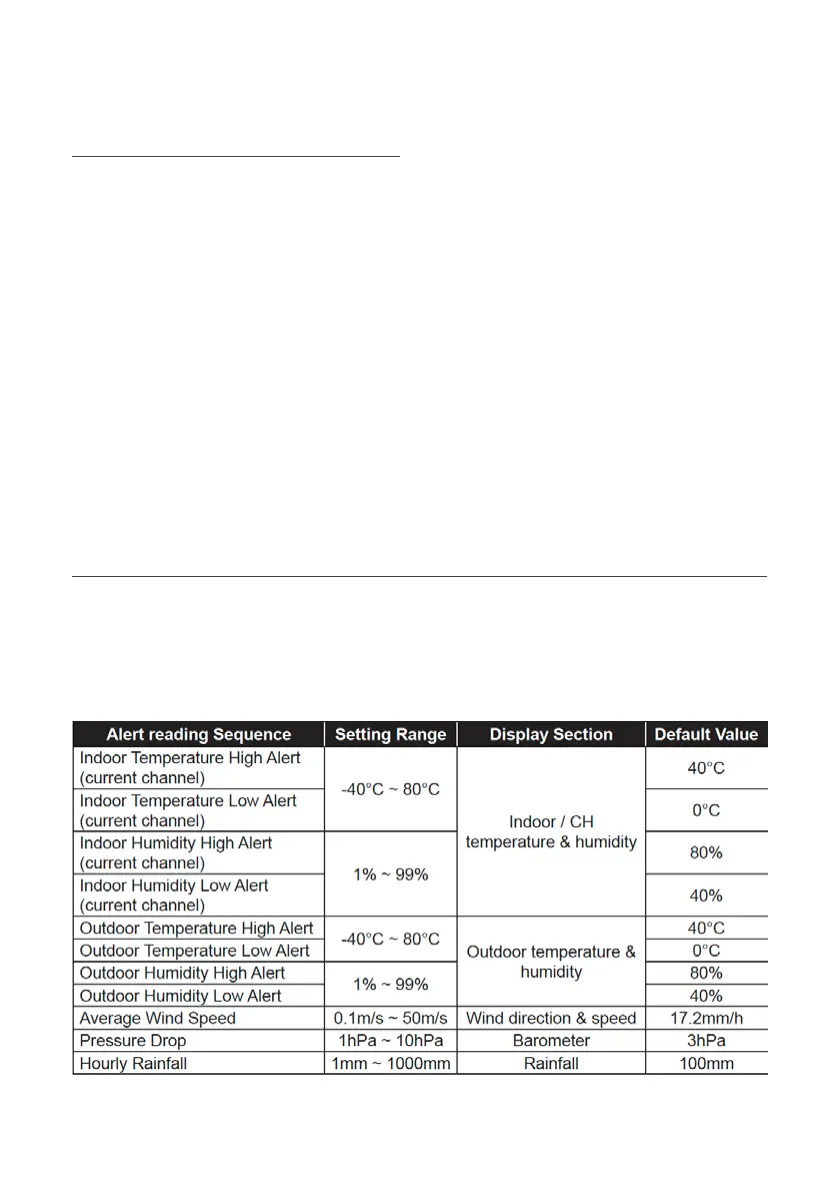
Weather Alert Setting
Weather Alert can alert you of certain weather conditions. Once the alert criteria
is met, the alarm sound will activate and the LCD alert icon will flash.
To Set Alert:
1. Press ALERT to select and display the desired weather alert reading in the sequence below:
Operation and Settings (continued)
Past 24 Hours History Data
1. Press HISTORY key to check the beginning of the
current hour's weather data
e.g. the current time is 7:25 am, March 8, the
display will show the data of 7:00am, March 8
2. Press HISTORY key repeatedly to view older
readings of the past 24 hours
e.g. 6:00am (Mar 8), 5:00am (Mar 8), …, 10:00am
(Mar 7), 9:00am (Mar 7), 8:00am (Mar 7)
The LCD will also display the HISTORY icon,
history data records with time and date.


 To Next Page