-09-
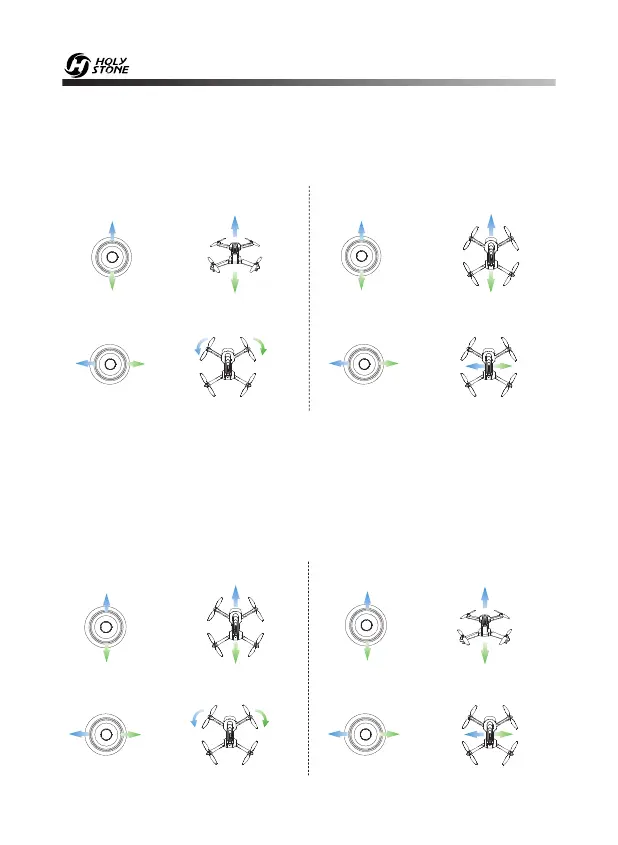
7.0 MODE SWITCH
7.1 MODE 2 (Left hand throttle MODE 2 will be default setting.)
Ascend
Descend
Rotate Right
Up
Left
Right
Up
Down
Down
Left Right
Left Joystick Right Joystick
7.2 MODE 1
Ascend
Descend
- - - - - - - - - - - - - - - - - - - - - - - - - - - - - - - - - - - - - - - - - - - - - - - - - - - - - - - - - - -
Forward
Backward
Up
Down
Up
Down
Left Joystick Right Joystick
- - - - - - - - - - - - - - - - - - - - - - - - - - - - - - - - - - - - - - - - - - - - - - - - - - - - - - - - - - -
Left Right
Left
Right
- - - - - - - - - - - - - - - - - - - - - - - - - - - - - - - - - - - - - - - - - - - - - - - - - - - - - - - - - - -
Fly to
Left
Fly to
Right
Rotate Left Rotate Right
Fly to
Left
Fly to
Right
Forward
Backward
Rotate Left
To enter MODE 1, turn on the transmitter while holding the “Record
Video” button. (Please do not release the “Record Video” button until
the transmitter is powered on.)


 To Next Page