-24-
- - - - - - - - - - - - - - - - - - - - - - - - - - - - - - - - - - - - - - - - - - - - - - - - - - - - - - - - - - -
11.6 Return to Home (RTH)
11.6.1 Smart RTH
11.6.2 Low Voltage RTH
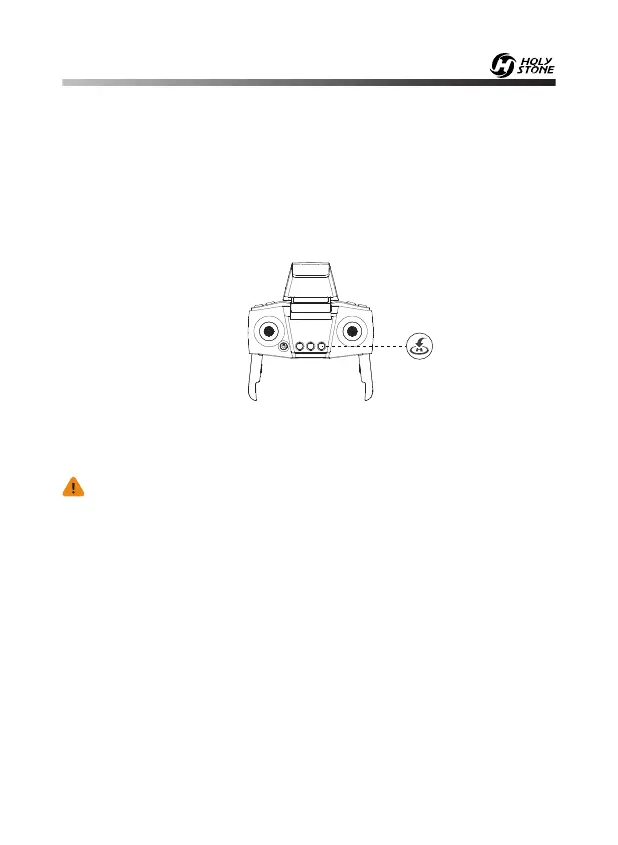
Short press the Return to Home button to enter the return procedure. And
you can exit the return procedure by long pressing the Return to Home
button again.
The Return to Home (RTH) function brings the drone back to the last
recorded take-off point. This function can only be achieved in GPS mode.
There are three types of RTH:
Smart RTH/Low Voltage RTH/Failsafe RTH.
When the drone's indicator lights flash continuously, it means that the
battery is in low voltage. The drone will enter the Low Voltage RTH mode
and fly back to the take-off point.
·When the flight distance is lower than 65 feet, you can exit Low Voltage
RTH.
·When the flight distance is higher than 65 feet, you cannot exit Low
Voltage RTH.
· When the flight altitude is lower than 65 feet, the drone will
elevate automatically to 65 feet high, and then return home.
· When the flight altitude is higher than 65 feet, the drone will stay
in the current altitude and fly back to the take-off point.
- - - - - - - - - - - - - - - - - - - - - - - - - - - - - - - - - - - - - - - - - - - - - - - - - - - - - - - - - - -


 To Next Page