-18-
10.7 Unlocking the Motor
10.6 Calibrating the Gyro
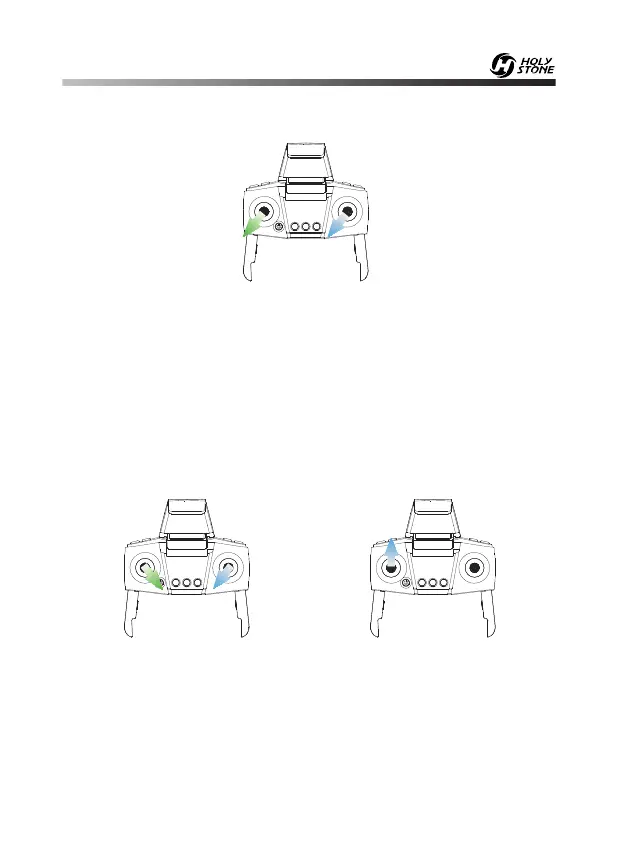
Simultaneously push the left joystick and the right joystick to the bottom left
corner to calibrate the gyro.
When the indicator lights on the drone blink quickly and turn solid on,
indicating calibration is completed.
Tip:
To ensure a stable flight, we suggest that the pilot calibrates the
gyro every time after pairing the drone and after a crash.
Method 1: Simultaneously push the left joystick to the bottom right corner
and the right joystick to the bottom left corner. The motors rotate and the
drone is unlocked. (Pic.3)
Method 2: Push the left joystick up, the motors rotate and the drone is
unlocked. (Pic.4)
Pic.3 Pic.4
- - - - - - - - - - - - - - - - - - - - - - - - - - - - - - - - - - - - - - - - - - - - - - - - - - - - - - - - - - -


 To Next Page