-25-
11.6.3 Failsafe RTH
·During the Failsafe RTH procedure, the drone can not avoid
obstacles.
·The drone cannot Return-to-Home if the GPS signal is weak.
If the GPS signal is available and the take-off point is recorded previously.
Failsafe RTH will be triggered if the transmitter signal is lost for more than 20
seconds. The drone will automatically start the return procedure and it will
fly back to the last recorded take-off point. You can exit Failsafe RTH mode
by pressing the Return to Home button if the transmitter signal is recovered.
- - - - - - - - - - - - - - - - - - - - - - - - - - - - - - - - - - - - - - - - - - - - - - - - - - - - - - - - - - -
11.7 Emergency Stop
The Emergency Stop function can be only used in case of
emergency during the flight to avoid any damage or injury.
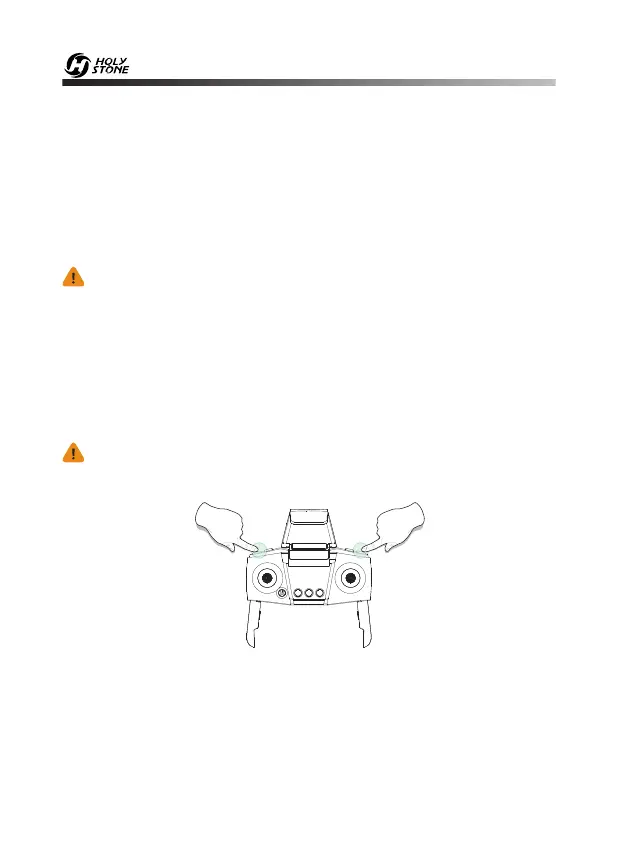
Press and hold the Record Video button and the Lens down button
simultaneously for 2 seconds, you will hear 5 beeps from the transmitter,
and the drone will fall down immediately. Be aware that you risk breakage
of the drone if it falls a large distance or hits anything at a high rate of speed.


 To Next Page