-22-
11.4 GPS Searching (DO NOT use GPS Mode indoors)
ATTENTION:
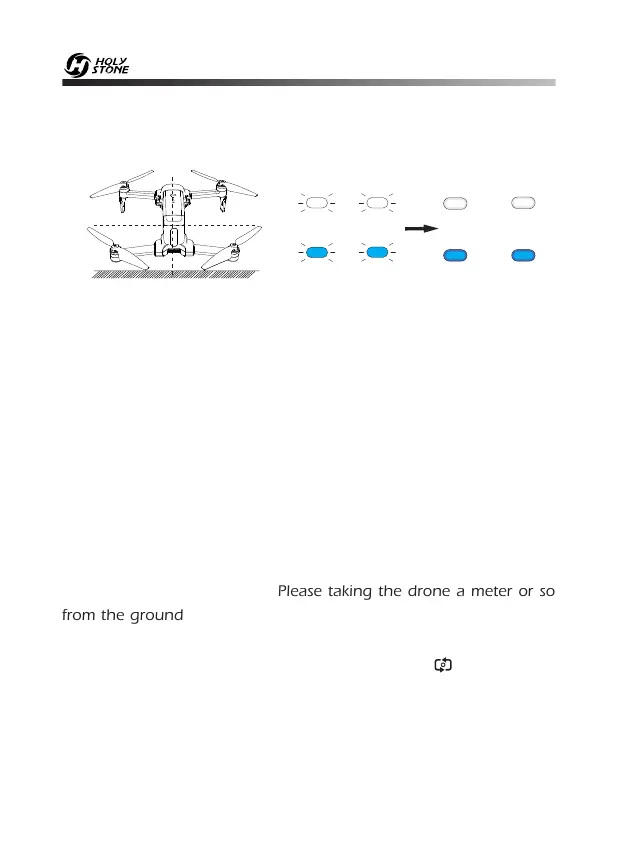
① If the indicator lights on the drone keep blinking quickly, it indicates
the drone is searching for GPS signals.
② If the lights keep blinking quickly after a few minutes, it indicates
that the process has FAILED. Please taking the drone a meter or so
from the ground, and repeat all the Compass Calibration operations
until the process is successful.
③ When flying indoors, please hold the button ( ) for about 3
seconds to exit GPS Mode, and the indicator lights will blink slowly. You
can fly this drone when you complete the Compass Calibration
operations if you exit GPS mode.
— Place the drone on a flat and dry surface where is unobstructed and lit .
— Indicator lights will turn to blink Blue (rear) and White (front) . This means
the drone is searching the GPS Signal. This process will take a few minutes.
Once all the lights have turned solid, GPS Mode is Ready (Only when the
drone is connected to GPS successfully can it take off).
— Blue (rear) and white (front) lights are all solid.
HEAD



 To Next Page