-11-
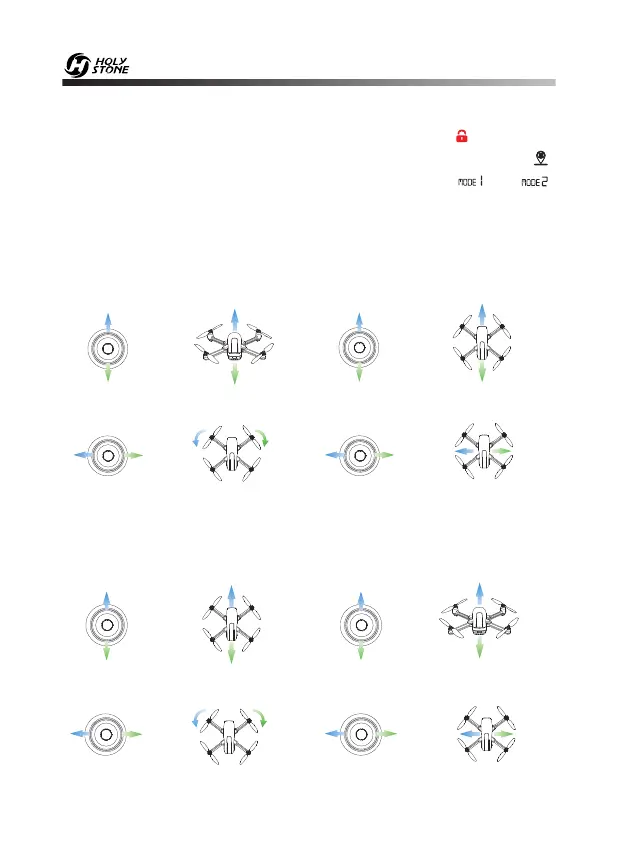
6.4 Mode Switch
Ascend
Descend
Rotate Left Rotate Right
Forward
Backward
Up
Left Right
Up
Down
Down
Left Right
Left Joystick Right Joystick
6.4.2 MODE 1
Ascend
Descend
- - - - - - - - - - - - - - - - - - - - - - - - - - - - - - - - - - - - - - - - - - - - - - - - - - - - - - - - - - -
Forward
Backward
Up
Down
Up
Down
Left Joystick Right Joystick
- - - - - - - - - - - - - - - - - - - - - - - - - - - - - - - - - - - - - - - - - - - - - - - - - - - - - - - - - - -
Left Right
Left Right
- - - - - - - - - - - - - - - - - - - - - - - - - - - - - - - - - - - - - - - - - - - - - - - - - - - - - - - - - - -
Fly to
Left
Fly to
Right
Fly to
Left
Fly to
Right
Rotate Left Rotate Right
6.4.1 MODE 2 (Default mode from factory)
MODE switching is only possible before pairing. Hold the “ ” button and
then turn on the power switch button at the same time, then press the “ ”
button for 3 seconds to switch the MODE. Check the icon “ ” or “ ”
on the LCD screen to confirms MODE status.













 To Next Page