-20-
9.4 Calibrating the Compass
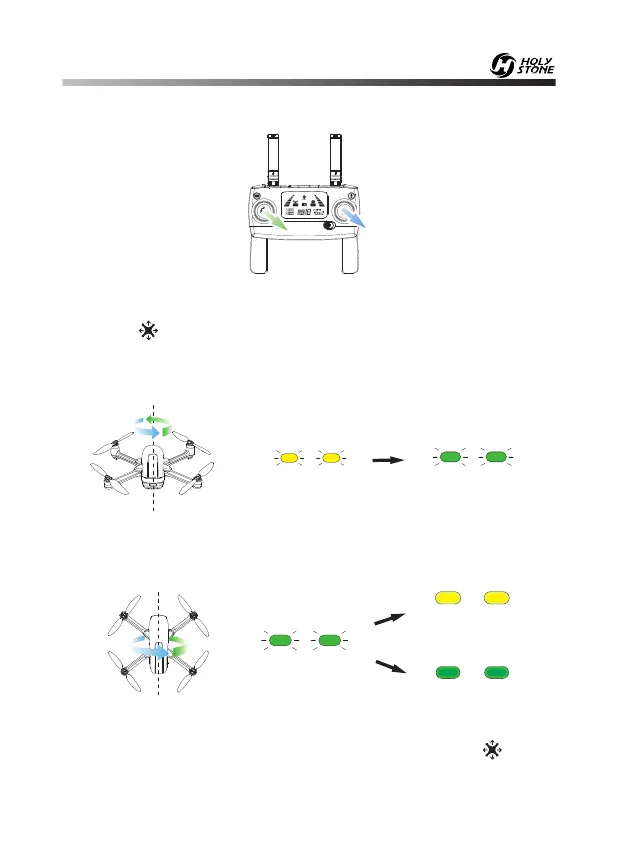
Step 1: As shown in the figure above, push both of the joysticks down to the
bottom right at the same time to enter the compass calibration.
When the “ ” icon appears on the LCD screen in the state of slow flashing
and the indicator lights flash yellow slowly, it indicates that the drone can
start compass calibration.
Step 2: Hold the drone horizontally and rotate the drone in 3 complete
circles. When completed the green lights will flash.
Step 3: Hold the drone vertically and rotate the drone in 3 complete circles.
When completed the indicator lights will turn solid green and “ ” on the
LCD screen changes from slow flash to disappear.
Good GPS signal
Weak GPS signal
- - - - - - - - - - - - - - - - - - - - - - - - - - - - - - - - - - - - - - - - - - - - - - - - - - - - - - - - - - -
- - - - - - - - - - - - - - - - - - - - - - - - - - - - - - - - - - - - - - - - - - - - - - - - - - - - - - - - - - -













 To Next Page