-19-
HEAD
All of the operations shown in this manual are demonstrated using
MODE 2.
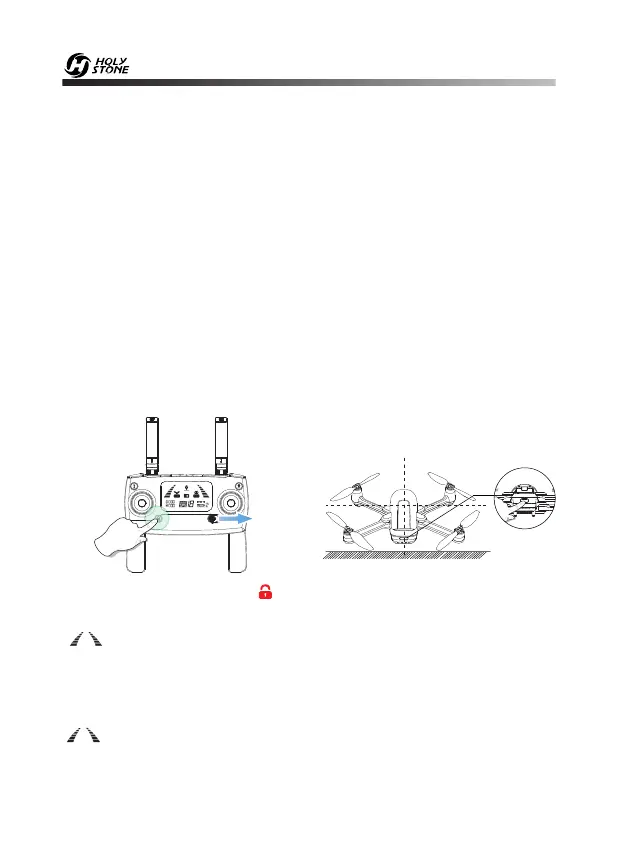
9.3 Pairing
① Simultaneously hold the “ “ button and slide the power switch to the
right to power on the transmitter. It will beep 2 times and the signal icon
“ “ will keep flashing.
② Long press the Power Switch to turn on the drone, and place it on a level
surface with the head forward.
③ Once the transmitter sends out a long beep sound and the signal icon
“ ” is shown on the LCD screen, which means that the drone has been
successfully paired with the transmitter.
1. Make sure the transmitter, mobile device, and the drone battery are fully
charged.
2. Make sure the drone battery and the propellers are mounted securely.
3. Make sure the drone arms are unfolded.
4. Make sure the camera is functioning normally.
5. Make sure that there is nothing obstructing the motors and that they are
functioning normally.
· Pre-Flight Checklist













 To Next Page