EasyManua.ls Logo

Honeywell 7000 - User Manual

Honeywell 7000
28 pages
Print Icon
To Next Page IconTo Next Page
Loading...
PRODUCT DATA
® U.S. Registered Trademark
Copyright © 1998 Honeywell Inc. • All Rights Reserved
Honeywell 7000 Solid State Alarm System
APPLICATION
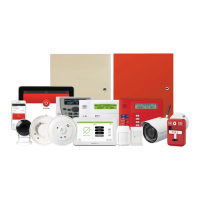
The Honeywell 7000 is a solid state fire/burglary and home
health care alarm system designed to protect a wide range of
private residences. This UL-listed system is easily
expandable and can be customized to meet the demanding
needs of homeowners.
FEATURES
Can display up to 96 points of protection.
Eight hardwire zones built into the control panel.
Optional RF and hardwired expansion on Hbus.
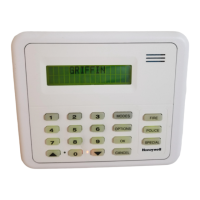
Supports keypads with custom text displays.
Mode-based operation for simple error-free control.
Date and time stamped event log.
Up to 24 fully programmable outputs.
Contents
Application .......................................................................... 1
Features .............................................................................. 1
Specifications ...................................................................... 2
Ordering Information ........................................................... 2
Installation ........................................................................... 3
Programming....................................................................... 19
Operation ............................................................................ 21
Checkout ............................................................................. 24
Troubleshooting .................................................................. 25
Regulatory Agency Statements ........................................... 26

69-1192-1

Questions and Answers

  • M
    Mckenzie HardyJul 31, 2025
    How to fix 'HOME NOT READY FORCE ARM? These Points not ready' on my Honeywell Security System?
    • L
      lynchjesseJul 31, 2025
      If your Honeywell Security System shows 'HOME NOT READY FORCE ARM? These Points not ready', it means a protected point is open or a transmitter cover is open. To resolve this: * Press the right arrow button to see which points are open. * Open and then close the indicated door or window, ensuring it remains closed. * If your system uses RF transmitters, check the transmitter at the specified location to ensure its cover is tightly closed.
  • M
    mark59Aug 5, 2025
    Why does my Honeywell 7000 say 'HOME SYS LOW BATTERY'?
    • M
      Matthew RiversAug 5, 2025
      If your Honeywell Security System displays 'HOME SYS LOW BATTERY', the control panel system backup battery is either defective or has weakened due to an extended AC power failure. Call Honeywell for service.
  • G
    Gina HollandAug 10, 2025
    What to do if my Honeywell 7000 says 'HOME AC POWER FAIL'?
    • D
      Dennis LarsenAug 10, 2025
      If your Honeywell Security System displays 'HOME AC POWER FAIL', first check the low voltage transformer, typically found near the control panel, to ensure it is properly plugged in. If the transformer is secure, verify whether there has been a power outage. If there hasn't been a power failure, contact Honeywell for service.
  • W
    Wendy FrenchAug 15, 2025
    What to do if my Honeywell Security System shows 'HOME TROUBLE TX GUEST WINDOW'?
    • K
      Katherine AustinAug 15, 2025
      If your Honeywell Security System displays 'HOME TROUBLE TX GUEST WINDOW', the potential causes include a defective battery, loose battery leads, transmitter malfunction, or receiver malfunction. Try these steps: 1. Clean the battery connections. If this doesn't work, replace the battery. 2. Tighten the battery and the battery clip. Reconnect the battery and test the system. 3. If replacing the transmitter battery doesn't fix the problem, or if the keypad indicates all points are in trouble, call Honeywell for service.
  • K
    Kevin PowellAug 20, 2025
    Why is there no display showing on my Honeywell Security System?
    • A
      Andrea LawrenceAug 20, 2025
      If no display is showing on your Honeywell Security System, it could be due to a lack of AC power or backup battery power. First, if only some lights are out, check and restore house circuit breakers or fuses as needed. Then, ensure the low voltage transformer near the Control Panel is securely plugged into an AC outlet. If the issue persists, call Honeywell for service.
  • M
    Matthew HuffmanAug 26, 2025
    What to do if my Honeywell 7000 Security System displays 'HOME FIRE TROUBLE SMOKE DETECTOR'?
    • A
      Amber RussellAug 26, 2025
      If your Honeywell Security System displays 'HOME FIRE TROUBLE SMOKE DETECTOR' and a warning tone is sounding, first check for any signs of fire. If there are no signs of fire, enter your passcode to silence the warning tone. Then, call Honeywell for service, as the wire to fire sensors may be damaged.

Summary

Honeywell 7000 System Application

Honeywell 7000 System Overview

The Honeywell 7000 is a solid state fire/burglary and home health care alarm system designed to protect a wide range of private residences.

System 7000 Specifications

Electrical Ratings and Power

Details system power requirements, including AC input and low voltage input to the control panel.

Output Specifications

Specifies the current ratings for system outputs such as Bell/Horn and Auxiliary power.

Circuit Wiring Details

Provides information on wiring for fire and burglary circuits, including maximum lengths and wire gauges.

Environmental and Dimensional Data

Outlines the system's operating environmental conditions and physical dimensions.

Honeywell 7000 Ordering Information

Contacting Honeywell for Product Information

Contact information for local sales office and customer relations for product inquiries.

Honeywell 7000 Installation Guide

Installation Overview and Equipment List

Provides a general overview of the system and lists equipment for installation and hookup.

Control Panel Components

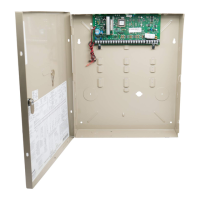
Details the main functions of the control panel and its internal components.

Control Panel Location Guidelines

Specifies ideal locations for the control panel, considering environmental factors and accessibility.

Control Panel Mounting Procedures

Instructions for mounting the control panel enclosure on drywall or plywood.

Circuit Board Installation and Wiring

Guide for installing the circuit board and connecting various system components.

Point Expansion Module (PEM) Installation

Instructions for installing the PEM, which adds hardwire points to the system.

PEM Wiring Diagram and Address Setup

Details PEM wiring connections and address configuration for up to 11 PEMs.

RF Expansion Module (RFEM) Installation

Guide for mounting the RFEM which provides additional RF protection points.

RFEM Wiring and RF Receiver Installation

Instructions for connecting the RFEM and installing the RF Receiver for wireless sensor communication.

RF Receiver Wiring and Switch Settings

Details RF receiver wiring and switch configuration for address settings.

Keypad Installation and HBus Wiring

Instructions for installing keypads and connecting them via the HBus.

Hardwired Detection Circuit Overview

Explains the use of input loops for zoning sensors and identifying protection points.

Burglary Circuit Wiring Standards

Details requirements for wiring burglary detection circuits, including EOL resistors.

Fire Circuit Types and Detectors

Covers supported two-wire fire detectors and installation requirements.

Two-Wire Smoke Detector Circuit

Details the system's support for two-wire smoke detectors on Loop 8.

Two-Wire Fire Circuit Installation

Instructions for installing two-wire smoke detectors on Loop 8.

Four-Wire Smoke Detector Circuit

Details four-wire smoke detector supervision and approved devices.

Four-Wire Circuit Installation and Reset

Instructions for installing four-wire smoke detectors and operating the reset relay.

RF Wireless Sensor Integration

Guide for programming and integrating Series 5800 RF sensors with the system.

Honeywell 7000 System Outputs

Control Panel and PEM Output Wiring

Details wiring for control panel and PEM programmable outputs and relays.

External Bell;Horn Installation

Instructions for installing external sounding devices like bells and horns.

Transformer Installation Procedure

Steps for installing the 120 Vac to 24 Vac plug-in transformer.

Battery Installation and Standby Power

Guide for installing rechargeable batteries for system standby power.

Battery Capacity Calculation Formula

Explains the formula used to calculate battery capacity based on system current draw.

Honeywell 7000 Programming Procedures

Setup for System Programming

Steps to prepare the system for local or remote programming via PC.

System Power-Up and Initial Configuration

Procedure for powering up the system and initial setup after programming.

Customer Data Entry and Configuration Options

Checklist for entering customer-specific data and system programming options.

Honeywell 7000 System Operation

Keypad Operation and Display Functions

Explains how to use the keypad, including display messages and button functions.

Context Sensitive Help and Mode Selection

Details how the keypad provides help and how to manage system modes.

Emergency System Shutoff and Power Failure Handling

Procedures for emergency shutdown and operation during power outages.

Honeywell 7000 System Checkout

System Installation Testing

Procedure for testing the system installation after setup is complete.

Local Test Sequence Verification

Steps for performing local tests to verify system functionality.

Customer Service Center (CSC) Communication Test

Procedure for testing communication with the CSC.

Duress Code and Telephone Connection Tests

Tests for duress code functionality and local telephone line connections.

Honeywell 7000 Troubleshooting Guide

Honeywell 7000 Regulatory Statements

UL Installation Requirements Summary

Key requirements for UL compliance in system installation.

California State Fire Marshal (CSFM) Requirements

Specific requirements mandated by the California State Fire Marshal.

Federal Communications Commission (FCC) Compliance

FCC statements regarding equipment operation and interference.

Honeywell 7000 Specifications

General IconGeneral
Battery BackupYes
Wireless CapabilityYes
Keypad Zones8
User Codes48
AutomationYes
Remote ControlYes
Power Supply120V AC
KeypadYes
CompatibilityHoneywell Total Connect

Related product manuals