EasyManua.ls Logo

HP 4262A - Page 240

HP 4262A
264 pages
Print Icon
To Next Page IconTo Next Page
To Previous Page IconTo Previous Page
Loading...
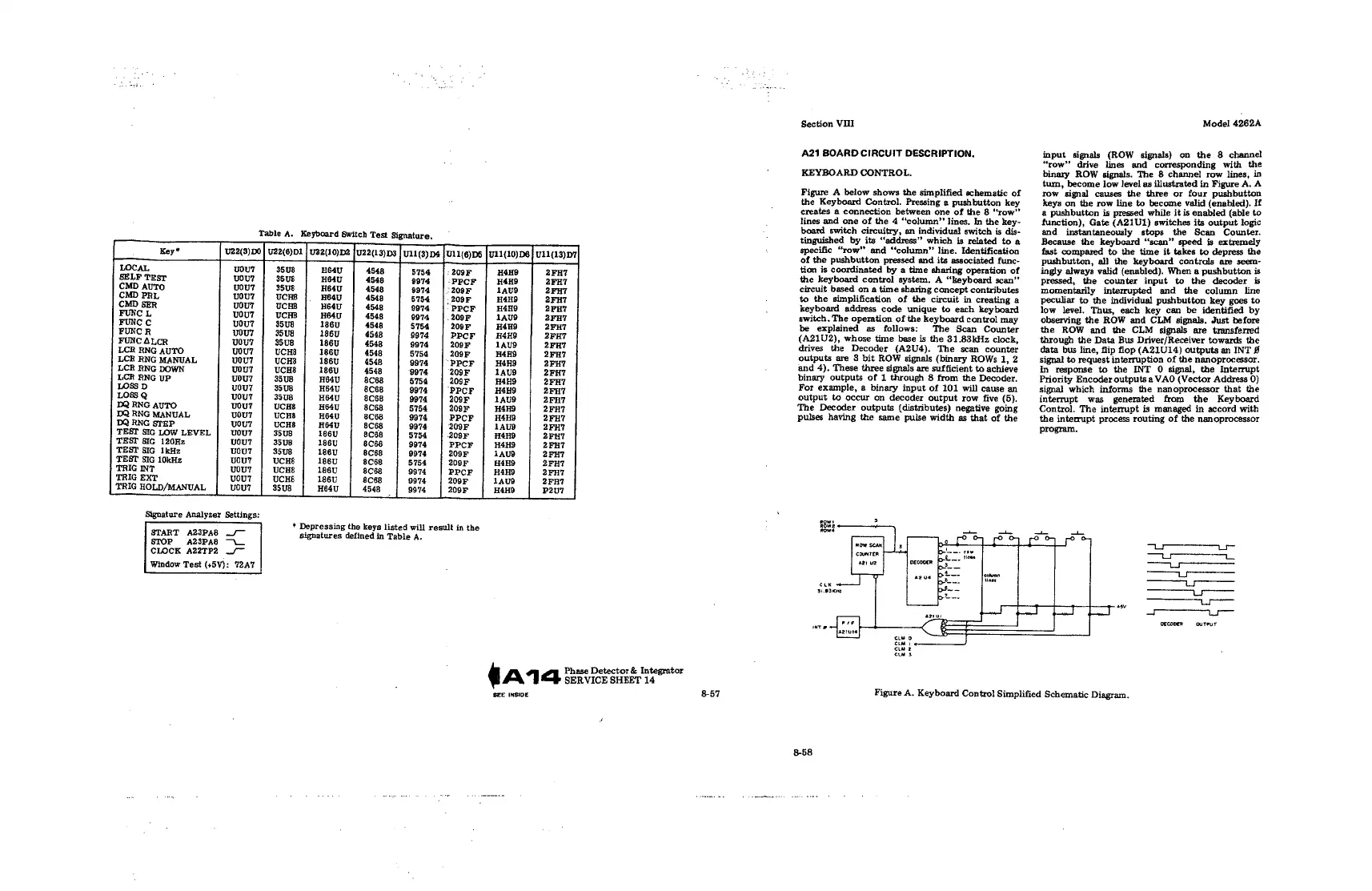
Table
A.
Keyboard
Switch
Tast
Signature.
[
Key*
U22(3)D0
|
U22(6)D1
|
UZ2(10)D2
{U22(13)D3
|
U11(3)
D4
{T11(6)D5
|U11{10)D6
|
U11(13)D7,
LOCAL
youT
35U8
HE4U
4548
5754
208F
H4HO
2FH7
SELF
TEST
uou?
35U8
H4U
4548
9974
PPCF
H4HO
2FH7
CMD
AUTO
wou?
35uU8
HB4U
4548
9974
209F
1ay9
2FH7
CMD
PRL
uou?
UCRS
H64U
4548
5754
209F
H4H9
2FH7
CMD
SER
vouT
UCHB
H64U
4548
9974
PPCF
H4H9
2FH7
FUNC
L
vou?
UCHS
H84U
4548
9974
209F
1AUS
2FH7
FUNC
uou?
35U8
186U
4548
5754
208F
H4H
2FHT
FUNC
R
vou7
35U8B
186U
4548
8974
PPCF
H4HE
2FHT
FUNC
ALCR
vouT
35U8
186U
4548
9974
209F
1AU9
2FH7
LCR
RNG
AUTO
you?
UCHS
186U
4548
5754
209F
H4HS
2FHT
LCR
RNG
MANUAL
uou?
UCHS
186U
4548
9974
PPCF
H4H9
2FH7
LCR
RNG
DOWN
voy?
UCHS
186U
4548
9974
209F
1AU8
2FH7
LCR
RNG
Up
uou?
35U8
H64U
8C68
5754
209F
H4H9
2FH7
LOSS
D
you?
35U8
HB4U
8ces
9974
PPCF
H4H9
2FHT
L0838
Q
voyT
35U8
H64U
8C68
9974
209F
1AU8
2FHT
DQ
RNG
AUTO
wouT?
UCHS
H64U
8C68
5754
208F
H4H9
2FH7
DQ
RNG
MANUAL
vou7
UCHS
H64U
8C68
9974
PPCF
H4HD
2FH7
DQ
RNG
STEP
vou7
UCHS
H64U
8C68
9974
209F
1AUD
2FH7
TEST
SIG
LOW
LEVEL
wou?
35U8
186U
8C68
5754
208F
H4HY
2FHT
TEST
8IG
120Hz
uou?
35U8
186U
8C68
9974
PPCF
H4HY
2FHT
TEST
SIG
1kHz
uouT
35U8
188U
8C68
9974
209F
1AU9
2FH?
TEST
SIG
10kHz
vouT
UCHS
186U
8C68
5754
208F
H4HY
2FH7
TRIG
INT
uou?
UCHS
186U
8C68
9874
PPCF
H4H9
2FHT
TRIG
EXT
uouT
UCHS8
186U
8Ces
9974
209F
1AU09
2FR7
TRIG
HOLD/MANUAL
vour
35U8
He4u
4548
9974
209F
H4HO
P2U7
Signature
Analyzer
Settings:
*
Depressing
the
keys
listed
will
result
in
the
START
A23PA8
_/—
signatures
defined
.
STOP
AZSDAS
ign:
es
defined
in
Table
A
CLOCK
A22TP2
./
Window
Test
{+5V):
7T2A7
Phase
Detector
&
Integrator
ANG
serVicE
sHEeT
14
SEE
INSIDE
8-57
Section
VIII
A21
BOARD
CIRCUIT
DESCRIPTION.
KEYBOARD
CONTROL.
Figure
A
below
shows
the
simplified
schematic
of
the
Keyboard
Control.
Pressing
a
pushbutton
key
creates
a
connection
between
one
of
the
8
“‘row”
lines
and one
of
the
4
“‘column’
lines.
In
the
key-
boamd
switch
circuitry,
an
individual
switch
is
dis-
shed
its
“‘address”
which
is
related
to
a
specific
“row”
and
"column"
line.
Idenhficahon
of
the
pushbutt.
d
and
its
d
func-
tion
is
coordinated
by
a
time
sharing
operation
of
the
keyboard
control
system.
A
“keyboard
scan’
circuit
based
on
a
time
sharing
concept
contributes
to
the
simplification
of
the
circuit
in
creating
a
keyboard
address
code
unique
to
each
keyboard
switch,
The operation
of
the
keyboard
control
may
be
explained
as
follows:
The
Scan
Counter
(A21U2),
whose
time
base
is
the
31.83kHz
clock,
drives
the
Decoder
(A2U4).
The
scan
counter
outputs
are
8
bit
ROW
signals
(binary
ROWs
1,
2
and
4).
These
three
signals
are
sufficient
to
achleve
binary
outputs
of
1
through
8
from
the
Decoder.
For
example,
2
binary
input
of
101
will
cause
an
output
to
occur
on
decoder
output
row
five
(5).
The
Decoder
outputs
(distributes)
negative
going
pulses
having
the
same
pulse
width
as
that
of
the
Model
4262A
input
signals
(ROW
signals)
on
the
8
channel
“row”
drive
lines
and
corresponding
with
the
binary
ROW
signals.
The
8
channel
row
lines,
in
turn,
become
low
level
as
illustrated
in
Figure
A.
A
row
signal
causes
the
three
or
four
pushbuiton
keys
on
the
row
line
to
become
valid
(enabled).
If
2
pushbutton
is
pressed
while
it
is
enabled
(able
to
function),
Gate
(A21U1)
switches
its
output
logic
and
instantaneously
stops
the
Scan
Counter.
Because
the
keyboard
‘“‘scan’
speed
is
extremely
fast
compared
to
the
time
it
takes
to
depress
the
pushbutton,
all
the
keyboard
controls
are
seem-
ingly
always
valid
(enabled).
When
a
pushbutton
is
pressed,
the
counter
input
to
the
decoder
is
momentarily
interrupted
and
the
column
line
peculiar
to
the
individual
pushbutton
key
goes
to
low
level.
Thus,
each
key
can
be
identified
by
observing
the
ROW
and
CLM
signals.
Just
before
the
ROW
and
the
CLM
signals
are
transferred
through
the
Data
Bus
Driver/Receiver
towards
the
data
bus
line,
flip
flop
(A21U14)
outputs
an
INT
#
signal
to
request
interruption
of
the
nanoprocessor.
In
response
to
the
INT
O
signal,
the
Interrupt
Priority
Encoder
outputsa
VAO
(Vector
Address
0)
signal
which
informs
the
nanoprocessor
that
the
interrupt
was
generated
from
the
Keyboard
Control.
The
interrupt
is
managed
in
accord
with
the
interrupt
process
routing
of
the
nanoprocessor
program,
B
B
B
i,
B
T
S
TS———
canen L]
Tines
—_—
e
—_—
g
E
ofconer
ouTeuT
Figure
A.
Keyboard
Control
Simplified
Schematic
Diagram.
8-58

Table of Contents

Related product manuals