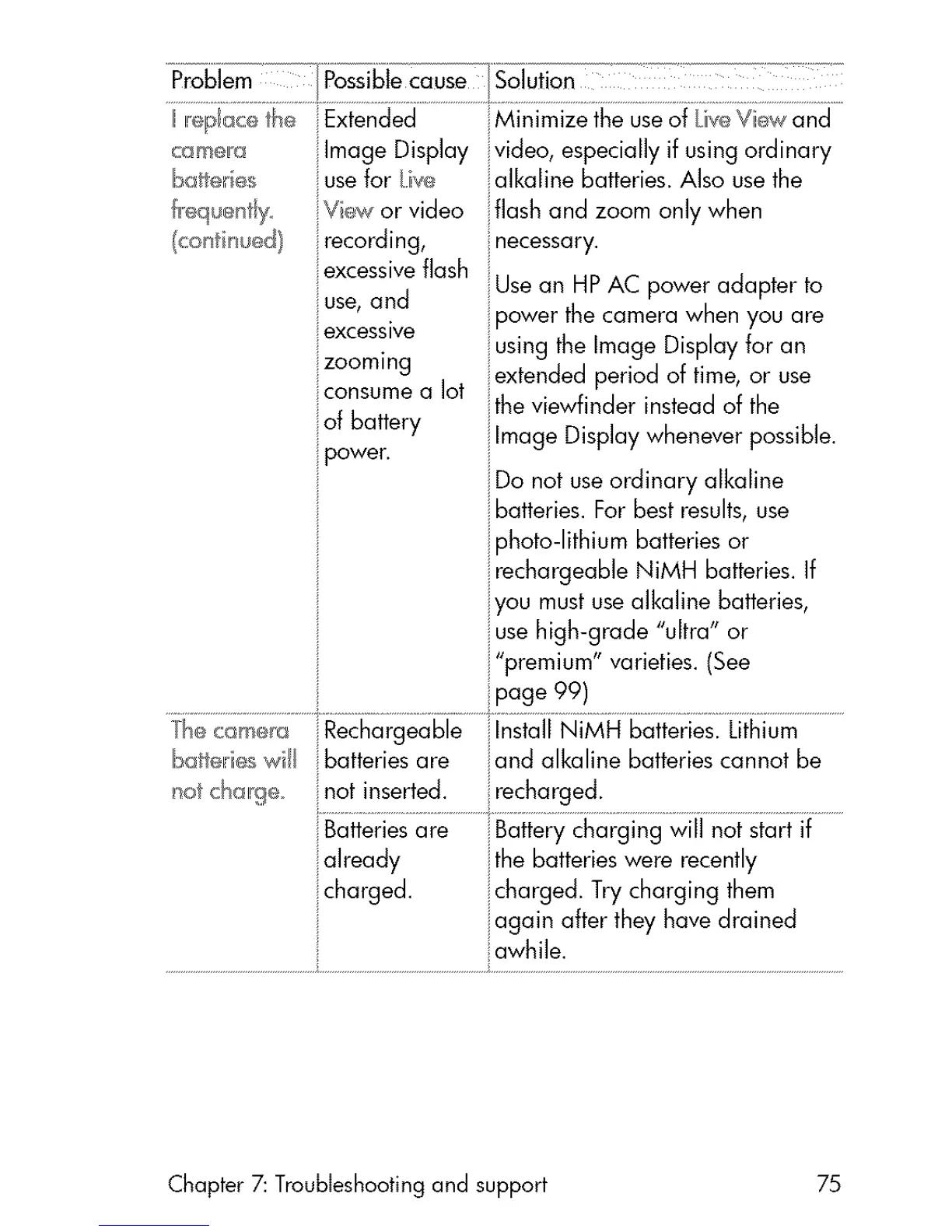
came[a
Iba er es
lExtended
Image Display
use for iw_
recording,
excessive flash
i use, and
excess ive
izoommg
consume a lot
of battery
power•
Minimize the use of Lice Viiew and
video, especially if using ordinary
alkaline batteries• Also use the
flash and zoom only when
:necessary.
Use an HP AC power adapter to
iIpower the camera when you are
i using the Image Display for an
ilextended period of time, or use
the viewfinder instead of the
i linage Display whenever possible.
i Do not use ordinary alkaline
i batteries. For best results, use
i photo-lithium batteries or
i rechargeabb NiMH batteries. If
iyou must use alkaline batteries,
i use high-grade "ultra" or
i'premium" varieties. (See
i page 99)
he c_smera Rechargeable i lnstdl NiMH batteries• Lithium
Ibatt_Me wi/ batteries are iand alkaline batteries cannot be
i not inserted, i recharged•
i
already ithe batteries were recently
charged, icharged. Try charging them
iagain after they have drained
Chapter 7: Troubleshooting and support 75



 To Next Page