EasyManua.ls Logo

HP 8153A - Page 123

HP 8153A
282 pages
Print Icon
To Next Page IconTo Next Page
To Previous Page IconTo Previous Page
Loading...
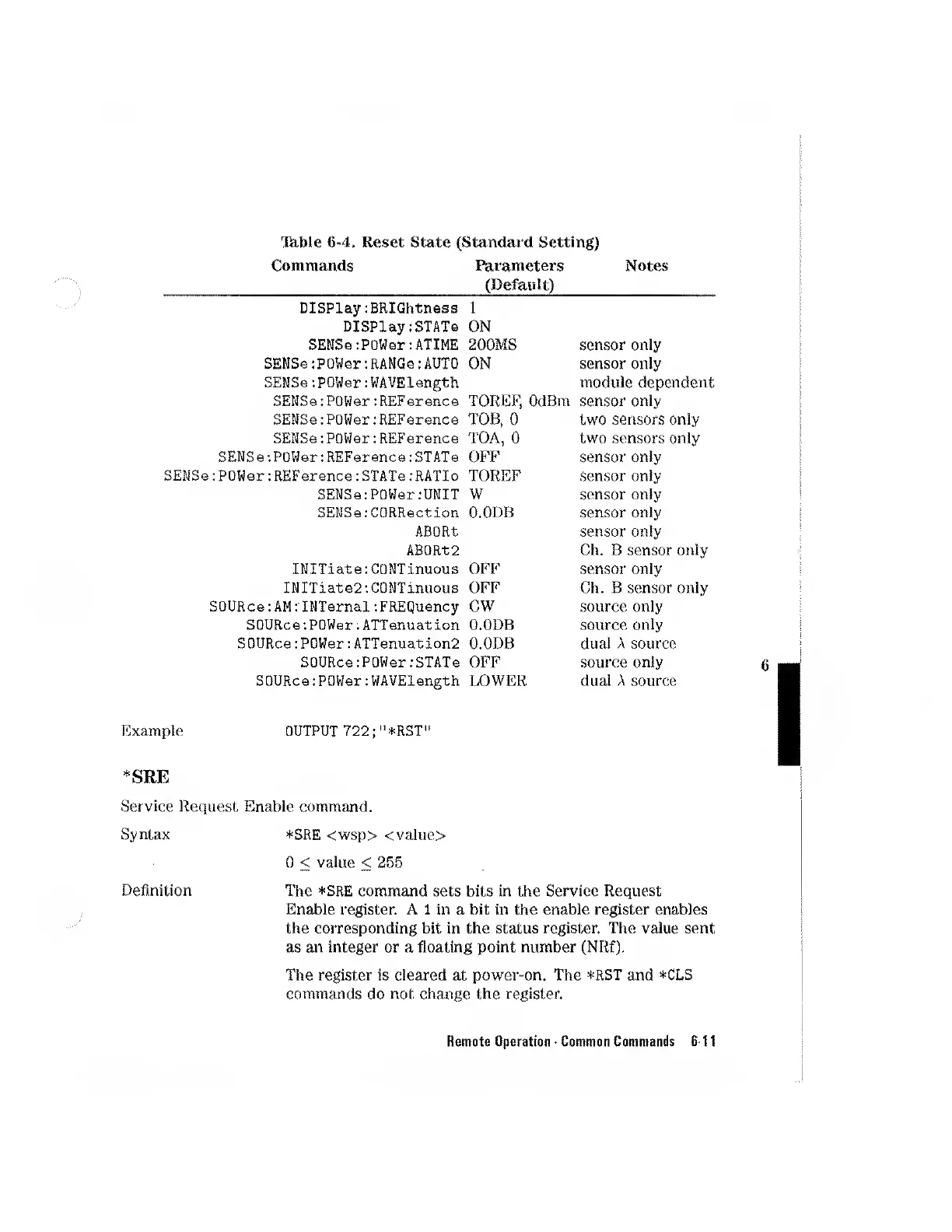
l^ble
6-4.
Reset
State
(Standard
Setting)
Commands
Parameters
(Default)
Notes
Display:BRIGhtness
Display:STATe
SEKSe:power:ATIME
SEKSg:
p
ower:RANGa:AUTO
SEKSe:powerrWAVElength
SEKSe:POWer:REFerence
SEKSe
'.POWer:
REFerence:
STATe
SEKSe;
POWer:
REFerence:
STATe:
RATIo
SEMSe:POWGr:UKIT
SEKSe:CQRRection
ABORT
AB0Rt2
INITiate:GOKTinuous
INITiate2:C0KTinuous
SOURce:
AMIKTernal:
FREQuency
SOURce:POWer:ATTenuation
SOURce:POWer:ATTenuation2
SOURce:POWer:STATG
SOURce:POWer:WAVElength
1
ON
200MS
ON
TOREF,
OdBm
TOB,
0
TOA,
0
OFF
TOREF
W
O.ODB
OFF
OFF
CW
O.ODB
O.ODB
Opp
LOWER
sensor
only
sensor
only
module
dependent
sensor
only
two
sensors
only
two
sensors
only
sensor
only
sensor
only
sensor
only
sensor
only
sensor
only
Ch.
B
sensor
only
sensor
only
Ch.
B
sensor
only
source
only
source
only
dual
A
source
source
only
dual
A
source
Example
OUTPUT
722;"*RST'
*SRE
Service
Request
Enable
command.
Syntax
*SRE
<wsp>
<value>
0
<
value
<
255
Definition
The
*SRE
command
sets
bits
in
the
Service
Request
Enable
register.
A
1
in
a
bit
in
the
enable
register
enables
the
corresponding
bit
in
the
status
register.
The
value
sent
as
an
integer
or
a
floating
point
number
(NRf).
The
register
is
cleared
at
power-on.
The
*RST
and
*CLS
commands
do
not
change
the
register.
Remote
Operation
-
Common
Commands
6-11

Other manuals for HP 8153A

Related product manuals