EasyManua.ls Logo

HP 8508A - Page 44

HP 8508A
130 pages
Print Icon
To Next Page IconTo Next Page
To Previous Page IconTo Previous Page
Loading...
Operation
d.
20kHz
Receiver
The
HP
8508A
can
be
used
with
the
input
module
extender
(HP
part
number
08508-60032)
as
a
20kHz
receiver.
This
feature
can
be
used
to
allow
magnitude
and
phase
measurements
on
a
20kHz
signal.
For
example,
to
make
delay
measurements
by
amplitude
modulating
an
RF
signal.
In
this
case,
the
HP
8508A
measures
the
phase
change
in
the
modulation
envelope
which
can
be
converted
to
delay.
,
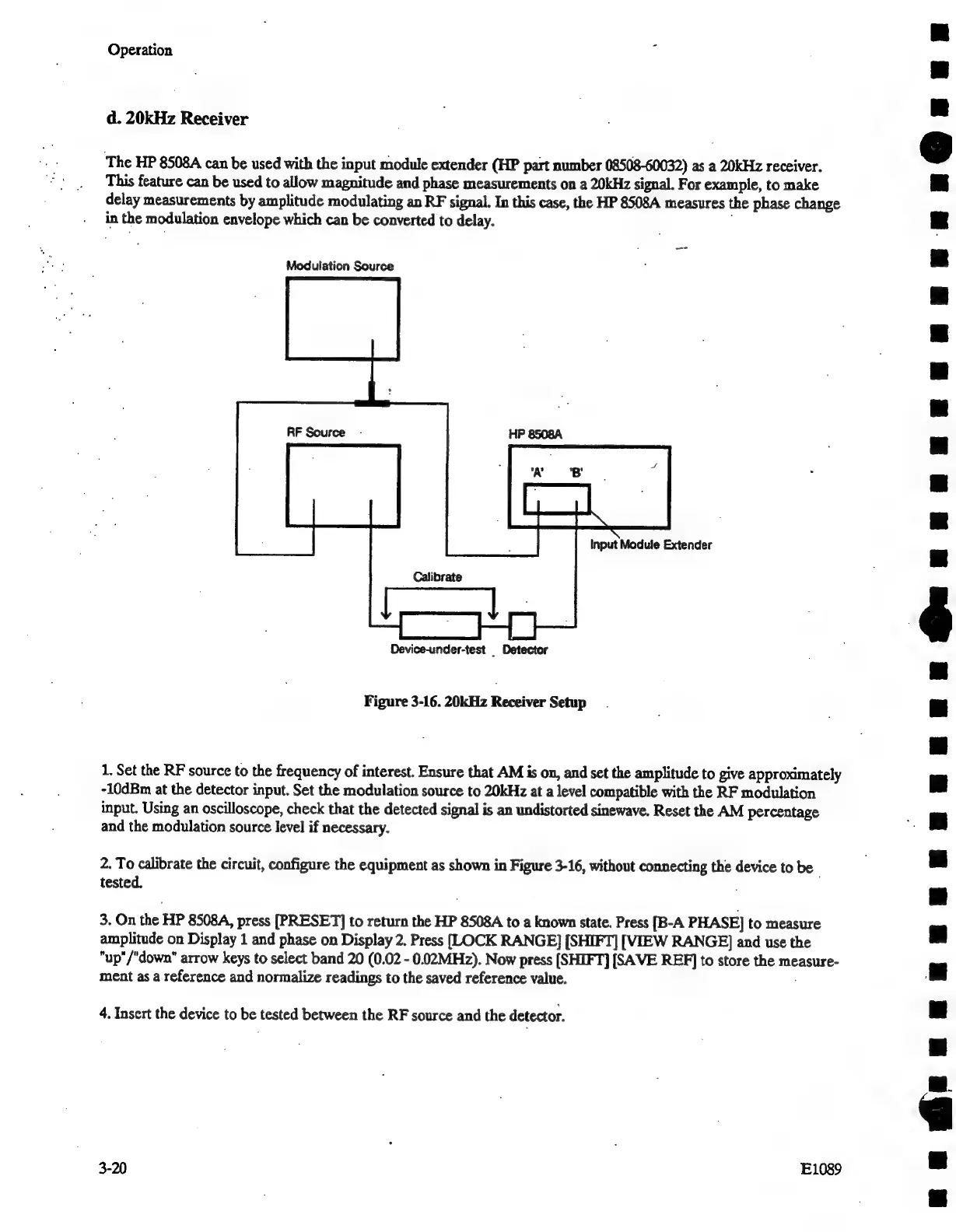
Modulation
Source
Input
Module
Extender
Device-under-test
_
Detector
Figure
3-16.
20kHz
Receiver
Setup
1.
Set
the
RF
source
to
the
frequency
of
interest.
Ensure
that
AM
is
on,
and
set
the
amplitude
to
give
approximately
-10dBm
at
the
detector
input.
Set
the
modulation
source
to
20kHz
at
a
level
compatible
with
the
RF
modulation
input.
Using
an
oscilloscope,
check
that
the
detected
signal
is
an
undistorted
sinewave.
Reset
the
AM
percentage
and
the
modulation
source
level
if
necessary.
2.
To
calibrate
the
circuit,
configure
the
equipment
as
shown
in
Figure
3-16,
without
connecting
the
device
to
be
tested.
;
3.
On
the
HP
8508A,
press
[PRESET]
to
return
the
HP
8508A
to
a
known
state.
Press
[B-A
PHASE]
to
measure
amplitude
on
Display
1
and
phase
on
Display
2.
Press
[LOCK
RANGE]
[SHIFT]
[VIEW
RANGE]
and
use
the
"up"/"down"
arrow
keys
to
select
band
20
(0.02
-
0.02MHz).
Now
press
[SHIFT]
[SAVE
REF]
to
store
the
measure-
ment
as
a
reference
and
normalize
readings
to
the
saved
reference
value.
4.
Insert
the
device
to
be
tested
between
the
RF
source
and
the
detector.
3-20
E1089

Related product manuals