109
Track configuration
Track overview
Introduction to collaboration
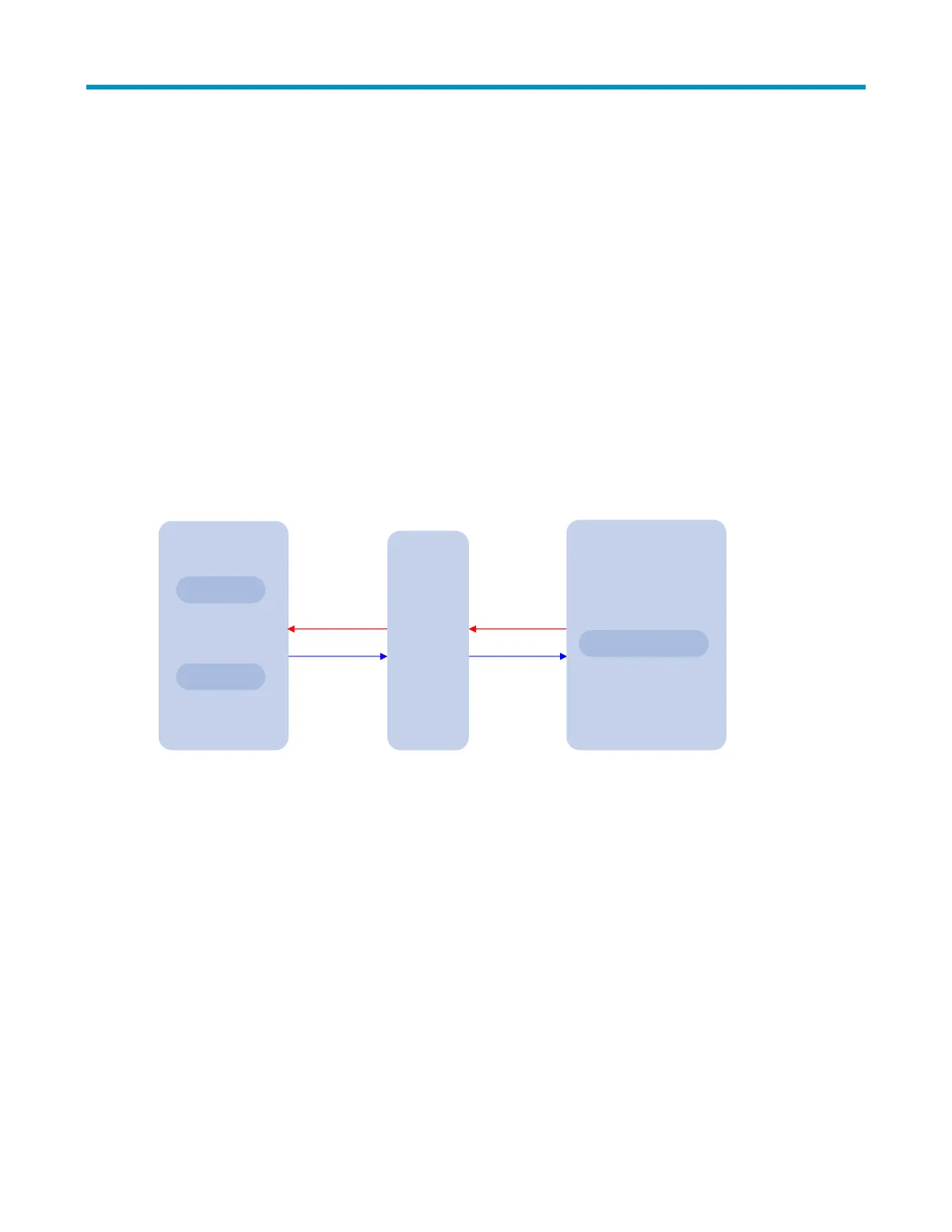
The track module works between application and detection modules, as Figure 28 shows. It shields the
application modules from the differences between various detection modules.
Collaboration is enabled after you associate the track module with a detection module and an
application module respectively. The detection module probes objects such as interface status, link status,
network reachability, and network performance, and informs the track module of detection results. The
track module sends the detection results to the associated application module. When notified of changes
of the tracked object, the application modules can react to avoid communication interruption and network
performance degradation.
Figure 28 Collaboration through the track module
Application module
Detection modules
NQA
Interface
management
Sends the
detection result
Sends the track
entry status
Track
module
Associates with
a detection entry
Associates with
a track entry
Static routing
Collaboration fundamentals
The track module collaborates with detection modules and application modules:
Collaboration between the track module and a detection module
Collaboration between the track module and an application module
Collaboration between the track module and a detection module
The detection module sends the detection result of the associated tracked object to the track module.
Depending on the result, the track module then changes the status of the track entry:
If the tracked object functions normally, for example, the target interface is up, or the target network
is reachable, the state of the track entry is Positive.
If the tracked object functions abnormally, for example, the target interface is down, or the target
network is unreachable, the state of the track entry is Negative.
If the detection result is not valid, for example, the NQA test group that is associated with the track
entry does not exist, the state of the track entry is Invalid.


 To Next Page