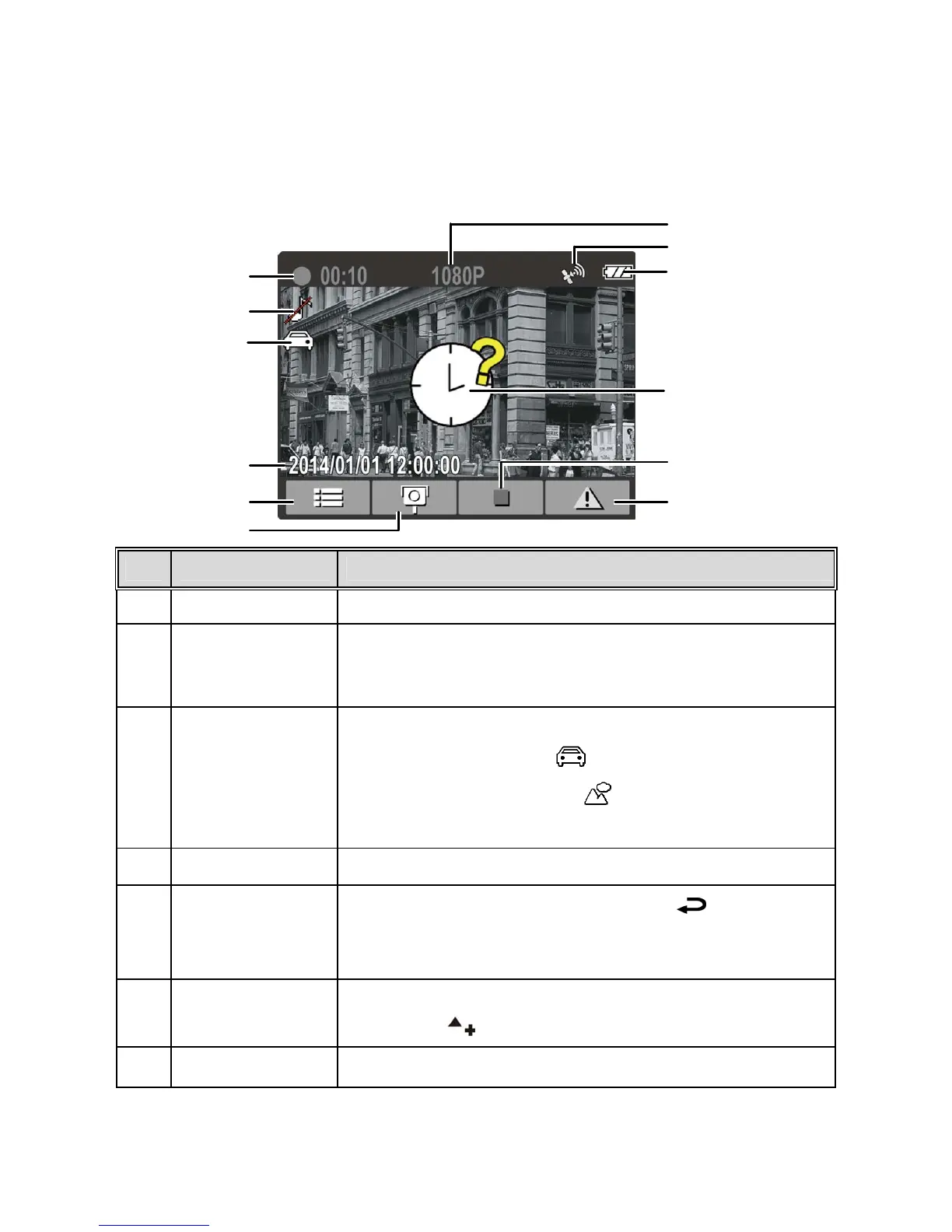
3.1.5 The Recording Screen
No.
Item Description
1 Duration Indicates the current recording duration.
2 Voice Record
Indicates sound will not be recorded with the
video. Enter the OSD menu to enable "Voice
Record".
3
Smart
Scene Mode
There are two options for the Smart Scene Mode:
1. Drive Priority
2. Scenery Priority
See section 4.2 Menu Tree for more details.
4 Date and time Indicates the current recording date and time.
5
Guide icon
(Menu)
During video recording, press the
button
to view the 4 GRID FUNCTION DISPLAY.
( Please refer to 3.1.6 explanation )
6
Add speed cam
point
During video recording with a good GPS signal,
press the
button to add a speed cam point.
7 Resolution Indicates the current video resolution.
12
9
11
4
5
1
8
7
6
2
3
10



 To Next Page