CAUTION:CAUTION: To prevent mechanical damage or depositing oil on your hands or other contaminants to the heatsink contact
surface, hold the heatsink only by the edge of its base plate. Do not touch the heatsink fins.
CAUTION:CAUTION:
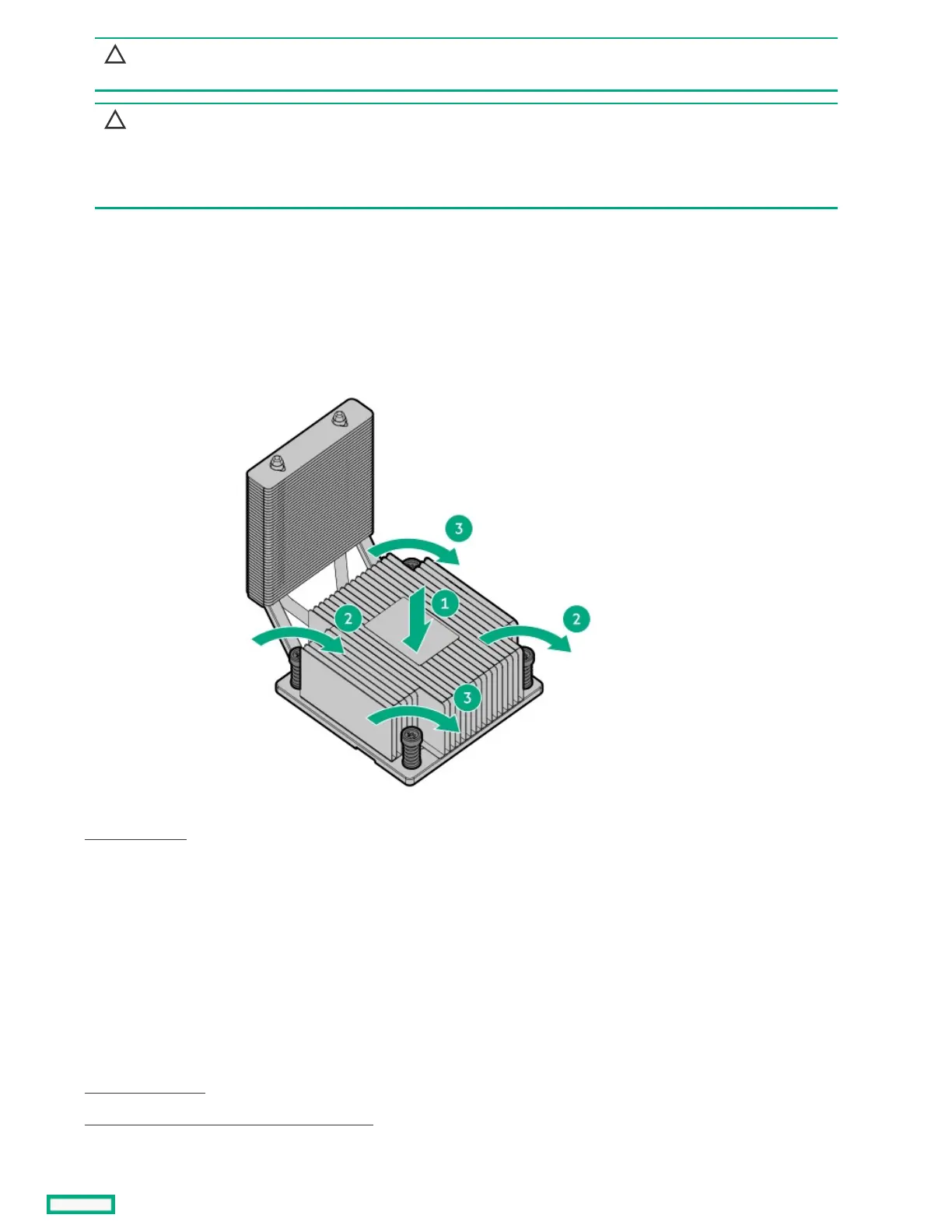
To prevent thermal failure or component damage, do not move the heatsink once the bottom of its base plate touches
the top of the processor. Excessive heatsink movement can cause the thermal grease to smear and become uneven.
Voids in the compound can adversely impact the transfer of heat away from the processor.
a. When using a torque wrench to tighten the heatsink screws, set it to 6.0.
b. Note the Front of serverFront of server text on the heatsink label to correctly orient the heatsink over the processor socket.
c. Position the heatsink on top of the processor, ensuring that it is properly seated before securing the screws.
d. Tighten one pair of diagonally opposite screws halfway, then tighten the other pair of screws.
e. Finish the installation by completely tightening the screws in the same sequence.
8. Close the chassis .
9. Install the front bezel.
10. Install the chassis cover.
11. If removed, install the security padlock and/or the Kensington security lock.
For more information, see the lock documentation.
12. Connect all peripheral cables to the server.
13. Connect the power adapter to the server, and then secure the power adapter cord in the power cord clamp.
14. Connect the power cord to the AC source.
15. Power up the server.
16. Reconfiguring the system date and time settings .
ResultsResults













 To Next Page