Installing the system boardInstalling the system board
PrerequisitesPrerequisites
Review the processor cautions .
Before you perform this procedure, make sure that you have the following items available:
T-15 Torx screwdriver or a bit driver with T-15 Torx bit
1.0 gm (0.5 ml) or two 0.5 gm (0.25 ml) of thermal grease
About this taskAbout this task
CAUTION:CAUTION: A discharge of static electricity from a finger or other conductor might damage system boards or other static-
sensitive devices. To prevent damage, observe antistatic precautions.
ProcedureProcedure
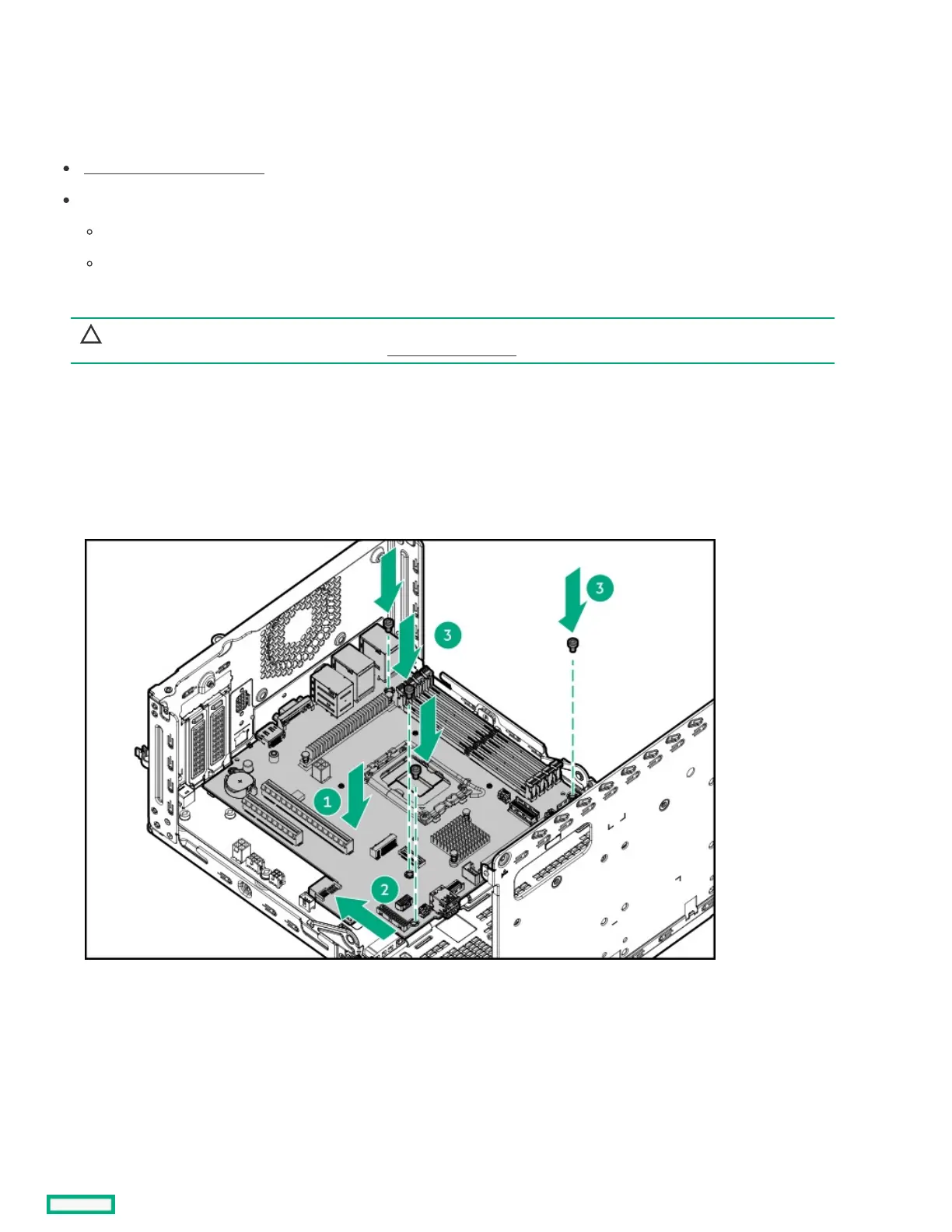
1. Install the system board:
a. Slide the system board towards the rear panel to attach it to the rear panel and the PDB.
Make sure that the system board is firmly connected to the PDB.
b. Install the system board screws.
2. If the processor dust socket cover is installed, remove it.
Retain the cover for future use.













 To Next Page