● A maximum of two chargers can be connected.
– If there is only one charger, it can be directly connected to the EMMA
through the FE port or connected to the router through the FE or WLAN
port.
– If there are two chargers, they must be connected to the router only
through the FE or WLAN port. Do not connect one charger to the EMMA
and the other charger to the router respectively at the same time.
● The EMMA directly controls the SG Ready heat pump through dry contacts or
an external relay.
● Smart switch devices (including smart sockets, smart circuit breakers, and
smart relays) can be connected to the router through the FE or WLAN port.
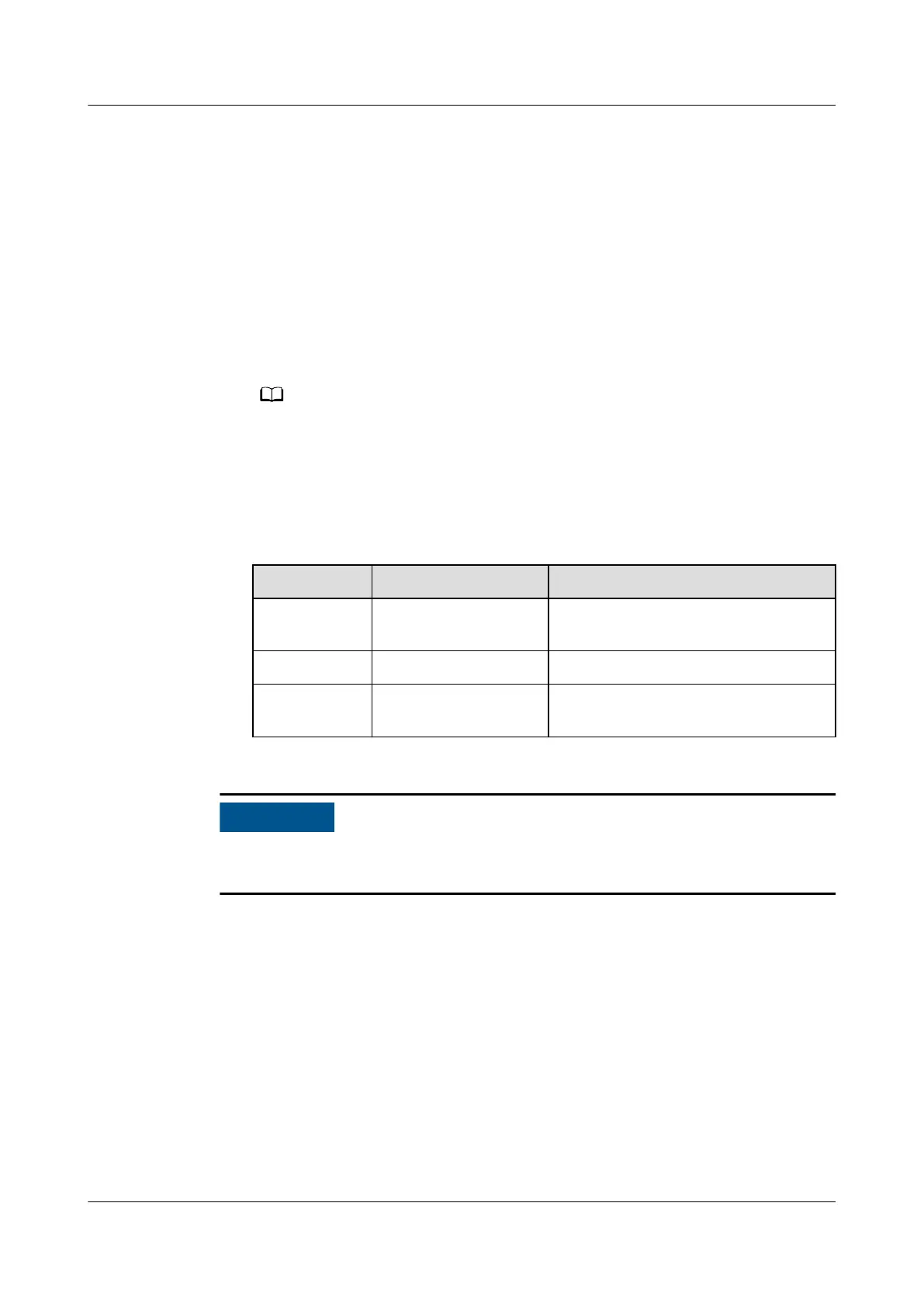
EMMA V100R023C10 (V100R023C10SPCXX) supports only the Shelly versions listed in
the following table. To check the Shelly version, perform the following steps:
1. Power on Shelly and connect to the WiFi of Shelly.
2. Enter the IP address for connecting to Shelly in the address box of the browser to
check the rmware version of Shelly. For details, see the Shelly user manual.
Table 2-2 Supported Shelly versions
Type
Model Version
Smart socket Shelly Plus Plug S 0.12.99-plugsprod1, 0.14.4, 1.0.8,
1.1.0-beta3
Smart relay Shelly Plus 2PM 0.10.2-beta4, 1.0.8, 1.1.0-beta3
Smart circuit
breaker
Shelly Pro 2PM 0.10.2-beta1, 1.0.3, 1.0.8, 1.1.0-
beta3
For details about the mapping in the EMMA network, see Residential Smart PV
Solution User Manual (EMMA).
EMMA-(A01, A02)
User Manual 2 Product Description
Issue 05 (2024-01-19) Copyright © Huawei Digital Power Technologies Co., Ltd. 15









 To Next Page