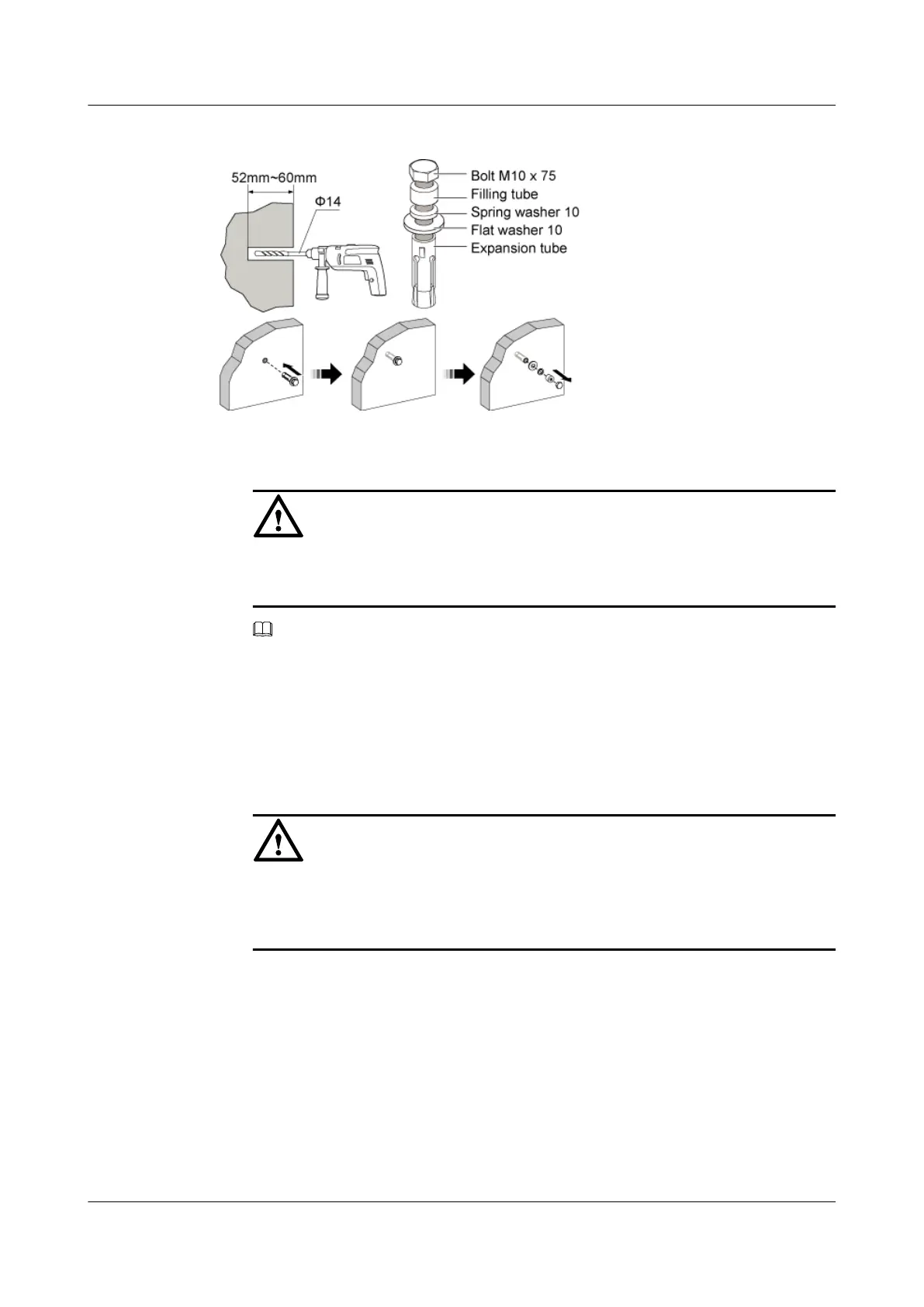
Figure 3-40 Drilling a hole and installing the expansion bolt assembly
1. Use the percussion drill with a Φ14 bit to drill four holes at the anchor points.
CAUTION
Protect yourself when drilling holes in the wall. Flying dust may hurt your eyes or you may
inhale the dust.
NOTE
The drilled holes must be 52 mm to 60 mm deep.
2. After the holes are drilled, use the cleaner to clean the dust both inside and around the holes.
If the inter-hole distance is too long or too short, locate and drill holes again.
3. Screw the expansion bolt slightly and put it into the hole. Hammer the assembly until the
expansion tube is completely buried into the hole.
4. Remove the bolt M10 x 75, filling tube, spring washer 10, and flat washer 10 in turn.
CAUTION
After disassembling the expansion bolt assembly, ensure that the top of the expansion tube
is completely buried into the wall. If it is not completely buried, the mounting plate cannot
be steady on the wall.
Step 3 Secure the mounting plate, as shown in Figure 3-41.
RRU
User Guide 3 Installing RRU and SRXU Hardware
Issue 01 (2008-04-18) Huawei Proprietary and Confidential
Copyright © Huawei Technologies Co., Ltd
3-37






 To Next Page