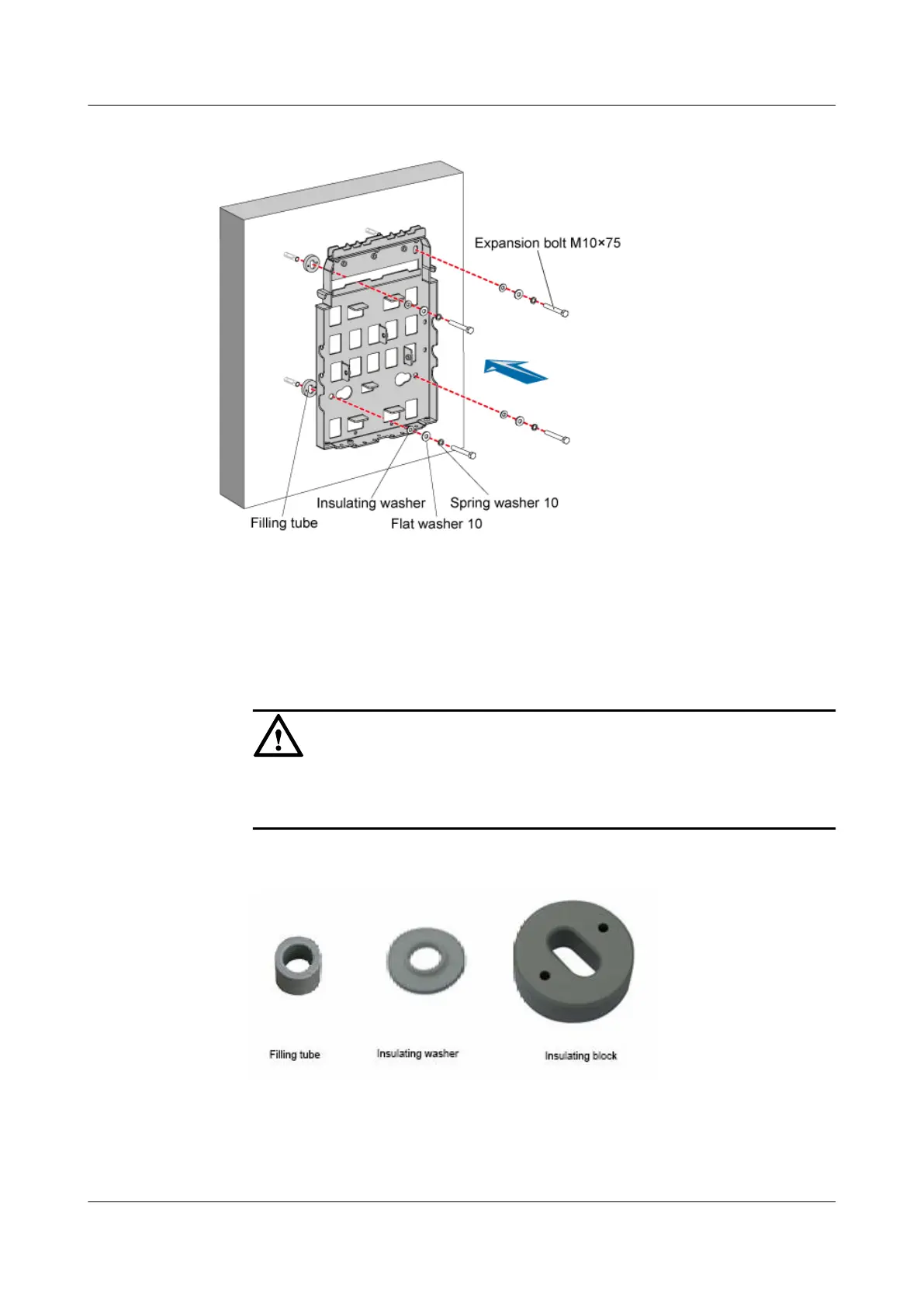
Figure 3-41 Securing the mounting plate
1. Place the mounting plate against the wall, and then align the mounting plate with the four
marked anchor points.
2. Lead each bolt M10 x 75 through the spring washer 10, flat washer 10, and insulating
washer in turn. Then, lead each assembled bolt through the hole in the mounting plate,
insulating block, and finally into the expansion tube through the hole in the wall.
CAUTION
When installing the bolt, remove the filling tube, and then use the insulating washer and
insulating block that are delivered with the mounting plate, as shown in Figure 3-42.
Figure 3-42 Filling tube, insulating washer, and insulating block
3. Use the wrench to fix the mounting plate to the wall by tightening the bolts clockwise.
----End
3 Installing RRU and SRXU Hardware
RRU
User Guide
3-38 Huawei Proprietary and Confidential
Copyright © Huawei Technologies Co., Ltd
Issue 01 (2008-04-18)






 To Next Page