Procedure
Step 1 Prepare an RRU PGND cable.
1. Cut the cable to the required length based on the actual cable route.
2. Add an OT terminal to each end of the cable by referring to Assembling the OT Terminal
and the Power Cable.
Step 2 Install the RRU PGND cable.
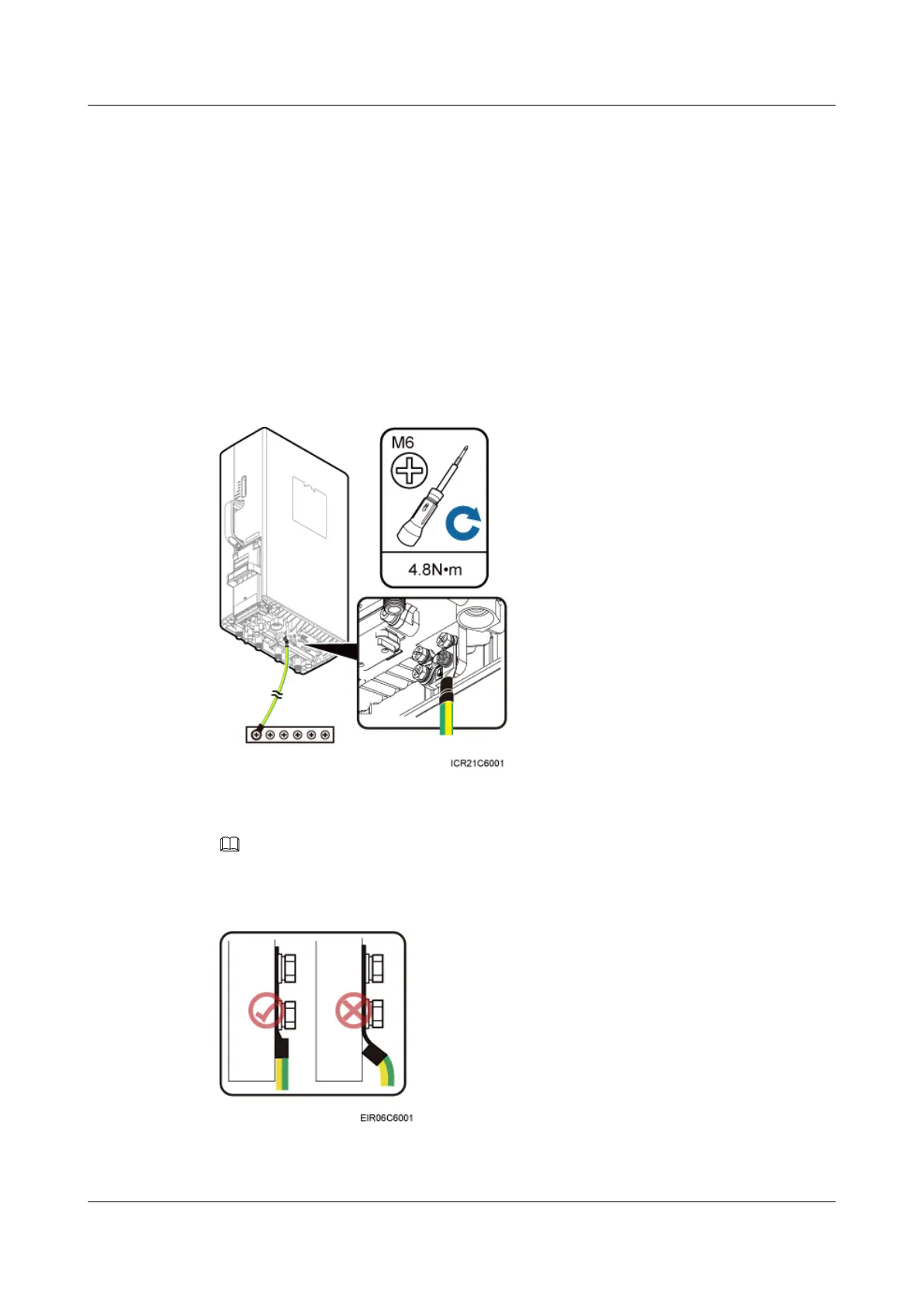
Connect the M6 OT terminal at one end of the PGND cable to the ground terminal at the RRU
bottom and the M8 OT terminal at the other end to the external ground bar, as shown in Figure
7-6.
Figure 7-6 Installing an RRU PGND cable
NOTE
Crimp OT terminals in correct positions, as shown in Figure 7-7.
Figure 7-7 Correct position of an OT terminal
RRU3232
Installation Guide 7 Installing RRU Cables
Issue 05 (2011-10-20) Huawei Proprietary and Confidential
Copyright © Huawei Technologies Co., Ltd.
66



 To Next Page