EasyManua.ls Logo

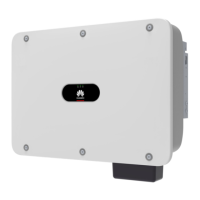
Huawei SUN2000-20KTL - User Manual

Huawei SUN2000-20KTL
130 pages
Print Icon
To Next Page IconTo Next Page
Loading...
31186168
SUN2000 (8KTL-28KTL)
User Manual
Issue
07
Date
2014-07-30
HUAWEI TECHNOLOGIES CO., LTD.

Table of Contents

Other manuals for Huawei SUN2000-20KTL

Questions and Answers

  • K
    Kimberly KingAug 30, 2025
    Why is my Huawei SUN2000-20KTL Inverter showing Cabinet Over-Temp?
    • S
      Steven DavisAug 30, 2025
      If the Huawei Inverter displays 'Cabinet Over-Temp', it means the inverter is installed in a place with poor ventilation. Check if the ambient temperature exceeds the upper limit. If it does, improve ventilation to decrease the temperature.
  • A
    Alison BentleyAug 29, 2025
    What causes DC Bus Voltage Fault in Huawei Inverter?
    • S
      Susan WeberAug 29, 2025
      A DC Bus Voltage Fault on your Huawei Inverter means abnormal external conditions have triggered DC circuit protection. This can happen if the inverter input is suddenly disconnected or shielded PV strings cause a sharp change in output power (Reason ID = 3), or if the input energy can't vent quickly due to a sharp change in grid voltage (Reason ID = 9 or 11). The inverter monitors external conditions and should automatically return to normal once the fault is rectified. If the alarm occurs repeatedly, contact Huawei technical support.
  • J
    Jared ShawAug 28, 2025
    What to do if Huawei SUN2000-20KTL shows Invert Module Fault?
    • B
      bobby90Aug 28, 2025
      The Huawei Inverter indicates an Invert Module Fault when abnormal external conditions trigger converter circuit protection inside the inverter. This could be due to a sharp drop in grid voltage or a short circuit, causing high output current (Reason ID = 4), or the inverter's output short-circuiting (Reason ID = 20). The inverter monitors external conditions and should return to normal once the issue is resolved. Check for any short circuits in the inverter's output cables and fix them.
  • K
    Katherine CrawfordAug 27, 2025
    Why is my Huawei Inverter showing a Grid Voltage Abnormal error?
    • S
      Shane LynnAug 27, 2025
      The grid voltage may be beyond the allowed range. This can happen if the grid A, B, or C phase voltage is less than the allowed range (Reason ID = 1 to 6), or if there's a power outage, a disconnected AC line, or a tripped AC circuit breaker (Reason ID = 29). If it's an accidental grid issue, the Huawei Inverter should automatically return to normal once the problem is resolved. Check if the AC voltage is normal.
  • R
    Ronald StaffordAug 26, 2025
    What does String 1-6 Reverse mean on Huawei Inverter?
    • J
      Jeremy LongAug 27, 2025
      The Huawei Inverter shows 'String 1-6 Reverse' when the cables between PV strings were connected in reverse during installation. Check if the cables between PV strings are correctly connected and reconnect them if necessary.
  • M
    Mark MorseAug 25, 2025
    How to troubleshoot Low Array Insulation Resistance on Huawei SUN2000-20KTL?
    • M
      Mark MillerAug 26, 2025
      The Huawei Inverter shows a Low Array Insulation Resistance error when the insulation resistance against ground of the PV strings is low, possibly due to a short circuit between PV strings and the ground. Check the insulation resistance against the ground of the PV strings and rectify any short circuit.
  • A
    Alyssa AbbottAug 25, 2025
    What does Frequency Abnormal mean on a Huawei SUN2000-20KTL Inverter?
    • N
      Natalie BrownAug 25, 2025
      The Huawei Inverter displays a Frequency Abnormal error when the grid's actual frequency is higher or lower than the required value for the local grid. If this alarm occurs accidentally, it's possible there's an issue with the grid. The inverter will automatically revert to normal once the problem is resolved.

Summary

1 Safety Precautions

Operation and Maintenance Safety

Safety guidelines during product operation and maintenance procedures.

4 Installation

4.1 Checking Before Installation

Steps to take before installing, including package checks.

Mounting Procedures

Instructions for support and wall mounting of the SUN2000 unit.

5 Electrical Connections

5.1 Installing PGND Cables

Procedure for connecting protection ground (PGND) cables.

5.2 Connecting AC Output Power Cables

Procedure for connecting the SUN2000 to AC power sources.

5.3 Installing DC Input Power Cables

Procedure for connecting DC input power cables from PV arrays.

5.4 Connecting Communications Cables

Procedure for connecting communication cables.

6 System Operation

6.1 Checking Before Power-On

Pre-operation checks to ensure normal system startup.

6.2 Powering on the SUN2000

Steps to safely power on the SUN2000 after electrical connection.

6.3 Setting Initialization Parameters

Initial setup steps for language, time, and grid code.

7 LCD Operations

8 Maintenance

8.1 Powering Off the SUN2000

Steps to safely power down the unit before performing maintenance.

Routine Maintenance and Faults

Daily maintenance tasks, intervals, and common fault troubleshooting.

10 Technical Specifications

11 Quality Assurance

Huawei SUN2000-20KTL Specifications

General IconGeneral
Max. efficiency98.6%
Rated AC output power20, 000 W
Max. apparent power22, 000 VA
No. of MPP trackers2
Max. input voltage1100 V
Protection degreeIP65
Max. DC Power30, 000 W
Start Voltage200 V
Nominal DC Voltage600 V
Max. Input Current per MPPT26 A
Nominal AC Grid Frequency50 Hz / 60 Hz
Adjustable Power Factor Range0.8 leading to 0.8 lagging
Total Harmonic Distortion (THD)<3%
DC Reverse-Polarity ProtectionYes
AC Overcurrent ProtectionYes
AC Short-Circuit ProtectionYes
DC Insulation Resistance DetectionYes
Residual Current MonitoringYes
AC Overvoltage ProtectionYes
DC SwitchYes
Cooling MethodNatural Convection
AC output voltage220 V / 380 V, 230 V / 400 V
MPPT operating voltage range200 V - 1000 V
Operating temperature range-25°C to +60°C
Relative Humidity0% - 100%
Operating AltitudeUp to 4000 m
Surge ProtectionType II DC & AC

Related product manuals