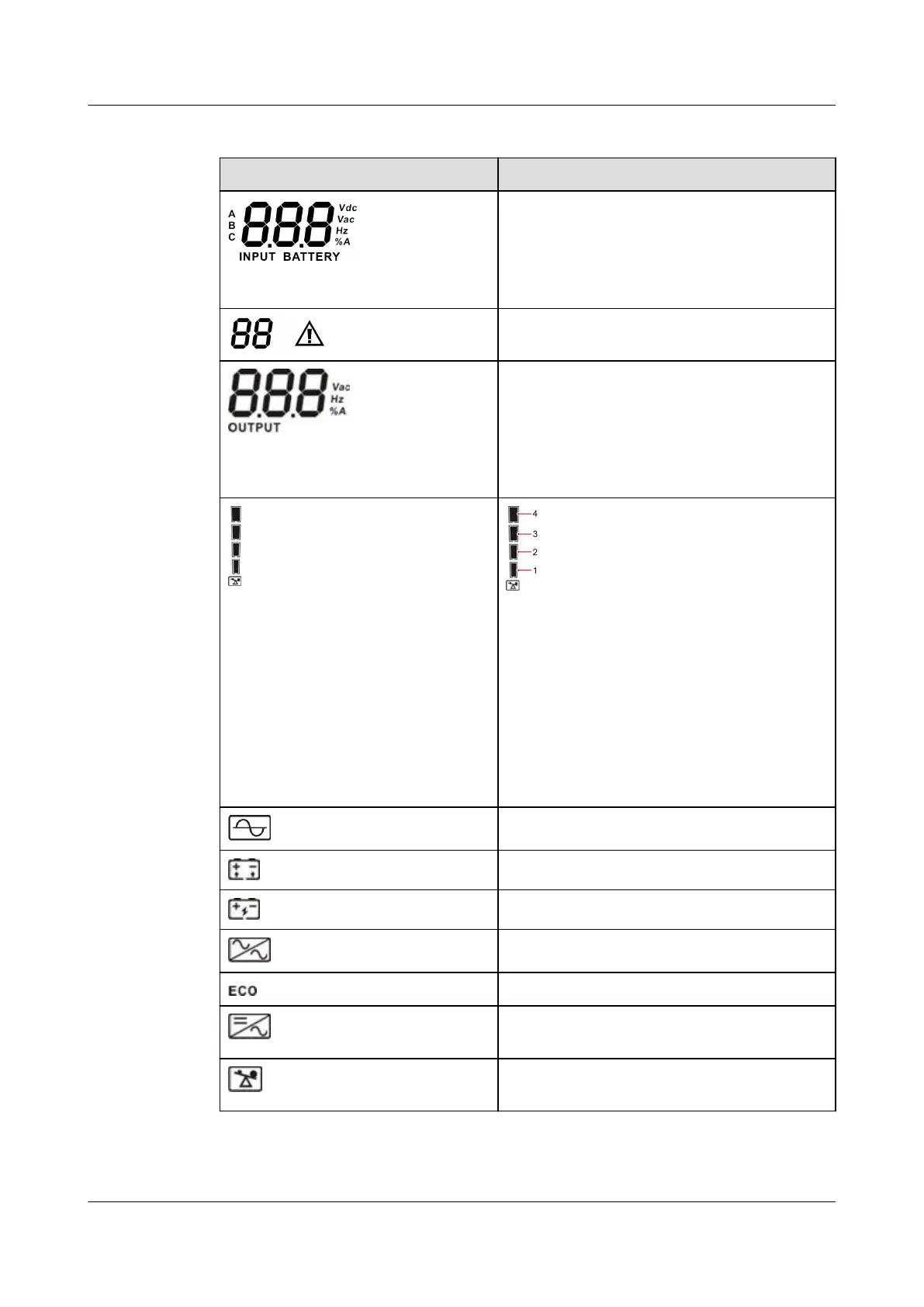
Table 4-1 LCD panel description
Display Function
Displays the input voltage, input
frequency, charge current, battery voltage,
and battery SOC.
Vac: input voltage; Vdc: battery voltage;
Hz: input frequency; %: battery SOC
Displays the current alarm and its ID.
Displays the output voltage, output
frequency, load percentage, battery
discharge current, and AC discharge
current.
Vac: output voltage; Hz: output frequency;
%: load percentage; A: output current
Displays the current load percentage by
level:
0%–24%: Indicator 1 is steady on.
25%–49%: Indicators 1 and 2 are steady
on.
50%–74%: Indicators 1, 2, and 3 are steady
on.
75%–100%: Indicators 1, 2, 3, and 4 are
steady on.
Indicates that the mains is connected.
Indicates that batteries are discharging.
Indicates that batteries are being charged.
Indicates that the UPS is in bypass mode.
Indicates that the UPS is in ECO mode.
Indicates that the DC/AC inverter circuit is
operating.
Indicates that the output terminal is
supplying power.
UPS2000-G-6KRTLL
User Manual 4 Control Panel
Issue 02 (2022-06-30) Copyright © Huawei Technologies Co., Ltd. 39







 To Next Page