(4) Start binding (This step is only required when first binding or replace the trans-
mitter, do it manually.)
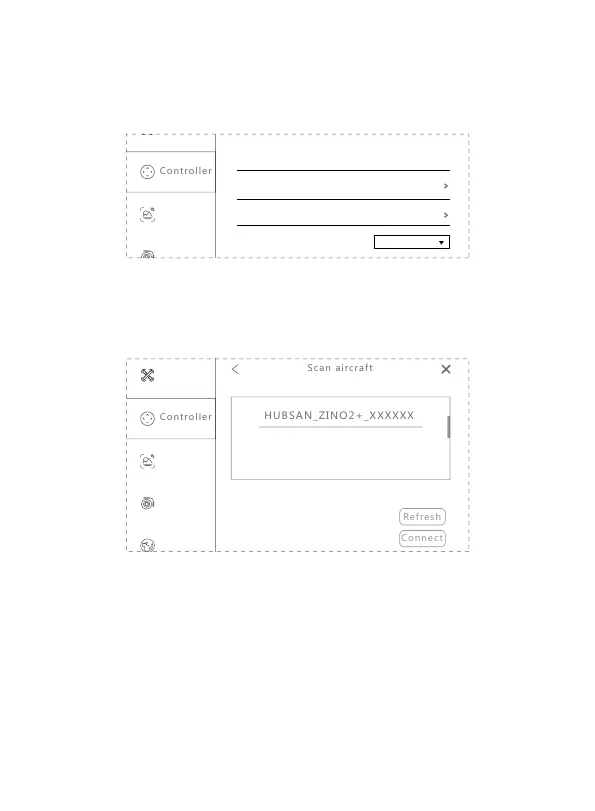
1. Go to APP - Setting - Controller, transmitter connection method:
Synchleas
Transmitter model
Joystick setting
Custom button Fn
No function
Set transmitter and aircraft connection
Synchleas
2. Using a pin to long press the aircraft bind button to enter binding mode.
3. Select "Set transmitter and aircraft connection" and scan aircraft.
4. Select the aircraft and connect.
Tips:
1. Using a pin to long press the aircraft
bind button to enter binding mode;
2. Click "Refresh" to refresh the aircraft
list, please make sure the your mobile
device and transmitter is connected before
refreshing;
3. Select the aircraft and connect.
You have to complete the binding process on APP when first use or replace the
transmitter, and then you can fly the aircraft with the transmitter directly without
connecting to the APP.
Tips:
-The binding process has been completed in the factory. Generally, user only need
to do the first 3 steps.
-After entering binding mode, all 4 LEDs flash rapidly and become solid after bind-
ing successfully.
-Please keep the distance between the aircraft and transmitter within 1 meter when
binding.
12



 To Next Page