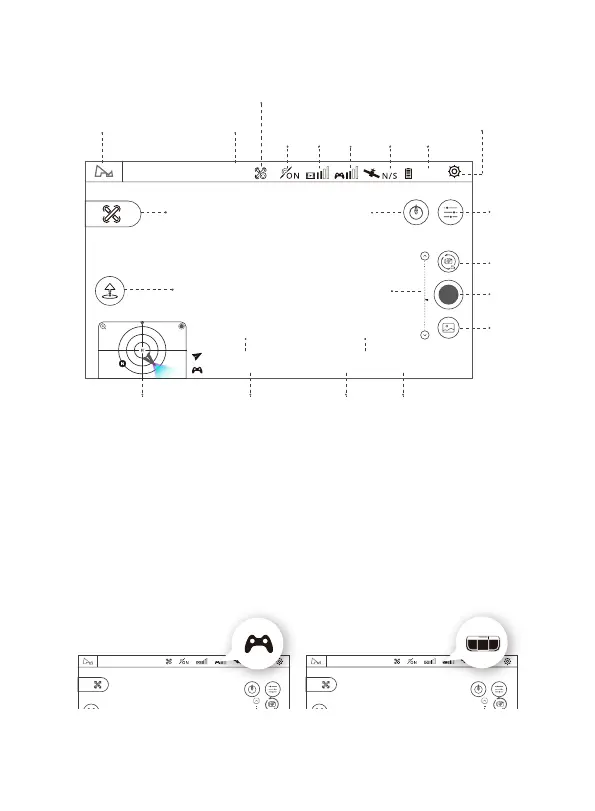
3.2 Main Interface Guide
3.3 Pairing The Aircraft
(1) Run X-Hubsan 2.0 APP, choose the aircraft model.
(2) Short press the aircraft power button and then long press for a few seconds to
turn it on.
(3) Short press the transmitter power button and then long press for a few seconds
to turn it on, connect the transmitter to your mobile device with the RC cable.
Before Pairing After Pairing
Not connected
N
N00.0000000,E000.0000000
45.877503 , -106.123984,65m
Pi tch 0° Yaw 0°Ro ll 0°
Speed 0.0m/s
H: 0.0m D: 0.0m
N00.0000000,E000.0000000
45.877503 , -106.123984,65m
Pi tch 0° Yaw 0°Ro ll 0°
Speed 0.0m/s
H: 0.0m D: 0.0m
Note: This is the interface in Map mode
FPV
(Video)
Signal
Aircraft
GPS
Signal
Aircraft
Battery
Level
Home Page
Flight Status
Sport Mode
Switch
Motor
Status
Setting
Camera
Setting
Headless On / Off
Photo /
Video Switch
Take Photo /
Video
Gallery
Gimbal Pitch
Location
00.000000 , -000.0000
45.877503 , -106.123984,65m
SPEED 0.0M/S
H: 0.0m D: 0.0m
Altitude DistanceTransmitter GPSAltitude Ball
Aircraft SpeedAircraft GPS
Auto Takeoff / Auto RTH
Flight Mode
Not Connected N
100%
11V
11
Remote
Control
Signal
Not connected
N



 To Next Page