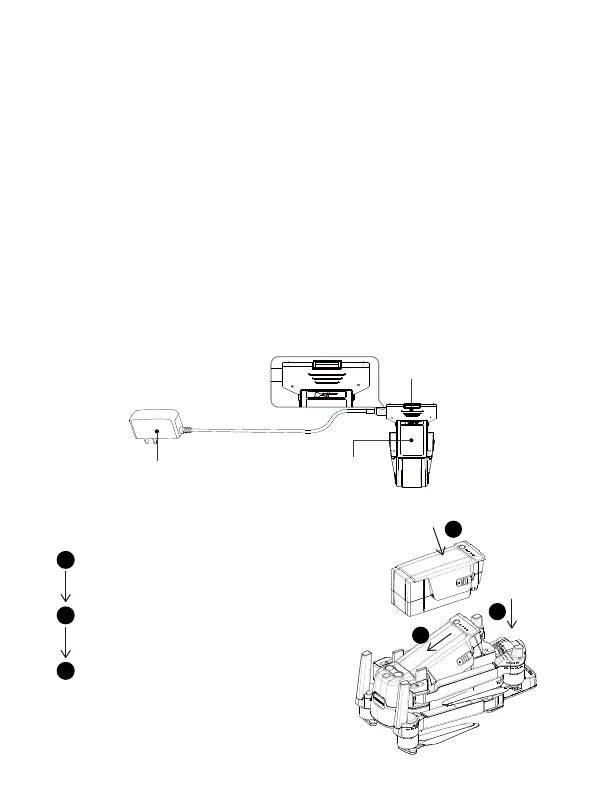
1.2 Aircraft Battery
1.2.1 Aircraft Battery Charging
1.2.2 Aircraft Battery Installation
Prepare the aircraft battery
Put the battery into the battery compartment,
and press the buckles on both sides of the
battery until the buckles pop out
Check if the battery buckles snaps
into place
Aircraft Lithiun Battery Capacity: 3800mAh, 15.2V lithium battery equipped with a
standard charger,charging time is about 110 minutes.
① Connect the power adapter to AC power (100V-240V, 50-60Hz).
② Connect the Intelligent Flight Battery and the power adapter with Intelligent
Flight Battery turned off
③ Intelligent Flight Battery Level indicator will flash and indicate current battery
lever under charging
④ Intelligent Flight Battery is fully charged when power indicator lights are all off.
Please remove the Intelligent Flight Battery and power adapter to complete
charging.
Note: After using the battery, please re-charge it in time (at least 50%) to avoid
long-term storage of the battery and affecting battery life.
1
2
3
1
2
3
3
Charger Adapter
Aircraft BatteryAdapter
IN OUT



 To Next Page