(3) The aircraft must be placed horizontally
(4) It is not recommended to take off forcefully when the GPS satellite signal
is not reached.
Starting the Motors
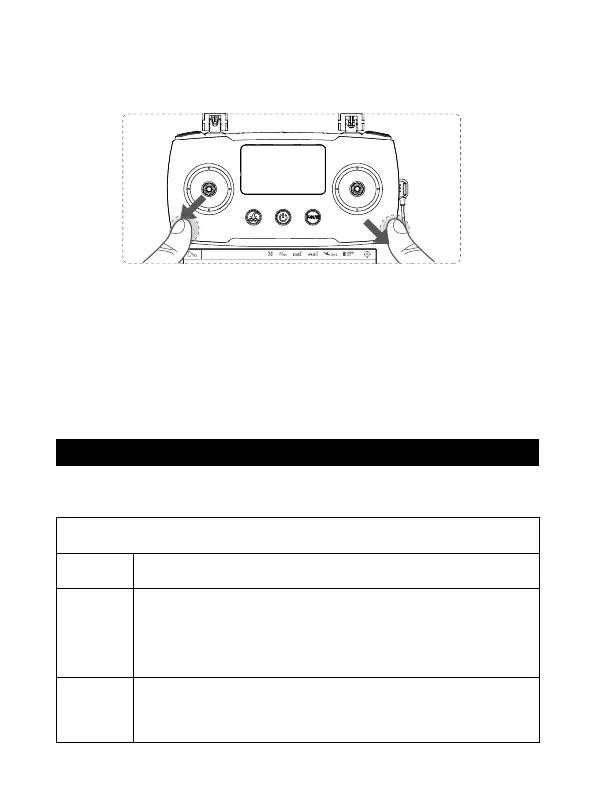
Push both stick to the bottom outer corners to start the motors. Once the motors
have started spinning,Release both sticks simultaneously.
Stopping the Motors
When the motor is running,Push both stick to the bot tom outer
corners to stop the motors. Release both sticks once motors stop.
Forced to Stop
When flying in the air, the motor c an be forced to stop in 2 seconds with outer
eight bar. Use this function with caution, as it can cause the aircraft to fall and may
endanger personal safety.
45.87 7503 , - 1 06.123 98 4
45.877503 , -106.123984,65m
Connected
4 Flight Controller
4.1 Flight Control Mode
15
GPS
Mode
Flight Control Mode
(The flight controller judges the GPS signal and switches the corresponding mode)
With good GPS conditions, using GPS fixed point and optical flow
assist.
When the aircraft is hovering, and the GPS quantity is insufficient,
using the optical flow fixed-point mode.
The effectively fixed height of optical flow mode is 3 meters and
greater than 3 meters for attitude mode.
In this mode, the maximum speed of the aircraft is 3m / s. The intel-
ligent mode is not available. Please fly with caution.
When GPS and optical flow effects are weak, the only manual flight
is available, and intelligent mode is prohibited. In attitude mode, the
aircraft's fixed point is abnormal. Please land as soon as possible.
Optical
flow
mode
Attitude
mode



 To Next Page