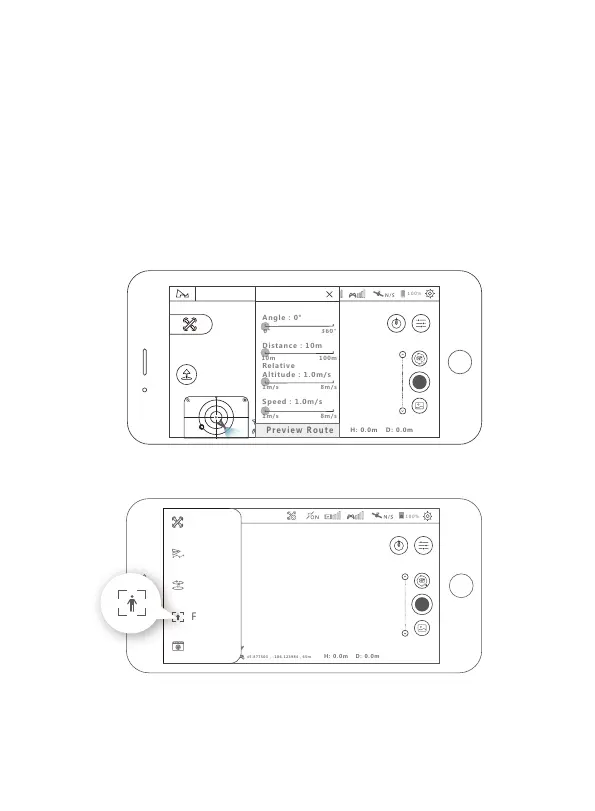
4.5.5 Line Fly Mode
Tap on "Mode Selection" then "Line Fly Mode".Set the angle,distance
and speed of the aircraft.
Performance requirements:
1. Set the angle (0 ~ 360 °, accuracy 1 °);
Set the distance (10-100 meters, accuracy 1 meter); set the speed (1-12 m / s, accu-
racy 0.1);
2. Once setup is complete, the aircraft will execute Line Fly mode.
During the flight, pilots can take photos or videos manually , or pause / resume /
stop the flight at any time.
During the flight, the throttle stick is co ntrollable and the other directions are
uncontrollable;
3. You can pause/resume/stop the flight at any time.
4. When the aircraft is low on battery or lost connection,the aircraft will always set
Return to Home as the priority mission.
4.5.6 Follow Mode
Enter into follow mode to choose the Image tracking and GPS follow.
Image Tracking:Select the target on the APP. After the selecting successfully, tap on
"Go" and the aircraft will follow the movements of the target. The range of tracking
altitude and distance is 5-15 meters. This function cannot be turned on within 5
meters of the distance between the person and the aircraft.
GPS Follow: the aircraft will follow the control device to fly when turning on the
GPS follow.
45.877503 , -106.123984
45.877503 , -106.123984,65m
SPEED 0.0M/S
Connected
N
Waypoint
M o d e
N o r m a l
M o d e
O r b i t
M o d e
Follow
Mode
C r e a t i v e
V i d e o
21
45.877503 , -106.123984
45.877503 , -106.123984,65m
SPEED 0.0M/S
Devices ConnecLineted
SPEED 0.0M/S
Line Fly Mode



 To Next Page