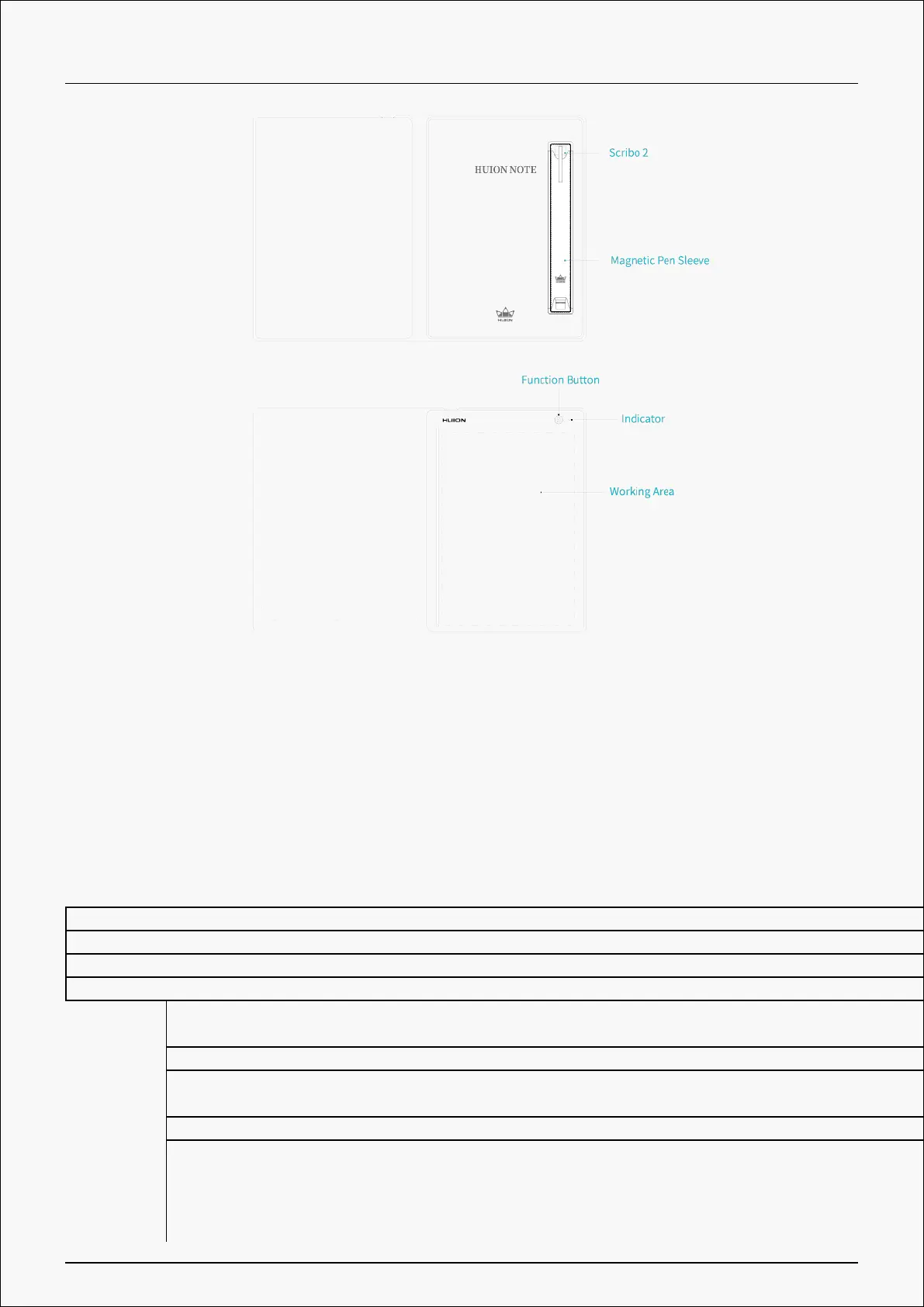
1.Indicator Light Status
There is an indicator light on Huion Note hardware to help you check the status of the smart
digital notebook.
Battery:
A red light flashes till the battery is dead. The battery goes below 10%.
A red light flashes for 1 minute. The battery of Huion Note goes below 20%.
A steady green light appears. The battery of Huion Note goes above 20%.
A steady red light appears. The battery of Huion Note is charging.
Connection: A steady green light appears. Huion Note hardware has not been connected to any device
yet and thus is in offline mode.
A steady blue light appears. Huion Note application and hardware are connected.
A steady white light appears. Huion Note hardware is connected to a computer via a cable
(a steady red light will appear if the battery of Huion Note hardware goes below 100%).
A 3s blue light changes to a steady white light. Huion Note and a computer are connected via Bluetooth and the driver is running.
A steady blue/white light changes to a steady green light. The Huion Note hardware is disconnected from a phone, tablet, or computer.
Note: After the function button has been pressed for 3s to disconnect Huion Note hardware to your
computer, tablet or phone, the smart digital notebook may not be able to automatically connect to
3 / 44







 To Next Page