26MEGA Live Imaging Display
W’ MEGA L I D
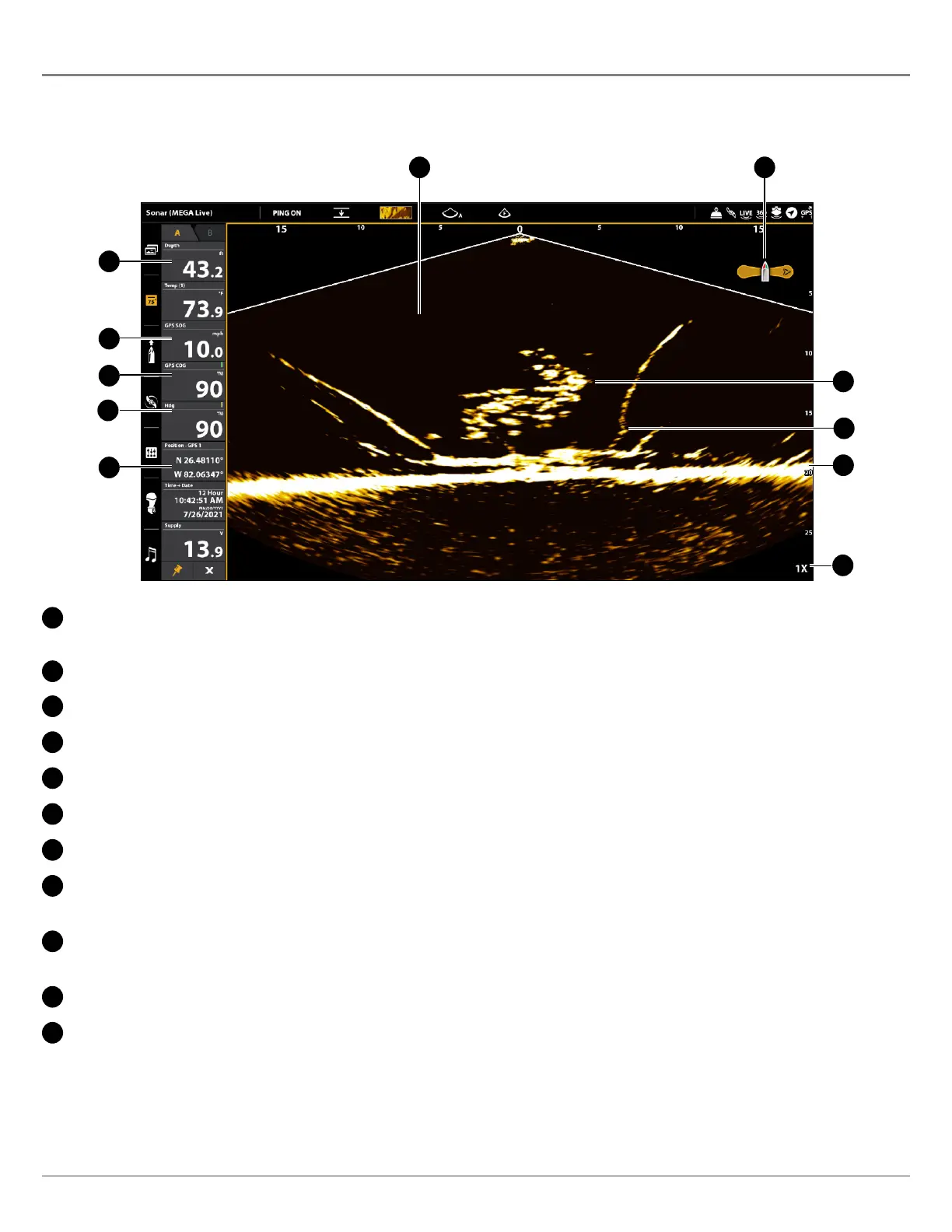
MEGA Live Imaging uses its unique transducer to provide an unobstructed view of the water in front of, around, and below your
boat. The high-definition beams produce the detailed sonar data that you see on the display. MEGA Live Imaging reveals a variety
of recognizable features so that you can interpret the structure and bottom contour, and the following items in this illustration.
A
C
D
E
F
B
G
H
I
J
K
A
Water Column: Shows the relative depth of the water under the boat at a given time. Variations in the width of the water
column show variations in the distance to the bottom as the boat passes over.
B
Bottom Return
C
Fish
D
Boat Icon: The boat icon shows the orientation of the transducer relative to the boat (GPS heading sensor required).
E
Structure: Cover where fish may be hiding.
F
Zoom Level
G
Position: The boat’s current latitude/longitude location determined by GPS.
H
Heading: The boat’s heading measured in degrees from North, where 000° is North, 090° is East, 180° is South, and 270° is
West (compass/heading sensor required).
I
Course: The current direction the boat is traveling measured in degrees from North, where 000° is North, 090° is East, 180° is
South, and 270° is West (GPS required).
J
Speed: The measurement of the boat’s progress across a given distance (GPS required).
K
Depth: The depth of the water as provided by another attached transducer (see Set Up MEGA Live on the Network).



 To Next Page