P/N 3141959_C 3-1
HUSSMANN CORPORATION • BRIDGETON, MO 63044-2483 U.S.A.
FNGSC-A Self Contained Merchandisers
START UP / OPERATION
Perform the following steps:
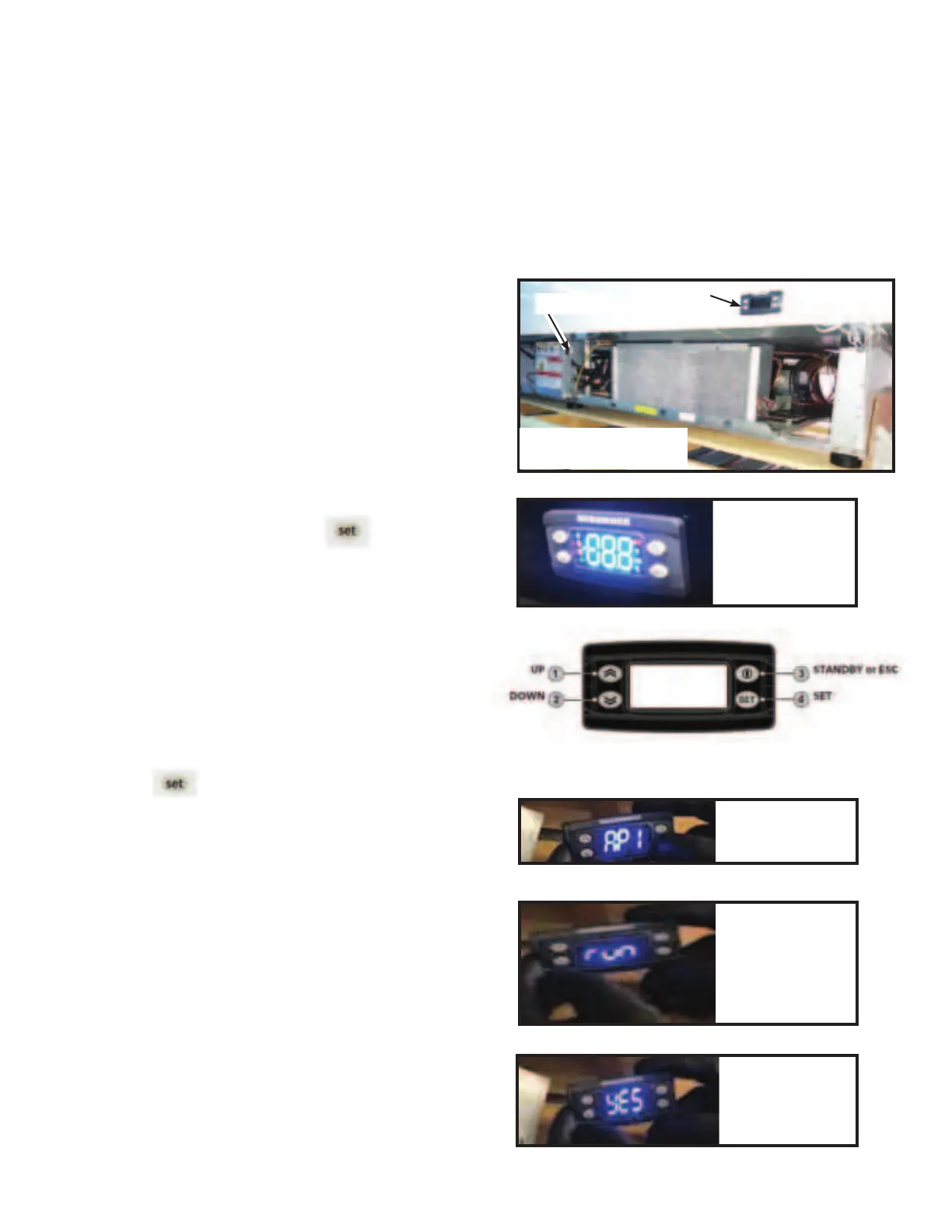
Remove the machine compartment cover to
access the controller box as shown in Figure 1.
Identify the controller power switch location.
See Figure 1. This switch feeds voltage to the
controller
Flip the main switch to “OFF”, then back to
the “ON” position.
• Controller display will start blinking
(Figure 2).
Then, press and hold the button (Item #4
in Figure 3).
• This step needs to be done in no more
than 3 seconds, or the process will fail.
• “AP1” is the medium temperature
application settings. “AP2” is the low
temperature application settings.
Navigate in the applications (AP1 - AP8) by
using UP or DOWN buttons (Figure 3).
Select the desired application by pressing
, or cancel the operation by pressing
the POWER key or by time out.
• The word “run“ will appear on the display
screen (Figure 4).
• If operation is successful, the display will
show “YES” (Figure 5), if not, it will
show “NO”.
• After that, display will start blinking for
a few seconds, which means operation
has completed successfully.
Once the merchandiser is running under the desired
application (MT or LT), there will be a defrost cycle
performed (Green snowflake symbol).
After coming out from defrost cycle, the system
goes to refrigeration mode showing the Blue
snowflake on the display. (Continued on next page.)
Switch
Controller
Keypad
Blinking Display
Figure 2
Controller Display
Figure 3
“run”
Figure 4
“YES”
Figure 5
Medium Temp.
App. Seng
CHANGING BETWEEN MEDIUM & LOW TEMPERATURE APPLICATIONS
The case is factory pre-programmed with 2 sets of controller settings. One applications is low
temperature, which is for frozen food. The second application is medium temperature. The case is
default programmed with low temperature setting from the factory.
Machine Compartment
Figure 1
1.
2.
3.
4.
5.
6.



 To Next Page