User Manual
Rev 9.0 Page 35 HV Diagnostics
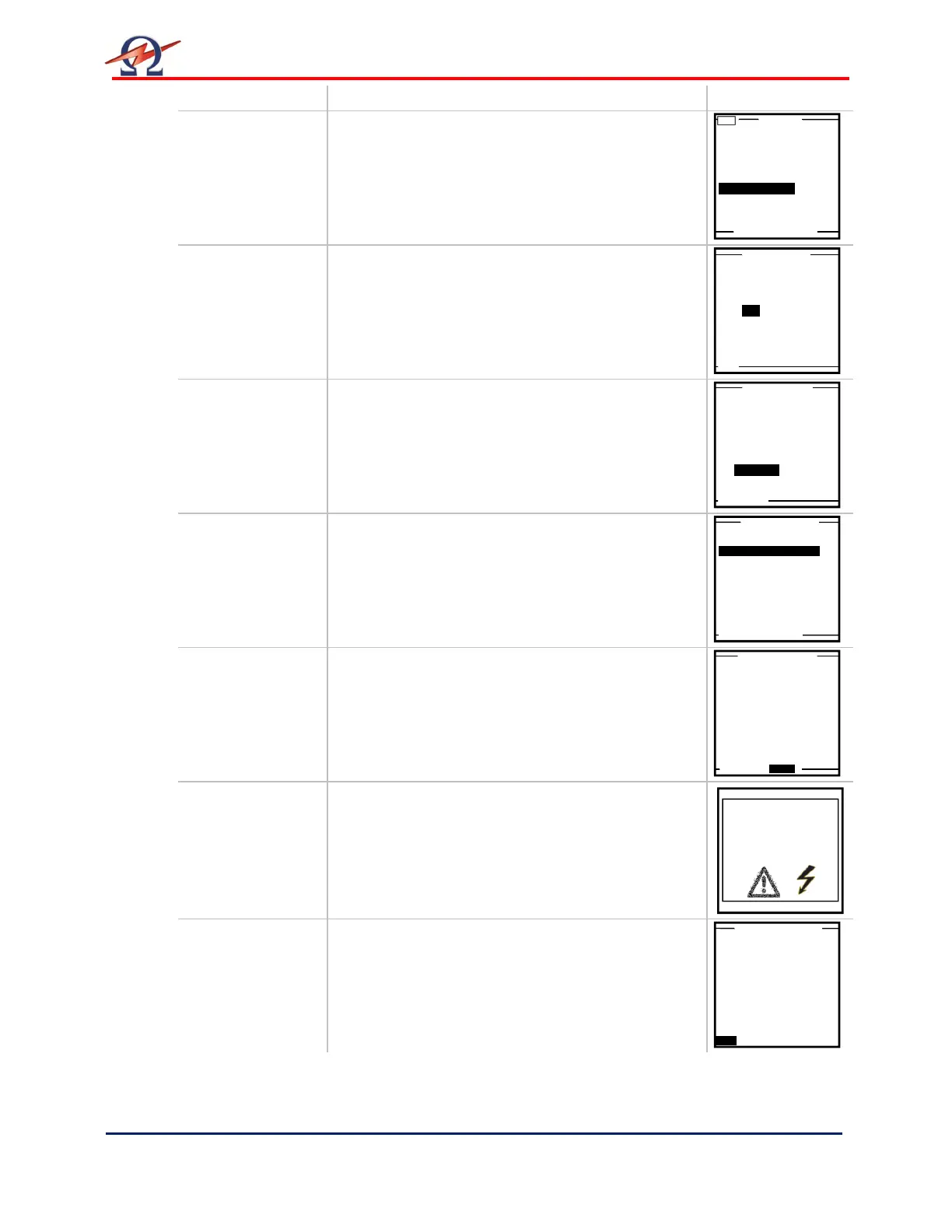
Step Procedure (Run Automatic Test ) Example
AR 1:
Use Last Seq. or
Start New Test
To repeat the previous test sequence:
• Select “Use Last Test Sequence” from “Main
Menu”
• Proceed to Step AR 5
Otherwise, select:
• “Start a new Test”
AR 2:
De / activate
Reporting
To activate reporting:
• Select “YES”, See 6 Reporting
To conduct a test without generating a report:
• Select “NO”
AR 3:
(If reporting
active: this step
follows report
setup
completion)
To run an test sequence:
• Select “Auto Seq”
AR 4:
Select Sequence
Select the appropriate test sequence
• To continue, select “NEXT”
AR 5:
Parameter
Verification
Verify that the selected sequence defines the
correct test parameters
To run the auto test sequence:
• Select “START” from the bottom of the screen
AR 6:
HV Activation
Once the activation screen appears,
• Press the HV switch (6) within 10 seconds.
If the HV switch is not activated within the 10
second window, the “Start Auto Test Seq. “screen
will reappear.
AR 7:
Test Start up
“Startup” appears on the screen to indicate that the
HVA is initializing test
3.0kV Maint. C. HYBR (T)
(T)
Start a New Test
Manual Mode
Reports & Setup
Do you want to
store a report?
Yes No
Auto Test Sequence
or use Manual Mode?
Auto Seq. Manual
3.0kV Maint. C. HYBR (T)
1.0kV Maint. C. XLPE (T)
1.0 kV Cable XPLE
Maintenance Test Sequence
Test Voltage: 1.0kVrms
Duration: 15 min
Waveform: Sine 0.1Hz
Trip out on
Reporting Active
ATTENTION
High Voltage!
Press I/O Button to
switch ON High Voltage
0.0kV
0.0µA
Startup


 To Next Page