SECTION 4
LEVEL – Level Measurement Mode Default Program
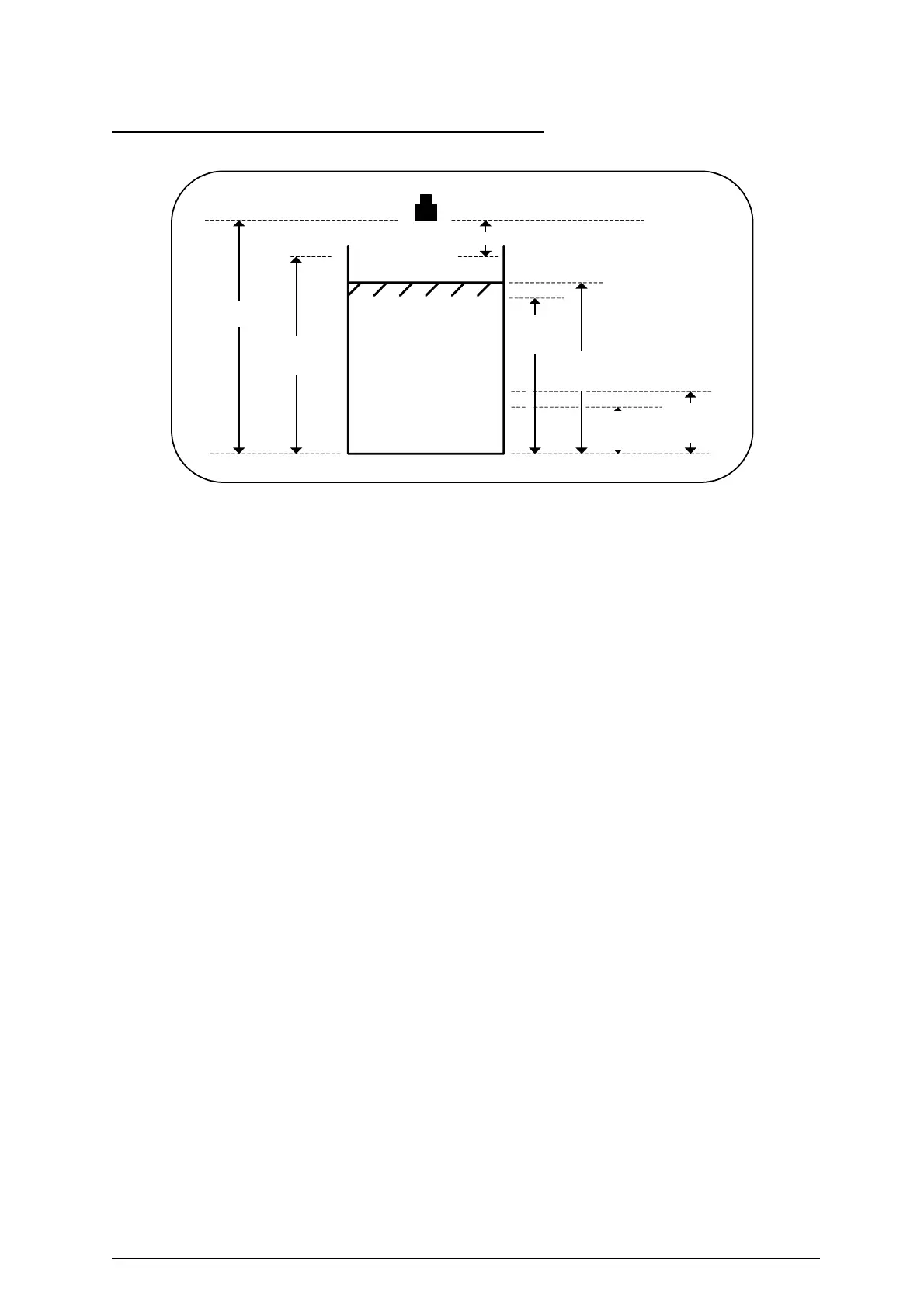
Changing the application to Level measurement loads this default program into memory.
Pr.2.0 Empty Distance
6.000m
Pr.8.1.1.1
R1 Set
5.000m
Pr.4.0 Blanking 0.500m
Pr.3.0 Operational
Span
5.500m
Pr.8.2.1.1
R2 Set
1.000m
Pr.8.2.1.2
R2 Reset
1.200m
Pr.8.1.1.2
R1 Reset
4.800m
This default program is created to do the following:-
To measure and display the level of liquid in metres.
Maximum level 5.5m.
Fill rate 1.0 metre/min.
Alarm if level exceeds 5.0 metres or goes below 1m.
4-20mA output proportional to level.
This program can be easily modified to suit the required application. You should delete from
the program any unwanted entries (e.g. Relay 2 settings).
Parameter Default Description
number Setting
2.0 Empty Distance = 6.000 Distance from transducer to zero level.
3.0 Operational Span = 5.500 The span, based on zero level.
4.0 Blanking = 0.500 Blanking zone into which level should not rise.
5.0 RateOfChange = 1.000 The maximum rate of change of liquid level in
metres/minute.
8.1 Rly1 Options = 8.1.1 Relay 1 Norm-Energised Relay 1 to alarm on level (normally energised)
8.1.1.1 Relay 1 Set = 5.0 Relay 1 to de-energise at 5.0 metres to indicate
high alarm.
8.1.1.2 Relay 1 Reset = 4.8 Relay 1 to re-energise at 4.8 metres to clear the
high alarm.
8.2 Rly2 Options = 8.2.1 Relay 2 Norm-Energised Relay 2 to alarm on level (normally energised)
8.2.1.1 Relay 2 Set = 1.0 Relay 2 to de-energise at 1.0 metre to indicate
low alarm.
8.2.1.2 Relay 2 Reset = 1.2 Relay 2 to re-energise at 1.2 metres to clear the
low alarm.
8.3 Rly3 Options = 8.3.4 Relay 3 L.O.E. Alarm Relay 3 (L.O.E. Alarm – de-energises
relay)
10.1 Relay 1 = 10.1.3 Relay 1 Hold State Hold alarm indication (relay 1) on failsafe.
10.2 Relay 2 = 10.2.3 Relay 2 Hold State Hold alarm indication (relay 2) on failsafe.
10.4 Fail Time = 600 Failsafe time in seconds
10.5 mA Fail = 10.5.3 Analogue Hold Analogue output holds on failsafe.
11.1 Analog O/P = 11.1.1 Output 4–20mA 4-20mA output fixed to span (Pr.3.0).
To simulate the program go to 12.5.2 yes then press ENT again.
Ref: MINIFLEX LR MANUAL Rev. 0 36


 To Next Page