31
OPTIONAL AUDIO AND DOCKING STATION
OPTIONAL AUDIO AND DOCKING STATION
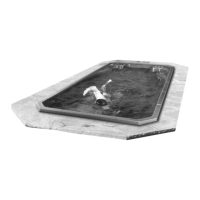
DOCKING YOUR AUDIO DEVICE
The Docking Station is compatible with all alternate audio sources such as IPOD, USB and MP3 players.
To install any audio device:
1 Locate and open the Docking Station door by gently pulling upward on the handle.
2 Remove the connector cover prior to plugging in your audio source. Always keep the cover on when the docking station is
not in use.
3 Center the device over the Docking Station Adaptor and connect.
4 Close the Docking Station door once you have begun using your device.
Audio source placement in pop out tray (device not included)
NOTE: For instructions on how to operate your optional AM/FM audio
system please refer to the additional “Operations Manual” provided.
OPTIONAL SPEAKERS
You have the option to customize your audio features so that you can use
your home stereo system in combination with the pop up speakers in-
stalled on the swim spa. It is the sole responsibility of the end user to en-
sure the proper installation and operation of the system and Hydropool is
not responsible for any defects or repairs as a result of workmanship and/
or faulty wiring.
NOTE: Any damage to the speakers are the sole responsibility of the
end user. Each speaker is rated 50 watts, 2-channel, 4 ohms per
channel.




 To Next Page