3.0 Additional Functions
CC1092267A 19
3.8.4 Enabling on-load operation
The HYDROVANE Pro controller allows the operator to
switch the compressor into off-load from a remote point
through the connection of a potential-free contact. This
function is needed when using an external control for
example.
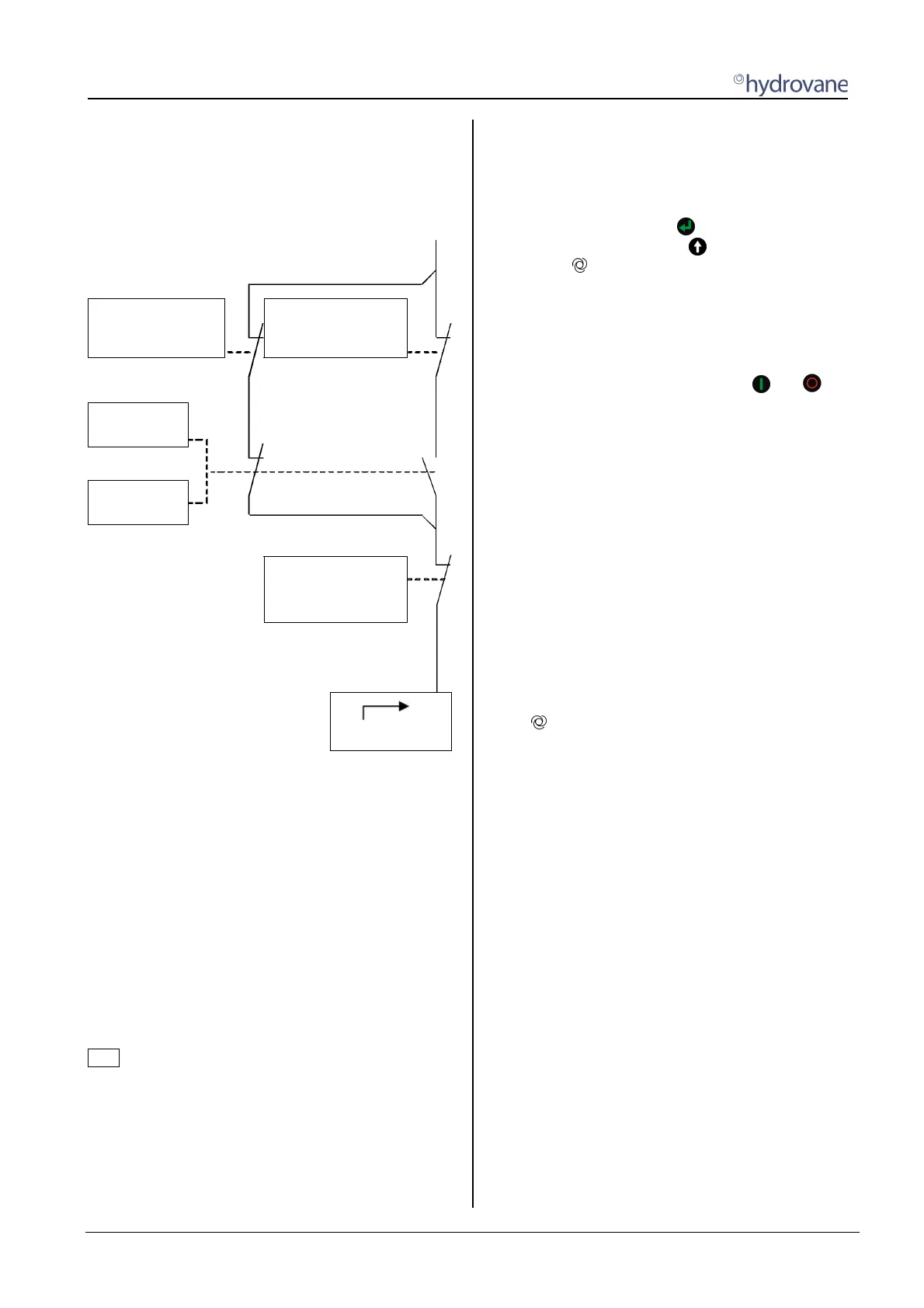
CUT-OUT POINT
TARGET PRESSURE
p2 CUT-OUT
p2 TARGET PRESSURE
p2 TIMER
CONTROL
INPUT
2nd PR.RANGE
INPUT X:
OPERATE_B1
ON-LOAD
Fig. 6 On-load/Off-load Remote Control
Go to the [OPTIONAL IN-/OUTPUTS] menu where you
must program one input with the OPERATE_B1 function
(Fig. 6). The unit can now be switched to off-load using the
input.
3.8.5 Remote start / stop
This function allows the operator to externally switch the
compressor on and off. You have two ways of
implementing this function. The remote start / stop
function is permanently programmed, this relates to
terminals X10 and X12 (see circuit diagrams).
The unit continues to run while the potential-free contact
is closed. If the contact is opened, the soft-stop is
undertaken and the unit stops.
Note
The unit is controlled using the remote start / stop
function. If the unit is shut down during operations, e.g.
due to power loss, it does not automatically start up when
the power is restored. The potential-free contact must
first be re-opened and then closed to restart the unit.
1st option
The compressor is to be activated using a potential-free
contact.
Activate this function in the [CONTROL MENU] sub-
menu. Go to the ENABLE REMOTE-START menu item.
Once you have pressed the key, the OFF value starts
to flash. You can now use the
key to change the value
to ON. The
symbol appears in the first display row.
Connect the potential-free contact that you need for the
remote start / stop function to the X10 and X12 terminals
(see circuit diagram). This input is permanently
programmed for the remote start / stop function.
If the remote start / stop function is activated, you can no
longer control the compressor using the
and
keys.
Only the emergency stop button remains activated. The
compressor can now only be switched on and off using
the potential-free contact.
2nd option
A control room is to decide whether the enable for the
remote start / stop function is issued. The function for the
enable is implemented using a digital input. If the enable
is issued, the compressor can only be switched on and
off using the external potential-free contacts (X10 and
X12). If the enable is not issued, the compressor can only
be switched on and off on the HYDROVANE Pro.
Connect the potential-free contact for the remote start /
stop function to the permanently programmed X10 and
X12 terminals.
In the [OPTIONAL IN-/OUTPUTS] menu you now have to
program one input with the ENAB.REM-START function
(see Section 3.5.1).
The symbol appears in the first display row. In the
[CONTROL MENU] sub-menu behind the ENABLE
REMOTE-START menu item, EXT. appears.
If the input is closed, the unit can only be switched on
and off using the potential-free contact.
If the input is opened, the unit can only be switched on
and off using the HYDROVANE Pro.


 To Next Page