2.0 Operating & Maintenance
CC1092267A 9
2 Operations
2.1 Starting the unit
Caution
If the unit is ready, i.e. the green LED is flashing, the
compressor may automatically start at any time.
Use the isolator to switch the unit on.
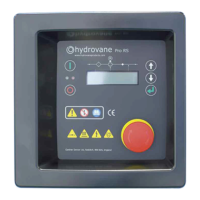
If warning or fault messages appear in the third row of the
display, these first have to be rectified and confirmed
using the key.
Then start the unit by pressing the key on the
HYDROVANE Pro.
2.2 Emergency stop button
The EMERGENCY stop button is located below the
HYDROVANE Pro. Only use the emergency stop button
to shut down the unit in real emergencies. When shutting
down normally, always use the key.
2.3 Switching off the unit
The unit is switched off by pressing the key on the
HYDROVANE Pro. However the unit will only stop after a
2-second soft-stop.
The soft-stop is preset to protect the compressor.
2.4 On-load/off-load
Descriptions of the CONTINUOUS OPERATION and
AUTOMATIC OPERATION modes can be found in
section 3.1.1.
OFF-LOAD:
If there is no pressure requirement from the system with
the unit in CONTINUOUS OPERATION, it switches to
OFF-LOAD. This means that the motor and compressor
run but no air is delivered into the system.
The unit behaves differently in AUTOMATIC OPERATION
mode. If there is no pressure requirement, the compressor
switches to OFF-LOAD. The unit is switched off after a run-
on time that is shown on the display. If there is another
pressure requirement during the run-on time, the unit is
automatically switched on.
ON-LOAD:
If the unit is in ON-LOAD, air is delivered into the system.
2.5 Warning/fault messages
Warning and fault messages are shown in the third row of
the display. The red light signal flashes at the same time.
A table containing messages and suggestions for how to
remedy them is in Section 4.5.
2.5.1 Warning messages
If there are warnings, the red light signal flashes slowly.
The unit does not automatically shut down when there
are warnings. However ignored warnings may cause
faults.
Rectify what is causing the warning and press the key
to cancel the warning.
2.5.2 Fault messages
Fault messages result in the unit automatically shutting
down or do not permit the unit to be started.
Once you have rectified the problem, you must confirm
by pressing the key.


 To Next Page