EN-GB - 10HYENA E-BIKE SYSTEMS
5.6. Walk assistance
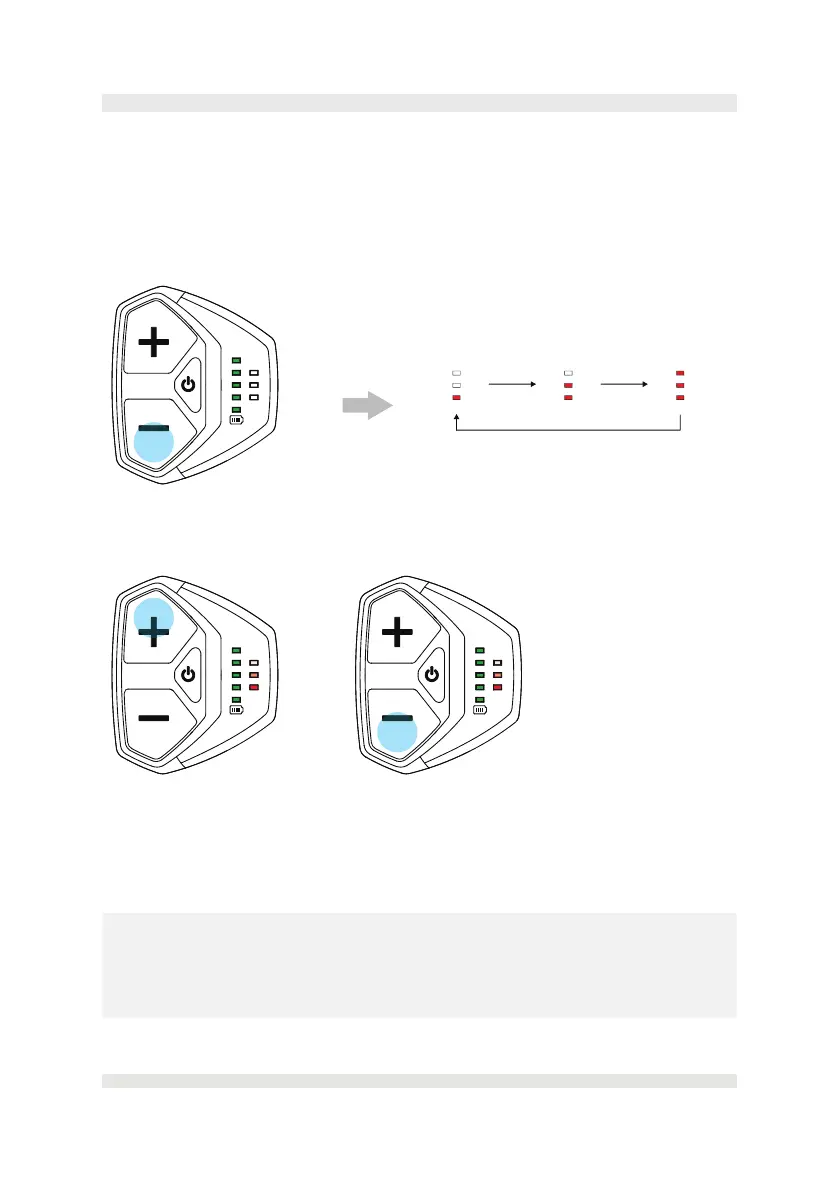
The Walk-assist mode can help you push your e-bike more easily, for example, up a hill,
with a maximum speed of up to 3 km/h (2 mph). You can only enable the Walk-assist mode
when the system is switched on and you are pushing the e-bike.
• Press and hold the DOWN (-) button on the console for two seconds to activate the
Walk-assist mode.
• When Walk-assist mode is activated, the assist level indicators on the console will blink
in a waterfall pattern towards the front of the bike.
• To propel the e-bike forward at a slow speed, press and hold the UP (+) button.
• Release the UP (+) button to stop the Walk-assist function on your e-bike.
• Short press the DOWN (-) button to turn the Walk-assist mode o.
• The Walk-assist mode will turn o automatically if no buttons are pressed in 5 seconds.
⚠
WARNINGS
• The Walk-assist function may only be used when pushing the e-bike. Make sure you are
ready and standing steady before activating the Walk-assist function.
• Do not activate the Walk-assist function when you are riding the e-bike or if the wheels
are not in contact with the ground.
> 2 secs to active
< 0.5 secs to turn o Press and hold to start the Walk-assist
Activated



 To Next Page