24 © Copyright 2019 HYPERVSN. All rights reserved
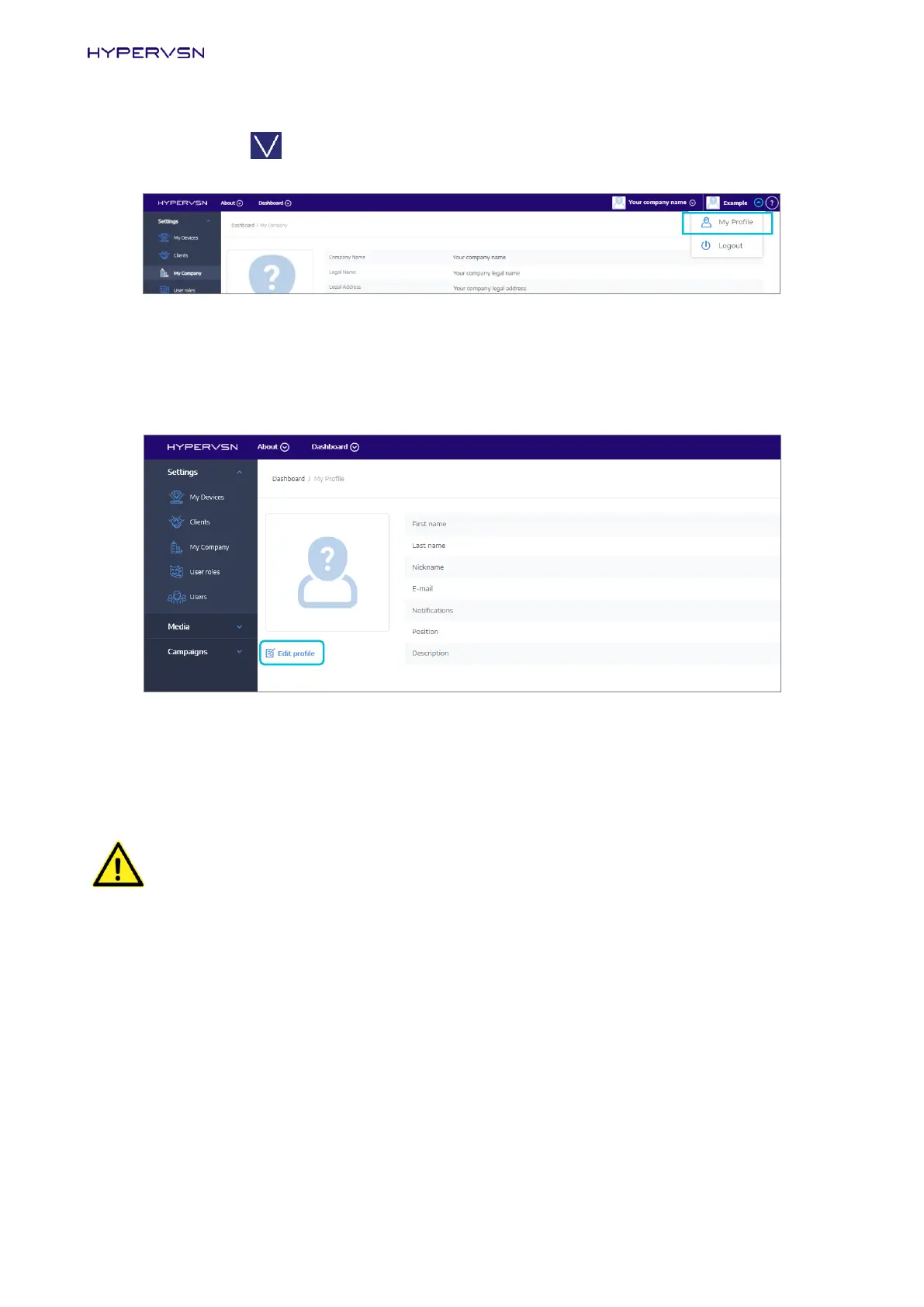
5. Click the arrow in the right page corner next to your email address.
Picture 23. My Profile command
The drop-down menu will appear.
6. Click My Profile (Picture 23). The following page will open:
Picture 24. “My Profile” page
7. Check the data. If it is required to be changed, click Edit profile and edit the data in the open window.
8. Move the mode switch on the rotor to the Setup (Hotspot) mode position (marked) (Picture 13).
WARNING! The Device must be always switched off and the rays stopped before you change
the mode (move the mode switches).
9. Turn the Device on again.
10. The Device will start to display the “HYPERVSN” message. After a few seconds the “BEGIN BY
UPLOADING YOUR 3D MEDIA” and “PLEASE ACTIVATE THE DEVICE” messages will start to alternate
on the Device.


 To Next Page