41
Working Mode UPS AC F.C. Bat First
Unattended 90% ON OFF
Language
中文
English España
Display Settings
Date/Time Brightness
Sound
WiFi
Reset
ON OFFEnergy Saver
Parallel Mode Single P. Split P. 3 Phase
Home
Settings
Information
Alerts
P1 P2
Cancel
WARNING! Consult Owner’s Manual. Improper Setup may
damage unit. Follow Wiring Diagrams.
Please turn OFF the AC output before operation!
Split-Phase. Select this unit’s phase:
Working Mode UPS AC F.C. Bat First
Unattended 90% ON OFF
Language
中文
English España
Display Settings
Date/Time Brightness
Sound
WiFi
Reset
ON OFFEnergy Saver
Parallel Mode Single P. Split P. 3 Phase
Home
Settings
Information
Alerts
Working Mode UPS AC F.C. Bat First
Unattended 90% ON OFF
Language
中文
English España
Display Settings
Date/Time Brightness
Sound
WiFi
Reset
ON OFFEnergy Saver
Parallel Mode Single P. Split P. 3 Phase
Home
Settings
Information
Alerts
P1 P2 P3
Cancel
WARNING! Consult Owner’s Manual. Improper Setup may
damage unit. Follow Wiring Diagrams.
Please turn OFF the AC output before operation!
Three-Phase. Select this unit’s phase:
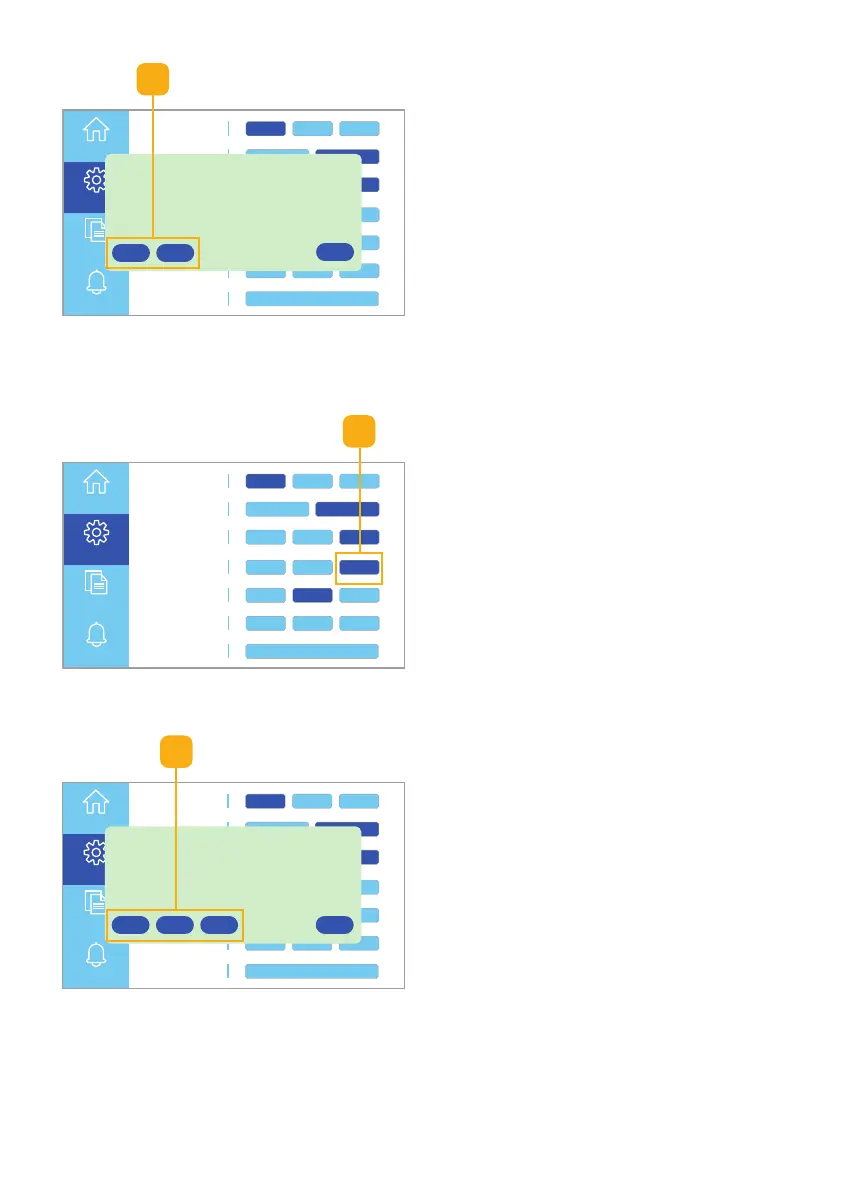
Fig. 6.27 Select P1, P2, or P3 option
2
2. Select the P1 or P2 button
(Fig. 6.25).
Note: Click the Cancel button to
return to the Settings menu
without saving the settings.
3-phase Settings
1. Select the 3-phase button to set
the unit’s phase to P1, P2, or P3
(Fig. 6.26).
1
Fig. 6.25 Select P1 or P2 option
Fig. 6.26 Select 3-phase button
2. Select the P1, P2, or P3 button
(Fig. 6.27).
Note: Click the Cancel button to
return to the Settings menu
without saving the settings.
2



 To Next Page